Get Community College Of The Air Force (ccaf) Transcript Request
How it works
-

Open form follow the instructions
-

Easily sign the form with your finger
-

Send filled & signed form or save
How to fill out the Community College of the Air Force (CCAF) Transcript Request online
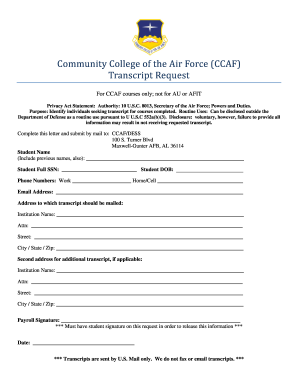
Submitting a transcript request to the Community College of the Air Force (CCAF) is a straightforward process. This guide will walk you through the steps needed to complete the transcript request form accurately and efficiently, ensuring you receive the necessary documentation you need.
Follow the steps to complete your transcript request form online.
- Click ‘Get Form’ button to obtain the form and open it in your preferred editing tool.
- Enter your full name in the designated field. Be sure to include any previous names you may have used for accurate identification.
- Input your full Social Security Number (SSN) in the corresponding section to ensure proper processing.
- Provide your date of birth (DOB) as requested; this helps verify your identity.
- Fill in your contact information, including your work phone number and home/cell phone number.
- Include your email address to receive any updates regarding your request.
- Indicate the address where you would like the transcript to be mailed, providing the institution name, attention line, street address, city, state, and zip code.
- If you need to send the transcript to a secondary address, repeat the process by filling in the second institution name and corresponding address details.
- Sign the form in the designated section to authorize the release of your transcript.
- Record the date of your signature to ensure the request is processed in a timely manner.
- After completing all fields, save your changes, and download a copy of the form for your records. You can then print it for mailing.
Complete your Community College of the Air Force Transcript Request form online today to ensure swift processing.
Related links form
You can view your Community College of the Air Force (CCAF) credits online through the CCAF student portal. After logging in, you will have access to your academic profile, including courses completed and credits earned. This online system simplifies tracking your educational progress. If you experience difficulties, do not hesitate to reach out for assistance or use resources offered by platforms like USLegalForms.