Loading
Get Da Form 3318
How it works
-

Open form follow the instructions
-

Easily sign the form with your finger
-

Send filled & signed form or save
How to fill out the DA Form 3318 online
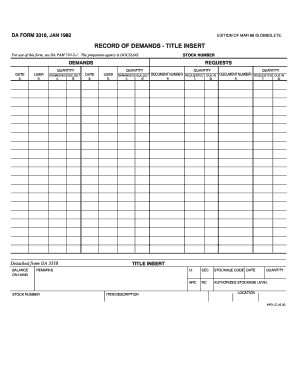
Filling out the DA Form 3318, also known as the Record of Demands, is an essential task in digital document management. This guide will provide you with clear, step-by-step instructions to complete the form efficiently and accurately.
Follow the steps to fill out the DA Form 3318 with ease
- Press the ‘Get Form’ button to access the DA Form 3318 and open it in your online editor.
- Begin filling out the title insert section by entering the stock number at the top of the form. This number references the specific items you are requesting.
- In the demands section, provide information about the requested due outs. For each item, fill in the following fields: user, demanded due out quantity, and corresponding date.
- If there are any items detached from the DA 3318, indicate them as per the instructions. Ensure to maintain proper documentation.
- In the requested due in section, complete the document number field for each item you are expecting. Also, specify the quantity and date for these requests.
- Complete the item description and ensure other details such as unit of issue (UI), security classification (SEC), and storage code date are accurately filled out.
- Review all sections for any errors or omissions before finalizing your form. Make sure all necessary fields are completed.
- Once you have verified your entries, you can save changes, download a copy of the completed form, print it, or share it as needed.
Start filling out your documents online today for a seamless experience.
Visit http://.e-publishing.af.mil/ To access their Forms.