Loading
Form preview
  • US Legal Forms
  • Other Templates
  • More Forms
  • More Uncategorized Forms
  • Apeas 2 Ocular Control Form

Get Apeas 2 Ocular Control Form

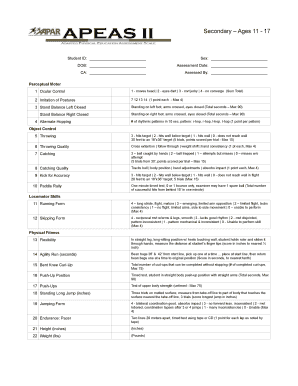
Assessed By: Perceptual Motor 1 Ocular Control 1 - moves head 2 - eyes dart 3 - mvt jerky 4 - no converge (Sum Total) 2 Imitation of Postures 7 12 13 14 (1 point each - Max 4) 3 Stand Balance Left Closed Standing on left foot, arms crossed, eyes closed (Total seconds Max 90) Stand Balance Right Closed 4 Alternate Hopping Standing on right foot, arms crossed, eyes closed (Total seconds Max 90) # of rhythmic patterns in 10 sec, pattern.

How it works

  1. Open form

    Open form follow the instructions

  2. Easily sign form

    Easily sign the form with your finger

  3. Share form

    Send filled & signed form or save

How to fill out the Apeas 2 Ocular Control Form online

Filling out the Apeas 2 Ocular Control Form online can streamline the assessment process for students aged 11 to 17. This guide provides detailed, step-by-step instructions to ensure accurate completion of the form, which includes essential components for evaluating ocular control and physical fitness.

Follow the steps to complete the form with ease.

  1. Press the ‘Get Form’ button to access the Apeas 2 Ocular Control Form and open it in your preferred online document editor.
  2. In the first section, enter the student ID, sex, date of birth (DOB), and assessment date. Ensure these details are accurate as they are essential for identification and correlation with assessment results.
  3. Next, fill in the information about the chronological age (CA) and the person who assessed the student. This section is crucial for providing context to the assessment.
  4. Proceed to the perceptual motor section, specifically ocular control. For each item listed, use the scoring system provided to evaluate the student's performance based on specified criteria.
  5. Continue filling out the object control section by assessing the student's throwing, catching, and kicking abilities. Record scores based on the outcomes of each trial as detailed in the form.
  6. In the locomotor skills section, assess running form and skipping form, providing scores for each based on the performance descriptors.
  7. Fill out the physical fitness category by completing assessments for flexibility, agility run, bent knee curl-up, push-up position, and additional strength tests as indicated.
  8. The adaptive behaviors for physical education participation section requires evaluation of peer interaction, fitness level, motor capabilities, and understanding of rules. Apply the scoring metrics to each task as described.
  9. Once all sections are completed, review the form for any inaccuracies or missing information. After confirming all details are correct, save your changes.
  10. Finally, download the completed form, print it if necessary, or share it as required for assessment purposes.

Complete your forms online for more efficient and accurate administrative processing.

Get form

Experience a faster way to fill out and sign forms on the web. Access the most extensive library of templates available.
Get form

Related content

Physical Education Evaluation for Students with...
Aug 30, 2012 — 2. Introduction. Many students with disabilities attend general physical...
Learn more
apeas ii - Rowan University
Reston, VA. Adapted Physical Education Assessment Scale II (APEAS II). (Beta version)...
Learn more

Related links form

Print Reinsurance Basics - Aaic.com Enclosed Is An Application For The 2014 Junior Volunteer Program At EMORY UNIVERSITY HOSPITAL, 1364 Valet Stamps Request Form - Emory Healthcare - Emoryhealthcare RenalReferralForm_Updated_080911UseThisOne - Emoryhealthcare

Questions & Answers

Get answers to your most pressing questions about US Legal Forms API.

Contact support

What does assessment for learning look like in PE? Strategy One: Provide a Clear and Understandable Vision of the Learning Target. Strategy Two: Use Examples and Models of Strong and Weak Work. Strategy Three: Offer Regular Descriptive Feedback. Strategy Four: Teach Students To Self-Assess and Set Goals.

The Adapted Physical Education Assessment Scale (APEAS II) is a longitudinal data system easily used by teachers to reach objective, data-driven decisions. Develop IEP goals. Measure student present level of performance. Use as ONE of the tools to determine eligibility for special education services.

Gross Motor Assessments Perceptual Motor Function. Object Control. Locomotor Skills. Physical Fitness. Adaptive Behaviors.

The Adapted Physical Education Assessment Scale (APEAS II) is an assessment education tool developed in cooperation with the Los Angeles Unified School District.

Adapted Physical Education (APE) An evaluation includes the area of fundamental motor skills and patterns, physical fitness, and lifetime leisure skills. Based on the evaluation findings, a recommendation is made in writing regarding appropriate placement.

APE teachers need to use a standardized assessment for initial, triennial, or exit assessment. In addition, IDEA mandates multiple assessments (i.e., standardized, non-standardized) be considered. There are a variety of APE assessments that may be considered.

Get This Form Now!

Use professional pre-built templates to fill in and sign documents online faster. Get access to thousands of forms.
Get form
If you believe that this page should be taken down, please follow our DMCA take down processhere.
Get Apeas 2 Ocular Control Form
Get form
  • Adoption
  • Bankruptcy
  • Contractors
  • Divorce
  • Home Sales
  • Employment
  • Identity Theft
  • Incorporation
  • Landlord Tenant
  • Living Trust
  • Name Change
  • Personal Planning
  • Small Business
  • Wills & Estates
  • Packages A-Z
  • Affidavits
  • Bankruptcy
  • Bill of Sale
  • Corporate - LLC
  • Divorce
  • Employment
  • Identity Theft
  • Internet Technology
  • Landlord Tenant
  • Living Wills
  • Name Change
  • Power of Attorney
  • Real Estate
  • Small Estates
  • Wills
  • All Forms
  • Forms A-Z
  • Other Templates
  • Legal Hub
  • About Us
  • Help Portal
  • Legal Resources
  • Blog
  • Affiliates
  • Contact Us
  • Delete My Account
  • Site Map
  • Industries
  • Forms in Spanish
  • Localized Forms
  • State-specific Forms
  • Forms Kit
  • Real Estate Handbook
  • All Guides
  • Notarize
  • Incorporation services
  • For Consumers
  • For Small Business
  • For Attorneys
  • USLegal
  • FormsPass
  • pdfFiller
  • signNow
  • altaFlow
  • DocHub
  • Instapage
Form Packages
  • Adoption
  • Bankruptcy
  • Contractors
  • Divorce
  • Home Sales
  • Employment
  • Identity Theft
  • Incorporation
  • Landlord Tenant
  • Living Trust
  • Name Change
  • Personal Planning
  • Small Business
  • Wills & Estates
  • Packages A-Z
Form Categories
  • Affidavits
  • Bankruptcy
  • Bill of Sale
  • Corporate - LLC
  • Divorce
  • Employment
  • Identity Theft
  • Internet Technology
  • Landlord Tenant
  • Living Wills
  • Name Change
  • Power of Attorney
  • Real Estate
  • Small Estates
  • Wills
  • All Forms
  • Forms A-Z
  • Other Templates
Customer Service
  • Legal Hub
  • About Us
  • Help Portal
  • Legal Resources
  • Blog
  • Affiliates
  • Contact Us
  • Delete My Account
  • Site Map
  • Industries
  • Forms in Spanish
  • Localized Forms
  • State-specific Forms
  • Forms Kit
Legal Guides
  • Real Estate Handbook
  • All Guides
Prepared for you
  • Notarize
  • Incorporation services
Our Customers
  • For Consumers
  • For Small Business
  • For Attorneys
Our Sites
  • USLegal
  • FormsPass
  • pdfFiller
  • signNow
  • altaFlow
  • DocHub
  • Instapage
Social Media
Call us now toll free:
+1 833 426 79 33
As seen in:
© Copyright 1999-2026 airSlate Legal Forms, Inc. 17 Station Street, Suite 303, Brookline, MA 02445
  • Your Privacy Choices
  • Terms of Service
  • Privacy Notice
  • Content Takedown Policy
  • Bug Bounty Program