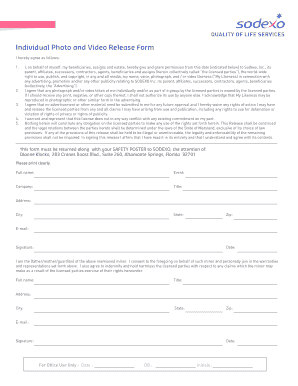
Ow) to Sodexo, Inc., its parent, af liates, successors, contractors, agents, bene ciaries and assigns (herein collectively called the licensed parties ), the world-wide right to use, publish, and copyright, in any and all media, my name, voice, photograph, and / or video likeness ( My Likeness) in connection with any advertising, promotion and/or any other publicity relating to SODEXO Inc. its parent, af liates, successors, contractors, agents, bene ciaries (collectively, the A.
Open form follow the instructions
Easily sign the form with your finger
Send filled & signed form or save
How to fill out the Iamsodexo online
Filling out the Iamsodexo form is a crucial step for granting permission to use your likeness for promotional purposes. This guide will provide clear and detailed instructions to ensure you successfully complete the form online, regardless of your experience level.
Follow the steps to fill out the Iamsodexo form with ease.
- Click ‘Get Form’ button to obtain the Iamsodexo form and open it in the editor.
- Begin by entering your full name in the designated field. Ensure that you print clearly to avoid any mistakes.
- Fill in the event related to this release form. This helps in identifying the specific activity for which the release is applicable.
- Provide your company name if applicable. This information may be relevant for professional contexts.
- Indicate your title within the organization or your role in relation to the event. This provides clarity on your association.
- Complete the address section accurately by including your street address, city, state, and zip code.
- Enter your email address. This allows for easy communication regarding the form.
- Sign your name in the signature field, affirming your consent to the terms outlined in the form.
- Include the date of signing, which is crucial for the effectiveness of the form.
- If filling out the form on behalf of a minor, provide your full name, title, address, city, state, zip, email, signature, and date as the guardian.
- Once all fields are completed, review the form for accuracy. You can then save the changes, download a copy, print it for physical submission, or share it as needed.
Complete your Iamsodexo document online today for a smooth submission process.
Experience a faster way to fill out and sign forms on the web. Access the most extensive library of templates available.
Related content
Self Service allows you to manage your personal information without the need for emails...
Get answers to your most pressing questions about US Legal Forms API.
What is ADP Self Service Portal?
The ADP Portal allows you to perform such functions as: Enroll in or change benefits information; Make changes related to life events such as marriage, moving, and birth of a child; View pay statements and W-2 information; Change W-4 tax information; Set up direct deposit; Manage your 401(K) and retirement accounts; ...
How do employees access ADP?
If your employer has provided you with online access, you can access your pay statements and W-2s at login.adp.com. If you have not previously logged in to the portal, you will need a registration code from your employer. Only your employer can provide you with this code.
Can I get my w2 online from ADP?
Form W-2s & 1099sOnline Access: If your current employer has given you online access to view your pay information, you can log into login.adp.com to view your W-2 online. ... ADP cannot provide you with a registration code.
How do I access ADP after termination?
Can you access ADP after termination? If you terminate your employment, you will still have access to ADP Self Service for three years from your separation date. Contact Scotts Payroll to request any pay statements prior to January 2014.
How can I get a copy of w2 quickly?
The quickest way to obtain a copy of your current year Form W-2 is through your employer. Your employer first submits Form W-2 to SSA; after SSA processes it, they transmit the federal tax information to the IRS.
How do I change my address on ADP?
Faculty and Staff (including Adjunct Faculty) can log into the ADP Portal - http://my.adp.com to update their mailing address or phone numbers.
How does ADP work for employees?
ADP's Basic Idea Rather than manually inputting an employee's worked hours, pay rates, tax rates and deductions into a spreadsheet, the ADP software performs each step quickly and automatically. HR managers can review the payroll before processing it and can then approve the payroll for payment.
How do I access my ADP account?
Follow the steps to enter your registration code, verify your identity, get your User ID and password, select your security questions, enter your contact information, and enter your activation code. You will then have the ability to review your information and complete the registration process.
How do I get my w2 from ADP?
Access the ADP Portal at https://portal.adp.com. Enter your ADP Portal User ID and. Portal Home Page. a) Depending on your access, you may or may not see the Employee/Manager tab on your home page. ... View W-2 Statement. a) Point to the Pay & Taxes tab and then click Pay & Tax Statements. Print W-2 Statement.
How do I get my w2 from my old job?
If you can't get your Form W-2 from your employer and you previously attached it to your paper tax return, you can order a copy of the entire return from the IRS for a fee. Complete and mail Form 4506, Request for Copy of Tax Return along with the required fee.
Use professional pre-built templates to fill in and sign documents online faster. Get access to thousands of forms.
If you believe that this page should be taken down, please follow our DMCA take down process here.