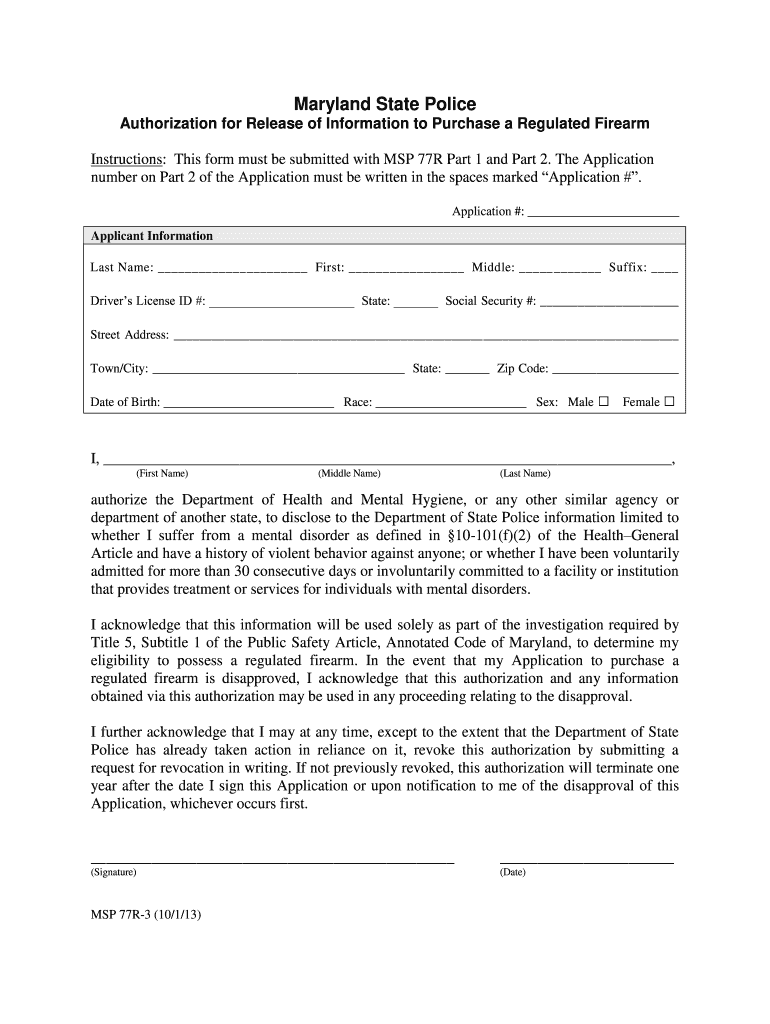
Maryland State Police Authorization for Release of Information to Purchase a Regulated Firearm Instructions This form must be submitted with MSP 77R Part 1 and Part 2. The Application number on Part 2 of the Application must be written in the spaces marked Application. Application Applicant Information Last Name First Middle Suffix Driver s License ID State Social Security Street Address Town/City State Zip Code Date of Birth Race Sex Male Female I First Name Middle Name Last Name authorize the Department of Health and Mental Hygiene or any other similar agency or department of another state to disclose to the Department of State Police information limited to whether I suffer from a mental disorder as defined in 10-101 f 2 of the Health General Article and have a history of violent behavior against anyone or whether I have been voluntarily admitted for more than 30 consecutive days or involuntarily committed to a facility or institution that provides treatment or services for indi....
Loading

Open form follow the instructions

Easily sign the form with your finger

Send filled & signed form or save
How to fill out the MD MSP 77R-3 online
The MD MSP 77R-3 form is essential for individuals looking to purchase a regulated firearm in Maryland. This guide provides a clear, step-by-step approach to successfully complete the form online.
Follow the steps to accurately fill out the MD MSP 77R-3 form.
- Click ‘Get Form’ button to obtain the form and open it in the editor.
- Begin by entering your application number in the designated spaces marked ‘Application #’. This number should correspond with Part 2 of the application.
- Next, fill in your applicant information, including your last name, first name, middle name, and any suffixes.
- Provide your driver's license ID number along with the issuing state.
- Enter your Social Security number in the specified field.
- Complete your street address, town or city, state, and zip code.
- Indicate your date of birth, race, and sex by selecting the appropriate options.
- Authorize the Department of Health and Mental Hygiene by clearly printing your full name as indicated in the authorization section.
- Sign and date the form in the designated areas to validate your authorization.
- After filling out all sections, ensure all information is accurate, save your changes, and then download, print, or share the completed form as necessary.
Complete your MD MSP 77R-3 form online today for a smooth firearm purchasing process.
Experience a faster way to fill out and sign forms on the web. Access the most extensive library of templates available.
Related content
Instructions: This form must be submitted with MSP 77R Part 1 and Part 2. The Application...
May 9, 2024 — MSP 77R: Maryland State Police Application and Affidavit to Purchase a...
Get answers to your most pressing questions about US Legal Forms API.
How easy is it to get a gun in Maryland?
Obtaining a firearm in Maryland involves a structured process initiated by the completion of the MD MSP 77R-3 application. While the process may seem complex, understanding the requirements and ensuring all your paperwork is in order can make it more manageable. Utilizing platforms like USLegalForms can streamline your application process by providing necessary forms and instructions. With proper preparation, you can navigate this process more easily.
What is the turnaround time for Maryland CCW?
The turnaround time for a concealed carry weapon (CCW) in Maryland typically ranges from 30 to 90 days after submission of your MD MSP 77R-3 application. This timeframe allows for comprehensive background checks and verification processes. It's beneficial to ensure all documents are complete, as this can expedite your application. Patience is key during this phase.
How long does MD 77R take?
The processing time for the MD MSP 77R-3 application can vary, typically taking between 90 to 120 days. Factors such as background checks and the volume of applications submitted can impact this timeframe. It’s wise to prepare your documentation carefully and submit timely to avoid unnecessary delays. Utilizing platforms like uslegalforms can streamline your application process and help you stay organized.
Do I have to register my guns in Maryland?
Maryland does not require you to register firearms, but it does mandate that certain handguns and assault weapons be transferred through an authorized dealer. However, when applying for a carry permit through the MD MSP 77R-3 application, you must provide information about the firearms you wish to carry. It's important to stay informed about local regulations to ensure your compliance.
What disqualifies you from owning a gun in Maryland?
In Maryland, multiple factors can disqualify you from owning a gun. These include felony convictions, certain mental health issues, and domestic violence restraining orders. Additionally, individuals who have been convicted of specific misdemeanors may also face disqualification. This information is essential for navigating the MD MSP 77R-3 application and ensuring compliance with local laws.
What is the new concealed carry law in Maryland?
The new concealed carry law in Maryland allows residents to apply for a permit to carry a handgun in public. This law aligns with the MD MSP 77R-3 application process, which requires applicants to demonstrate good and substantial reason for the permit. Additionally, applicants must complete fingerprinting and pass a safety course. Understanding this law is crucial for anyone considering carrying a firearm in Maryland.
What is a 77R application in Maryland?
A 77R application in Maryland is a formal request for a handgun to be purchased and owned legally within the state. It serves as an essential document that requires detailed personal information and background checks to ensure public safety. Using platforms like US Legal Forms can simplify the process, making it easy to fill out and submit your 77R application correctly.
What is the wait time for a 77R in Maryland?
The wait time for a 77R application in Maryland can vary. Typically, applicants might experience anywhere from several weeks to a few months before receiving their approval. Factors such as application volume and the completeness of submitted paperwork can influence this duration. For smoother processing, consider using the US Legal Forms platform to prepare your 77R application efficiently.
What disqualifies you from buying a handgun in Maryland?
Several factors can disqualify an individual from purchasing a handgun in Maryland, including felony convictions, mental health issues, and domestic violence charges. It's crucial to be aware of these disqualifications before applying for the MD MSP 77R-3. Familiarizing yourself with these regulations can save you time and effort. For further guidance, consider the US Legal Forms platform which provides essential legal insights.
What is the wait time for the Maryland 77R?
The wait time for the Maryland 77R can vary based on several factors, including application volume and local processing speeds. Typically, applicants may experience a wait time of several weeks. Keeping updated on your application status can help you plan accordingly. For more information, consider using resources available through the US Legal Forms platform.
Use professional pre-built templates to fill in and sign documents online faster. Get access to thousands of forms.
If you believe that this page should be taken down, please follow our DMCA take down process here.