Loading
Get Mo 812-1099 2004
How it works
-

Open form follow the instructions
-

Easily sign the form with your finger
-

Send filled & signed form or save
How to fill out the MO 812-1099 online
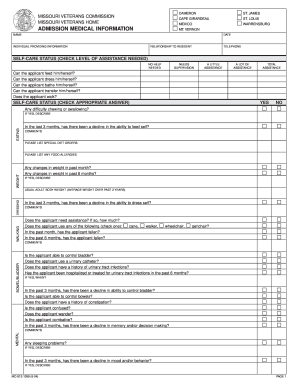
This guide provides a comprehensive walkthrough for filling out the MO 812-1099 form online. Whether you are a veteran or assisting a loved one, following these steps will ensure accurate completion for admission medical information.
Follow the steps to fill out the MO 812-1099 with ease.
- Click ‘Get Form’ button to access the form and open it in your preferred online editor.
- Begin filling out the applicant's name and date at the top of the form. Ensure you provide the correct information for identification purposes.
- Identify the individual providing information and describe their relationship to the applicant. Include your contact telephone number for any follow-up inquiries.
- Check the appropriate self-care status level needed by the applicant. Options include no help needed, needs supervision, a little assistance, a lot of assistance, or total assistance. Please be honest to ensure proper assessment.
- Answer the questions regarding the applicant's ability to feed, dress, bathe, transfer, and walk. Select 'yes' or 'no' for each self-care question.
- Record any difficulties the applicant may face with chewing or swallowing, and provide details if necessary. Also, note any changes in weight over the past month or six months.
- Indicate whether the applicant has any food allergies and list any special diet orders as necessary.
- On the bowel and bladder section, answer the questions regarding control and any issues previously experienced, including the need for assistance and history of urinary tract infections.
- Document any mental health observations including confusion or combative behavior. Ensure to provide comments if there have been declines in cognitive abilities.
- Review the communication ability section carefully, checking off any difficulties with speech, hearing, or eyesight.
- In the history section, outline significant details concerning the applicant's medical history and any treatments received.
- Complete the section regarding daily events and involvement patterns to paint a comprehensive picture of the applicant's lifestyle.
- Conclude by ensuring all information is accurate. Provide your signature, the name of the applicant, and the date before submitting the form.
- Finally, once you have reviewed your entries, save your changes, download, print, or share the completed form as required.
Complete the MO 812-1099 form online today for a seamless submission process.
Get form
Experience a faster way to fill out and sign forms on the web. Access the most extensive library of templates available.
To get your 1099 from your brokerage, check your online account or contact their customer service for assistance. Brokerages typically generate and send out 1099 forms by the end of January each year if you have met the reporting requirements. If you need help navigating this process, platforms like USLegalForms can guide you through obtaining the MO 812-1099.
Get This Form Now!
Use professional pre-built templates to fill in and sign documents online faster. Get access to thousands of forms.