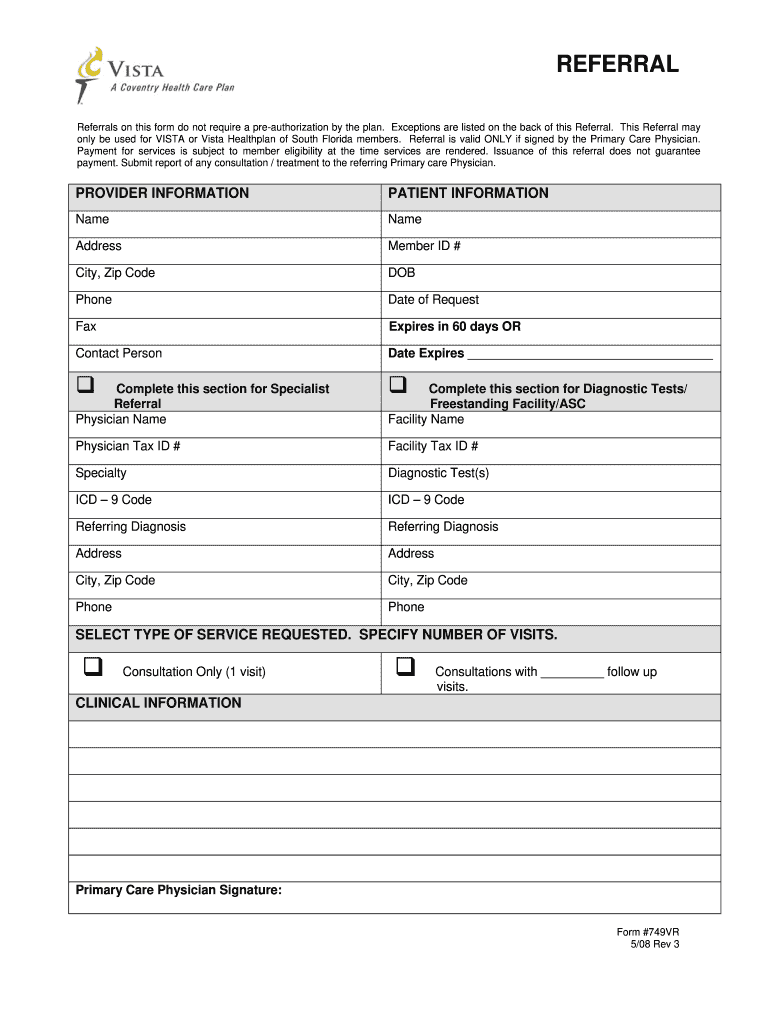
South Florida members. Referral is valid ONLY if signed by the Primary Care Physician. Payment for services is subject to member eligibility at the time services are rendered. Issuance of this referral does not guarantee payment. Submit report of any consultation / treatment to the referring Primary care Physician. PROVIDER INFORMATION PATIENT INFORMATION Name Name Address Member ID # City, Zip Code DOB Phone Date of Request Fax Expires in 60 days OR Contact Person Date Expires __.
Loading

Open form follow the instructions

Easily sign the form with your finger

Send filled & signed form or save
How to fill out the Vista 749VR online
Filling out the Vista 749VR form online is essential for obtaining referrals within the VISTA Healthplan. This guide will provide you with clear and comprehensive instructions to ensure you complete the form correctly and efficiently.
Follow the steps to successfully complete the Vista 749VR form online.
- Click the ‘Get Form’ button to access the Vista 749VR document. This will open the form in your online editor for you to begin filling it out.
- Provide the patient information accurately. This includes their name, address, member ID number, date of birth, phone number, and the date of request.
- Enter the provider information in the designated section. Fill in the referring physician's name, tax ID number, specialty, and contact details.
- Indicate the service requested by selecting the type of service and specifying the number of visits if necessary. Options typically include consultation only or consultations with follow-up visits.
- Complete the clinical information section as required, ensuring all fields are filled out accurately to avoid processing delays.
- Ensure that the form bears the signature of the primary care physician, as this validates the referral.
- Once all fields are filled out, review the form for accuracy. Make any necessary corrections before proceeding.
- After confirming the information is correct, you can choose to save your changes, download, print, or share the completed form as needed.
Start filling out the Vista 749VR form online today to streamline your referral process.
Experience a faster way to fill out and sign forms on the web. Access the most extensive library of templates available.
Related content
Microsoft, Windows, Windows Server, Windows XP, Windows Vista, ... Server 2008 R2, Windows...
When connecting to computers running versions of Windows earlier than Windows Vista or...
The Villa Vista fireplace is an energy efficient, ... (749 mm). 34-3/4". (883 mm). 45"...
Get answers to your most pressing questions about US Legal Forms API.
Why was Vista so hated?
Windows Vista faced criticism for its high system requirements and compatibility issues. Many users found it less user-friendly compared to earlier versions, leading to widespread dissatisfaction. Nevertheless, tools like Vista 749VR exist to improve user experience by providing tailored solutions for specific needs.
Is Vista still a thing?
While Windows Vista is largely phased out from mainstream usage, it still exists within niche markets. Certain professionals and enthusiasts continue to use Windows Vista for specific applications, including those related to Vista 749VR. Understanding the relevance of Vista helps users assess their technology needs.
Is Windows Vista out of date?
Yes, Windows Vista is considered out of date by current standards. The lack of official support and updates makes it increasingly vulnerable to security risks. However, for specific functionalities like those after the Vista 749VR, users may find utility in exploring Legacy software solutions.
When was Vista discontinued?
Microsoft officially discontinued support for Windows Vista on April 11, 2017. This decision marked the end of updates and security patches for Vista users. Although Vista is no longer supported, some features might still be utilized through specific applications, such as Vista 749VR, that offer unique capabilities for users needing legacy support.
Which is older, Windows 7 or Vista?
Windows Vista is older than Windows 7. Microsoft released Vista in January 2007, while Windows 7 followed in October 2009. As technology has progressed, some users still reference Vista, especially for legacy applications like the Vista 749VR. Understanding these timelines can help clarify your operating system choices.
How to access CPRS booster?
Accessing the CPRS booster requires installation and configuration based on your organization’s guidelines. Once set up, you can easily enhance your CPRS experience with additional features and functionalities. The Vista 749VR aids in this setup, ensuring seamless integration and better performance. With the booster, your efficiency in managing patient records can significantly improve.
How to search on CPRS?
Searching within CPRS is straightforward. Users can utilize the search bar to find specific patient records or clinical information. By leveraging features from Vista 749VR, you can refine your search parameters for better accuracy and speed. This efficient search capability helps healthcare professionals quickly access the data they need for informed decision-making.
What is CPRS software?
CPRS is a software system designed for healthcare providers to access and manage patient records efficiently. This application centralizes vital patient information, allowing for improved clinical decision-making. Integration with tools like Vista 749VR can enhance its functionality, making it easier for users to interact with patient data. Ultimately, CPRS aims to support healthcare providers in delivering high-quality care.
How to open CPRS?
Opening CPRS involves selecting the application from your workstation or start menu. Once you have initiated the program, you will be prompted to enter your username and password. For users incorporating the Vista 749VR, this process can be quicker and more intuitive. After successful login, you'll be ready to navigate through patient data and documentation.
How do I log into CPRS?
To log into the Computerized Patient Record System (CPRS), you need a secure connection to your organization's network. After entering your credentials, you will gain access to patient records and vital health information. Additionally, integrating tools such as Vista 749VR can streamline your login process, making it even more user-friendly. Remember, maintaining the confidentiality of your login information is crucial.
Use professional pre-built templates to fill in and sign documents online faster. Get access to thousands of forms.
If you believe that this page should be taken down, please follow our DMCA take down process here.