Loading
Get Ph Sss Member Loan Application 2015-2026
How it works
-

Open form follow the instructions
-

Easily sign the form with your finger
-

Send filled & signed form or save
How to fill out the PH SSS Member Loan Application online
Filling out the PH SSS Member Loan Application online can seem daunting, but with the right guidance, the process can be straightforward. This guide will help you navigate each section of the application effectively, ensuring that all required information is accurately provided.
Follow the steps to complete your loan application online.
- Click 'Get Form' button to obtain the form and open it in your preferred editor.
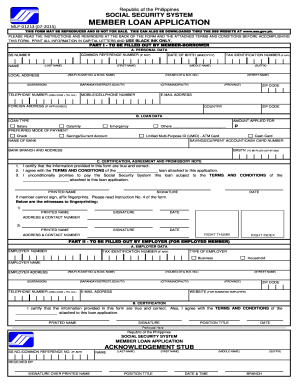
- Part I - Personal data. Fill out the personal data section by entering your common reference number (if applicable), Social Security (SS) number, full name, date of birth, local address, telephone numbers, tax identification number (if any), mobile number, email address, and foreign address (if applicable). Ensure all information is printed in capital letters using black ink.
- Part B - Loan data. Indicate the loan type you are applying for, such as salary, calamity, emergency, or others. Specify the amount you are applying for and your preferred mode of payment, whether through check, savings/current account, or cash card. Fill in the necessary bank details if applicable.
- Part C - Certification, agreement, and promissory note. Read the certification statement carefully. Confirm the information provided is accurate, agree to the terms and conditions, and promise to repay the loan. Sign and date the form where indicated. If you cannot provide a signature, ensure that a witnessing process occurs, documenting the fingerprint with the required signatures.
- Provide the employer data in Part II if applicable. This section gives details about your employer, including the employer number, tax identification number, name, address, and contact details. Your employer is required to certify the information provided.
- Finally, review all sections to ensure all information is complete and accurate. Save your changes, download, print, or share the form as necessary.
Complete your PH SSS Member Loan Application online today for a smooth and efficient process.
Member Loan Application Form. SSS digitized ID or E-6 (acknowledgement stub) with any two valid IDs, one of which with recent photo. Unexpired Driver's License. Professional Regulation Commission (PRC) ID card. Passport. Postal ID. School or Company ID. Tax Identification Number (TIN) card.