Loading
Form preview
  • US Legal Forms
  • Form Library
  • Foreign Forms
  • Foreign Canada Other Forms
  • Canada Bmo Insurance Request For Pre-authorized Payment

Get Canada Bmo Insurance Request For Pre-authorized Payment

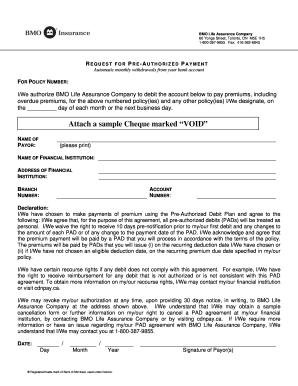
CY NUMBER: I/We authorize BMO Life Assurance Company to debit the account below to pay premiums, including overdue premiums, for the above numbered policy(ies) and any other policy(ies) I/We designate, on the _________ day of each month or the next business day. Attach a sample Cheque marked “VOID” NAME OF PAYOR: (please print) NAME OF FINANCIAL INSTITUTION: ADDRESS OF FINANCIAL INSTITUTION: BRANCH NUMBER: ACCOUNT NUMBER: Declaration: I/We have chosen to make payments of premium using t.

How it works

  1. Open form

    Open form follow the instructions

  2. Easily sign form

    Easily sign the form with your finger

  3. Share form

    Send filled & signed form or save

How to fill out the Canada BMO Insurance Request for Pre-Authorized Payment online

Filling out the Canada BMO Insurance Request for Pre-Authorized Payment form online is a straightforward process that ensures automatic monthly withdrawals from your bank account for insurance premiums. This guide will walk you through each step to help you complete the form accurately and efficiently.

Follow the steps to fill out the form correctly.

  1. Press the ‘Get Form’ button to obtain the form and open it in your preferred editor.
  2. Enter your policy number in the designated field to ensure the correct application of the pre-authorized payment.
  3. In the authorization section, indicate the day of the month you would like the payments to be debited from your account.
  4. Attach a sample cheque marked 'VOID' from the account you wish to use for the payments.
  5. Fill in your name as the payor, ensuring to print clearly in the specified area.
  6. List the name of your financial institution where your bank account is held.
  7. Provide the address of your financial institution, including the branch number.
  8. Enter your account number to specify the account from which the payments will be debited.
  9. Read the declaration carefully and ensure you understand your rights regarding the pre-authorized debit plan.
  10. Sign the form where indicated to authorize BMO Life Assurance Company to process the payments.
  11. After completing the form, ensure all information is correct, then save your changes and proceed to download, print, or share the completed form as needed.

Complete your Canada BMO Insurance Request for Pre-Authorized Payment online today.

Get form

Experience a faster way to fill out and sign forms on the web. Access the most extensive library of templates available.
Get form

Related content

424B3
To be eligible to participate in the pre-authorized debit (PAD) service, a registered...
Learn more
Payments
Call reception at +1 604-685-5808 to provide a credit number for your application fee or...
Learn more
INTERCONTINENTAL EXCHANGE, INC.
Feb 4, 2021 — Indicate by check mark if the registrant is a well-known seasoned issuer...
Learn more

Related links form

MPW Incident Report 2013 MSSM Laboratory Self-Assessment Mt. Diablo Silverado Council Request for Liability Insurance MTA HR-BEN-034

Questions & Answers

Get answers to your most pressing questions about US Legal Forms API.

Contact support

To set up a pre-authorized payment on BMO, visit the BMO website or mobile app. From there, navigate to the payments section and select the option for Canada BMO Insurance Request for Pre-Authorized Payment. Follow the prompts to provide your account details, payment schedule, and authorized amount.

Yes, you can perform pre-authorized transactions using a debit card, although it depends on the policies of your financial institution. Many banks allow users to set up automatic debit payments for recurring expenses. When you're interested in a structured approach, consider the Canada BMO Insurance Request for Pre-Authorized Payment for better management.

The short form often used for pre-authorized payments is PAD, which stands for Pre-Authorized Debit. This acronym is widely recognized in banking and payment processing. When discussing your options with financial institutions, mentioning the Canada BMO Insurance Request for Pre-Authorized Payment can help clarify your needs.

Pre-authorized credit in Canada refers to the arrangement where a person gives permission to a bank or financial institution to deposit funds into their account directly. This process can streamline your finances, especially for regular income payments. When looking for reliable options, consider the Canada BMO Insurance Request for Pre-Authorized Payment to manage your incoming funds.

Creating a PAD form requires you to have the right template, which you can usually find on your bank's website or through professional services. Fill in your personal information, banking details, and specify the payment terms. For a smoother process, many users prefer utilizing platforms like UsLegalForms, which can simplify the steps involved in the Canada BMO Insurance Request for Pre-Authorized Payment.

To obtain a pre-authorized payment form from RBC, you can start by visiting the RBC website. Look for the forms section under the banking services tab, or contact customer service for assistance. Additionally, you can often find the necessary forms at your local branch. Completing the Canada BMO Insurance Request for Pre-Authorized Payment can simplify your banking experience.

authorized debit from TD Bank operates similarly to other banks, allowing automatic withdrawal of funds for various payments. If you're considering the Canada BMO Insurance Request for PreAuthorized Payment, it can provide an alternative way to manage your payments, ensuring timely processing and reducing errors. TD Bank and BMO offer solutions tailored to meet your financial needs effectively. Always consult your bank's guidelines for specific details on their services.

To set up a pre-authorized payment, you typically need to provide your bank details and authorize the company to withdraw funds regularly. For a Canada BMO Insurance Request for Pre-Authorized Payment, you would fill out a specific form provided by BMO or the service provider. Follow clear instructions on how to complete this setup either online or through a customer service representative. Once established, enjoy the ease of managing regular payments efficiently.

Yes, you can stop a pre-authorized payment with BMO, provided you act in accordance with their procedures. You should reach out to BMO's customer service or use their online banking platform to initiate the stopping process. If you have set up a Canada BMO Insurance Request for Pre-Authorized Payment, make sure to review any specific terms related to reversing the authorization. This will help you avoid any unwanted withdrawals.

Preauthorized debit refers to a financial arrangement where you permit a company to withdraw funds from your account at regular intervals. This setup, like the Canada BMO Insurance Request for Pre-Authorized Payment, ensures timely payment without your active participation. It allows for greater control over your finances while minimizing the risk of late fees or missed payments. Understanding this service helps you manage recurring obligations efficiently.

Get This Form Now!

Use professional pre-built templates to fill in and sign documents online faster. Get access to thousands of forms.
Get form
If you believe that this page should be taken down, please follow our DMCA take down processhere.

Industry-leading security and compliance

US Legal Forms protects your data by complying with industry-specific security standards.
  • In businnes since 1997
    25+ years providing professional legal documents.
  • Accredited business
    Guarantees that a business meets BBB accreditation standards in the US and Canada.
  • Secured by Braintree
    Validated Level 1 PCI DSS compliant payment gateway that accepts most major credit and debit card brands from across the globe.
Get Canada BMO Insurance Request for Pre-Authorized Payment
Get form
  • Adoption
  • Bankruptcy
  • Contractors
  • Divorce
  • Home Sales
  • Employment
  • Identity Theft
  • Incorporation
  • Landlord Tenant
  • Living Trust
  • Name Change
  • Personal Planning
  • Small Business
  • Wills & Estates
  • Packages A-Z
  • Affidavits
  • Bankruptcy
  • Bill of Sale
  • Corporate - LLC
  • Divorce
  • Employment
  • Identity Theft
  • Internet Technology
  • Landlord Tenant
  • Living Wills
  • Name Change
  • Power of Attorney
  • Real Estate
  • Small Estates
  • Wills
  • All Forms
  • Forms A-Z
  • Form Library
  • Legal Hub
  • About Us
  • Help Portal
  • Legal Resources
  • Blog
  • Affiliates
  • Contact Us
  • Delete My Account
  • Site Map
  • Industries
  • Forms in Spanish
  • Localized Forms
  • State-specific Forms
  • Forms Kit
  • Real Estate Handbook
  • All Guides
  • Notarize
  • Incorporation services
  • For Consumers
  • For Small Business
  • For Attorneys
  • USLegal
  • FormsPass
  • pdfFiller
  • signNow
  • altaFlow
  • DocHub
  • Instapage
Form Packages
  • Adoption
  • Bankruptcy
  • Contractors
  • Divorce
  • Home Sales
  • Employment
  • Identity Theft
  • Incorporation
  • Landlord Tenant
  • Living Trust
  • Name Change
  • Personal Planning
  • Small Business
  • Wills & Estates
  • Packages A-Z
Form Categories
  • Affidavits
  • Bankruptcy
  • Bill of Sale
  • Corporate - LLC
  • Divorce
  • Employment
  • Identity Theft
  • Internet Technology
  • Landlord Tenant
  • Living Wills
  • Name Change
  • Power of Attorney
  • Real Estate
  • Small Estates
  • Wills
  • All Forms
  • Forms A-Z
  • Form Library
Customer Service
  • Legal Hub
  • About Us
  • Help Portal
  • Legal Resources
  • Blog
  • Affiliates
  • Contact Us
  • Delete My Account
  • Site Map
  • Industries
  • Forms in Spanish
  • Localized Forms
  • State-specific Forms
  • Forms Kit
Legal Guides
  • Real Estate Handbook
  • All Guides
Prepared for you
  • Notarize
  • Incorporation services
Our Customers
  • For Consumers
  • For Small Business
  • For Attorneys
Our Sites
  • USLegal
  • FormsPass
  • pdfFiller
  • signNow
  • altaFlow
  • DocHub
  • Instapage
Social Media
Call us now toll free:
+1 833 426 79 33
As seen in:
© Copyright 1999-2026 airSlate Legal Forms, Inc. 3720 Flowood Dr, Flowood, Mississippi 39232
  • Your Privacy Choices
  • Terms of Service
  • Privacy Notice
  • Content Takedown Policy
  • Bug Bounty Program