Loading
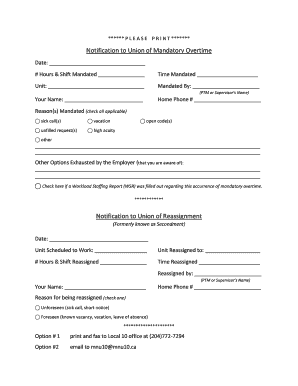
Get Notification To Union Of Mandatory Overtime Form - Mnu Local 10 - Mnu10
How it works
-

Open form follow the instructions
-

Easily sign the form with your finger
-

Send filled & signed form or save
How to fill out the Notification To Union Of Mandatory Overtime Form - MNU Local 10 - Mnu10 online
Filling out the Notification To Union Of Mandatory Overtime Form - MNU Local 10 - Mnu10 is an essential process for notifying your union about mandatory overtime circumstances. This guide will provide clear and supportive steps to assist you in completing the form accurately online.
Follow the steps to complete the form online effectively.
- Click ‘Get Form’ button to obtain the form and open it in the editor.
- Enter the date of the mandatory overtime in the designated field at the top of the form. This is important as it records when the overtime was mandated.
- Fill in the number of hours and the specific shift mandated in their respective fields. This information helps the union to understand the scope of the overtime.
- Indicate the time that the overtime was mandated by filling in the time section accurately.
- In the 'Unit' field, provide the name of the unit where the mandatory overtime occurred.
- Complete the 'Mandated By' section with the name of the person who mandated the overtime, typically a PTM or supervisor.
- In the 'Your Name' field, enter your full name to identify the individual reporting the mandatory overtime.
- Include your home phone number for contact purposes.
- Check all applicable reasons for the mandatory overtime from the provided options. You may also add any additional reasons in the lines provided.
- If you are aware of other options exhausted by the employer, please document them in the space provided.
- If a Workload Staffing Report was filled out regarding this mandatory overtime occurrence, check the corresponding box.
- At the bottom of the form, complete the Notification to Union of Reassignment section similarly by entering the date, unit scheduled to work, and unit reassigned to.
- Fill in the number of hours and time reassigned, and indicate who reassigned you.
- Select the appropriate reason for reassignment and fill out your name and home phone number again.
- Once all fields are completed, save your changes, and take the final step to submit the document by either printing and faxing it to Local 10 office or emailing it to the specified address.
Complete your mandatory overtime form online today to ensure proper communication with your union.
Nurses who work longer than 12-hour shifts on a regular basis or without enough time off between shifts become fatigued, which can lead to mistakes. They also may feel resentful or dejected, which can lead to subpar patient care. Burnout is a common result for nurses who must work long hours.
Industry-leading security and compliance
US Legal Forms protects your data by complying with industry-specific security standards.
-
In businnes since 199725+ years providing professional legal documents.
-
Accredited businessGuarantees that a business meets BBB accreditation standards in the US and Canada.
-
Secured by BraintreeValidated Level 1 PCI DSS compliant payment gateway that accepts most major credit and debit card brands from across the globe.