Loading
Get Dsi Screening
How it works
-

Open form follow the instructions
-

Easily sign the form with your finger
-

Send filled & signed form or save
How to fill out the Dsi Screening online
Filling out the Dsi Screening online is a straightforward process that involves providing key information about your employment history and professional qualifications. This guide will walk you through each section of the form to ensure accurate completion.
Follow the steps to fill out the Dsi Screening form effectively.
- Click ‘Get Form’ button to obtain the form and open it for editing.
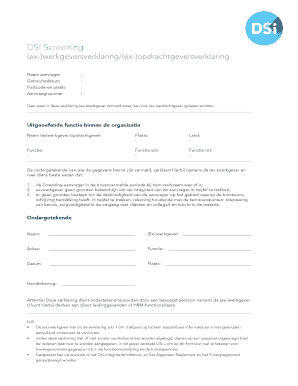
- Begin by entering your full name in the designated field labeled ‘Naam aanvrager’.
- Input your date of birth in the format requested under ‘Geboortedatum’.
- Fill in your postal code and city in the respective fields labeled ‘Postcode en plaats’.
- Enter your application number in the field marked ‘Aanvraagnummer’.
- In the section labeled 'Uitgeoefende functie binnen de organisatie', provide the name of the (ex)employer or client in the specified line.
- Indicate the location where the (ex)employer or client is based by filling in the appropriate city and country.
- Specify your function title in the 'Functie' field and the duration of your employment by entering the start date in 'Functie van' and the end date in 'Functie tot'.
- Review the statements in points 1 to 3 regarding your integrity and expertise; confirm these accurately reflect your situation.
- Have the declaration signed by an authorized individual from your (ex)employer, ensuring their name and title are provided.
- Finally, save changes to the form, and if needed, download, print, or share it.
Complete your Dsi Screening online today to ensure a smooth processing experience.
Industry-leading security and compliance
US Legal Forms protects your data by complying with industry-specific security standards.
-
In businnes since 199725+ years providing professional legal documents.
-
Accredited businessGuarantees that a business meets BBB accreditation standards in the US and Canada.
-
Secured by BraintreeValidated Level 1 PCI DSS compliant payment gateway that accepts most major credit and debit card brands from across the globe.