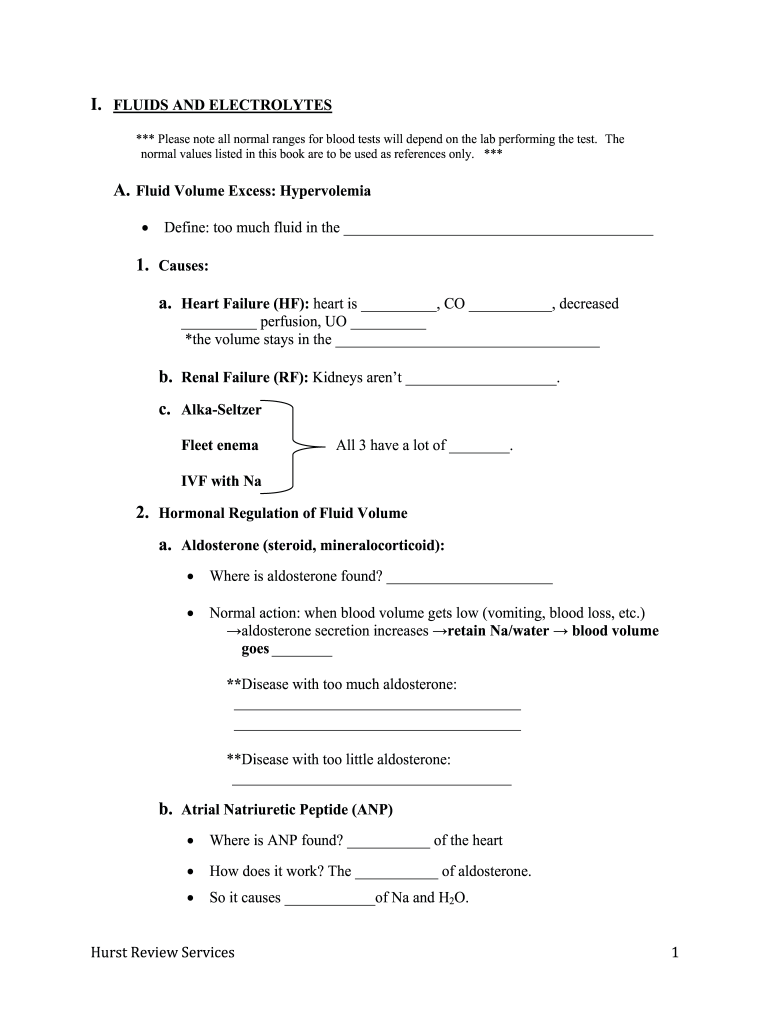
A. Fluid Volume Excess: Hypervolemia • Define: too much fluid in the _________________________________________ 1. Causes: a. Heart Failure (HF): heart is __________, CO ___________, decreased __________ perfusion, UO __________ *the volume stays in the ___________________________________ b. Renal Failure (RF): Kidneys aren’t ____________________. c. Alka-Seltzer Fleet enema All 3 have a lot of ________. IVF with Na 2. Hormonal Regulation of Fluid Volume a. Aldosterone (steroid, miner.

Open form follow the instructions

Easily sign the form with your finger

Send filled & signed form or save
How to fill out the Hurst Review Services online
Filling out the Hurst Review Services document can be a straightforward process if you follow the right steps. This guide provides clear instructions for completing each section, ensuring you have a seamless experience in managing your digital documentation needs.
Follow the steps to effectively complete the form.
- Press the ‘Get Form’ button to access the document, allowing you to open it in your preferred editor.
- Begin by reviewing the introductory information provided in the form to understand the context and purpose of the Hurst Review Services.
- Carefully fill out each required field, ensuring accuracy and clarity in your responses. Pay particular attention to any instructions or examples provided.
- Complete any sections related to Fluid Volume Excess and Fluid Volume Deficit, detailing symptoms or treatments as prompted.
- Continue to populate the sections related to IV fluid types and their uses, ensuring you follow the format requested.
- Once all fields are filled, save your changes. You can choose to download, print, or share the completed form as needed.
Complete your documents online for a more efficient workflow.
Experience a faster way to fill out and sign forms on the web. Access the most extensive library of templates available.
Related content
NCLEX Review Resources ; Hurst Review Services, Inc. 127 S. Railroad Ave. Brookhaven, MS ;...
Students can customize their NCLEX® review experience to best suit their individual...
May 12, 2017 — This document lists observations made by the FDA representative(s) during...
Get answers to your most pressing questions about US Legal Forms API.
Is a Hurst Review enough to pass NCLEX?
Many learners achieve success by relying on Hurst Review Services as their primary study tool. It equips you with crucial knowledge and strategies that align with NCLEX expectations. However, supplementing your study materials with practice tests and other resources can further enhance your preparation and boost your confidence.
What is better than UWorld?
Choosing what's better than UWorld hinges on what features you prioritize. Hurst Review Services offers structured content and a focus on core knowledge, which some learners find essential. If personalized guidance and foundational understanding are your goals, you might consider Hurst Review Services as a strong alternative.
Can you pass NCLEX with Archer review?
While some students claim that Archer Review can help in passing the NCLEX, results vary significantly. Many candidates have reported success with various review programs, but Hurst Review Services is often favored for its structured approach. For those prioritizing comprehensive preparation, Hurst Review Services may provide the support you need to succeed.
Is UWorld or Hurst better?
Choosing between UWorld and Hurst Review Services depends on your study goals. UWorld is known for its extensive question bank, which many find helpful, while Hurst Review emphasizes understanding concepts. Both have their merits, but if a solid grasp of core principles is what you seek, Hurst Review Services could be the better fit.
Is Hurst Review or Kaplan better?
When comparing Hurst Review Services and Kaplan, it often comes down to personal preference and learning style. Hurst Review focuses intensively on core concepts, while Kaplan offers a broader range of resources. Consider your study habits and decide which program aligns more closely with your learning needs.
Is the Hurst Review worth it?
Many students find Hurst Review Services to be a valuable resource. It offers comprehensive preparation materials that cater specifically to NCLEX exam requirements. The engaging content and supportive resources help bolster your understanding and confidence, ultimately enhancing your chances of success.
Which NCLEX review has the highest pass rate?
Various NCLEX review programs claim high pass rates, but Hurst Review Services is highly regarded for its effectiveness. Many nursing students have found it instrumental in improving their scores. The focus on key concepts and strategies can help increase your confidence going into the test. Always check the most recent pass rates to choose the right option for you.
Does Archer use real NCLEX questions?
Archer does not use actual NCLEX questions, as the exam content is protected by copyright. Instead, it provides practice questions that are similar in format and difficulty to what you could expect on the test. This can give you a good feel for the exam experience. To supplement your preparation, consider using Hurst Review Services for a deeper insight into nursing concepts.
How accurate is Archer predictor?
The Archer predictor is known for providing a reliable estimate of your potential performance on the NCLEX. Many users have reported that their predictor scores align closely with their actual exam results. While not infallible, it can serve as a helpful guide in determining your readiness. For comprehensive preparation, consider incorporating Hurst Review Services to solidify your understanding.
Is 2 weeks enough time to study for NCLEX?
Two weeks can be a tight timeframe to prepare for the NCLEX, but it's not impossible if you utilize your resources wisely. Hurst Review Services offers efficient study plans that cover essential content quickly. Prioritize reviewing key concepts and taking practice tests during this time. If you stay focused and dedicated, you can maximize your chances of success.
Use professional pre-built templates to fill in and sign documents online faster. Get access to thousands of forms.
If you believe that this page should be taken down, please follow our DMCA take down process here.