Loading
Get Preferred Client Registration Form Canada - Amy Sky Nation
How it works
-

Open form follow the instructions
-

Easily sign the form with your finger
-

Send filled & signed form or save
How to fill out the Preferred Client Registration Form Canada - Amy Sky Nation online
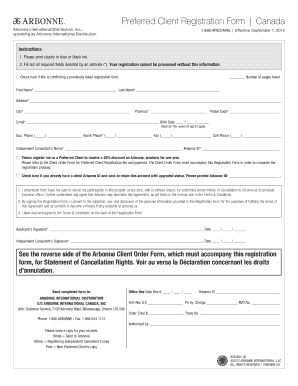
This guide provides clear instructions on how to complete the Preferred Client Registration Form for Canada - Amy Sky Nation online. Whether you are familiar with online forms or not, these step-by-step instructions will help you navigate the process with ease.
Follow the steps to complete your registration smoothly.
- Click ‘Get Form’ button to obtain the form and access it in the appropriate editor.
- Begin filling out the form by clearly entering your first name and last name in the designated fields marked with an asterisk (*). Ensure your input is accurate, as this information is crucial for your registration.
- Enter your full address, including street number and name, city, province, and postal code. This section is mandatory for processing your application.
- Provide your email address. This will be used for communication regarding your registration and updates.
- Indicate your birth date in the specified format. Note that you must be 18 years or older to register.
- Fill in your business and home phone numbers, along with a fax number if applicable. These contact numbers are helpful for any follow-up related to your registration.
- Input your cell phone number for quick communication. It is advisable to provide the number you use regularly.
- Complete the fields for the independent consultant’s name and their Arbonne ID. This information is necessary for your application.
- Choose to register as a Preferred Client to receive discounts on Arbonne products. Ensure you understand the associated registration fees and include the Client Order Form as needed.
- Read the agreement statements carefully. By signing the registration form, you confirm your understanding of the rights to cancel your participation and consent to the collection of personal information.
- Sign and date the form in the designated areas to complete your application. Ensure both your signature and the independent consultant's signature are included if applicable.
- Once the form is thoroughly completed, you can save changes, download it for your records, print a copy, or share it as necessary.
Submit your Preferred Client Registration Form online today to start enjoying your benefits!