Loading
Get Maxwell Meighen Psu
How it works
-

Open form follow the instructions
-

Easily sign the form with your finger
-

Send filled & signed form or save
How to fill out the Maxwell Meighen Psu online
Filling out the Maxwell Meighen Primary Support Unit application online can be straightforward when following the necessary steps. This guide will walk you through each section of the form, ensuring you provide all required information accurately.
Follow the steps to complete the application form effectively.
- Click ‘Get Form’ button to obtain the form and open it in the editor.
- Enter the date in the provided field at the top of the form. Make sure to use the correct format for clarity.
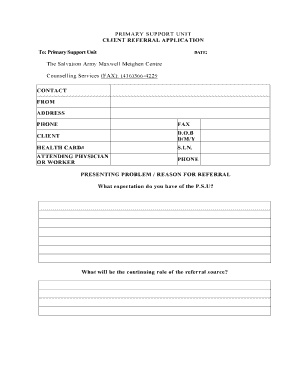
- Fill in the contact information for the referral source, including the name, address, phone number, and fax number.
- Complete the client information section, including the client's full name, date of birth (D.O.B.), health card number, and social insurance number (S.I.N.).
- Provide the attending physician or worker's name and phone number to ensure clear communication.
- Outline the presenting problem or reason for referral. Specify what expectations the referral source has of the Primary Support Unit.
- Detail the continuing role of the referral source concerning the client.
- Fill out the medication schedule by listing the type and dosage of each medication the client is currently taking.
- In the client support network section, provide the names and contact numbers for their psychiatrist, family doctor, mental health workers, and housing workers.
- Address whether there are any additional agency contacts currently assisting the client. If so, provide their names and phone numbers.
- Identify any issues or concerns the client may have related to physical health, mental health, substance abuse, and any other relevant areas by answering the provided questions.
- Input any pre-arranged appointment details, including date, time, location, and the individual or agency they have the appointment with.
- After completing the form, ensure that you have the signature of the worker overseeing the referral.
- Review the entire form for any inaccuracies or missing information. Once confirmed, save your changes, and choose your preferred method for submitting the form, whether downloading, printing, or sharing it.
Complete your documents online with confidence and accuracy.