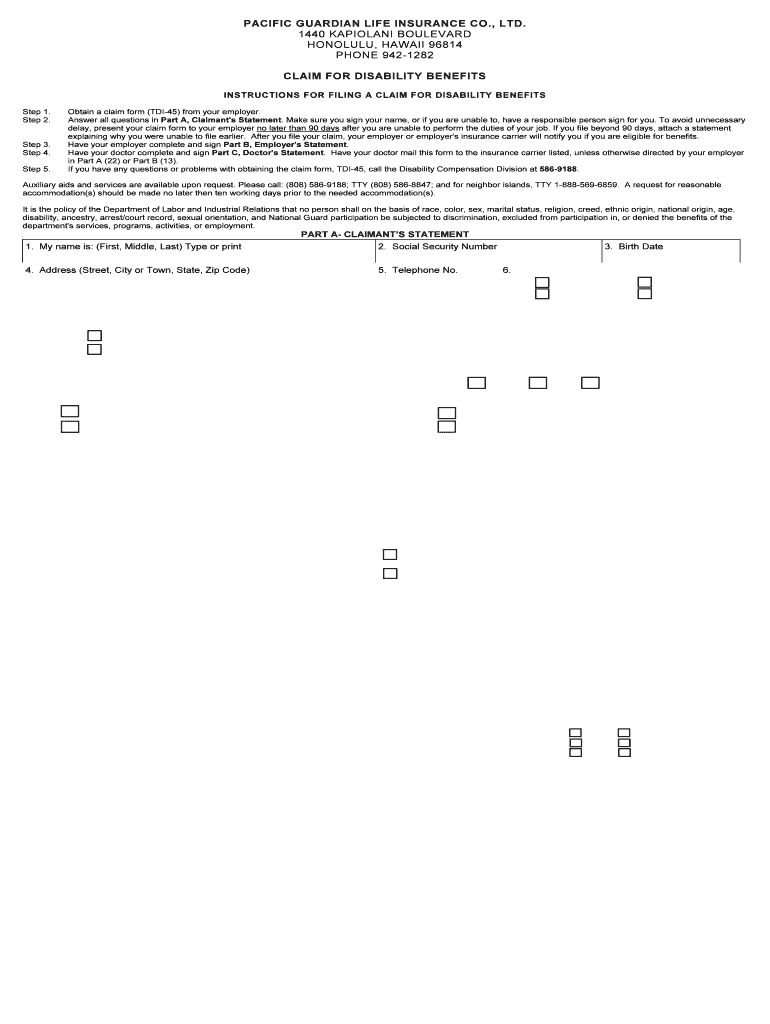
ILING A CLAIM FOR DISABILITY BENEFITS Step 1. Step 2. Step 3. Step 4. Step 5. Obtain a claim form (TDI-45) from your employer. Answer all questions in Part A, Claimant's Statement. Make sure you sign your name, or if you are unable to, have a responsible person sign for you. To avoid unnecessary delay, present your claim form to your employer no later than 90 days after you are unable to perform the duties of your job. If you file beyond 90 days, attach a statement explaining why you were unabl.
Loading

Open form follow the instructions

Easily sign the form with your finger

Send filled & signed form or save
How to fill out the Pacific Guardian Life TDI-45 online
Filing a claim for disability benefits can be a crucial step for many individuals who are unable to work due to illness or injury. This guide provides detailed, user-friendly instructions on how to fill out the Pacific Guardian Life TDI-45 form online.
Follow the steps to complete your TDI-45 form with ease.
- Click ‘Get Form’ button to access the TDI-45 claim form and open it in the editing interface.
- In Part A, Claimant's Statement, provide your full name, Social Security Number, address, telephone number, and birth date as prompted. Ensure that you sign your name or ask a responsible person to sign if you are unable to.
- Describe the nature of your disability in section 8. Indicate whether it is due to sickness or an accident, and, if applicable, provide details about the accident including the date and circumstances.
- In section 9, input the first day you were unable to perform your job duties. If you have recovered, fill in the date as well.
- Provide information about your employment in Part A. Fill in your present employer's name and address, as well as the dates you worked at your job and your weekly earnings.
- Complete the questions regarding other employment and TDI notices that apply to your situation in sections 18 and 19.
- Record any other benefits you are receiving in section 20. This includes unemployment or workers' compensation benefits, among others.
- Finally, read the statement at the bottom of Part A, ensuring all information is accurate, then sign and date the form.
- After completing Part A, provide the form to your employer for them to fill out Part B, Employer's Statement, ensuring it's submitted promptly to the insurance carrier.
- Have your doctor complete and sign Part C, Doctor's Statement, and ensure it is mailed to the specified insurance carrier address.
- Review the completed document for accuracy, then you can save any changes, download the form, print it, or share it as necessary.
Start filling out your TDI-45 form online today to ensure timely processing of your disability benefits claim.
Experience a faster way to fill out and sign forms on the web. Access the most extensive library of templates available.
Related content
Ask for Form TDI-45, Claim for TDI Benefits, from your employer. Or contact us. A TDI...
Oct 30, 2015 — The System has approximately. 23,500 benefits-eligible retired employees...
Authors by Number of Posts (Highest First). Be aware that many list participants used...
Get answers to your most pressing questions about US Legal Forms API.
What is TDI on my paycheck?
TDI on your paycheck reflects the deductions made for Temporary Disability Insurance. This amount contributes to your financial safety net in case of a temporary work incapacity. Understanding these deductions, especially how the Pacific Guardian Life TDI-45 plan works, can help you feel more secure in your financial planning.
What is TDI disability?
TDI disability refers to a temporary condition that prevents an employee from performing their job duties. The Pacific Guardian Life TDI-45 plan offers support during these challenging periods, providing financial benefits to assist with your living costs. Knowing your options can help you manage your circumstances more effectively.
What is TDI tax?
TDI tax is a payroll tax deducted from employee earnings to fund temporary disability insurance programs. The rate varies by state, and understanding how it applies to your income is crucial. With the Pacific Guardian Life TDI-45 plan, you can familiarize yourself with your tax contributions and the benefits they provide in times of need.
What is TDI in payroll?
TDI in payroll refers to the Temporary Disability Insurance deductions taken from employees' wages. These deductions contribute to the fund that provides insurance benefits during a disability. Managers and HR professionals should ensure they understand the Pacific Guardian Life TDI-45 contributions to properly communicate this benefit to their teams.
Who pays for NJ TDI?
In New Jersey, employers fund Temporary Disability Insurance through payroll taxes. Employees also contribute through wage deductions. Understanding these contributions is essential for employees and can help you better navigate the Pacific Guardian Life TDI-45 plan options available for support and benefits.
What are the benefits of TDI in Hawaii?
The benefits of TDI in Hawaii include financial support when you cannot work due to a temporary disability. With the Pacific Guardian Life TDI-45 plan, you receive a percentage of your weekly wages, which can help cover living expenses. Additionally, this coverage promotes peace of mind, allowing you to focus on your recovery without the stress of financial burdens.
What are TDI claims?
TDI claims refer to Temporary Disability Insurance claims that individuals file when they cannot work due to a medical condition. In Hawaii, the Pacific Guardian Life TDI-45 plan provides coverage for employees, ensuring they receive benefits during their recovery. By understanding TDI claims, you can navigate the process more smoothly, securing the financial support you need during difficult times.
What does TDI mean at work?
At work, TDI refers to Temporary Disability Insurance, a program that provides income support when employees are unable to work due to medical reasons. Understanding TDI is essential for both employers and employees, as it impacts workplace benefits. Using Pacific Guardian Life TDI-45 can help clarify your rights and benefits related to TDI. It’s beneficial to discuss these options with your HR department.
What is claim type TDI?
Claim type TDI refers to the specific category of claims related to Temporary Disability Insurance. Under this type, individuals seek benefits when a health issue prevents them from being able to work. The Pacific Guardian Life TDI-45 serves as a resource to better understand and navigate the requirements of these claims. Knowing the details can empower you in your claim submission process.
What is a TDI 45 form?
The TDI 45 form is a specific document used to apply for Temporary Disability Insurance benefits in New Jersey. This form collects important information regarding your work history and medical condition, helping you present your case effectively. Utilizing the Pacific Guardian Life TDI-45 can enhance your ability to fill out this form correctly. Ensure all necessary sections are completed to avoid delays.
Use professional pre-built templates to fill in and sign documents online faster. Get access to thousands of forms.
If you believe that this page should be taken down, please follow our DMCA take down process here.