Loading
Get Supplier Registration Form
How it works
-

Open form follow the instructions
-

Easily sign the form with your finger
-

Send filled & signed form or save
How to fill out the Supplier Registration Form online
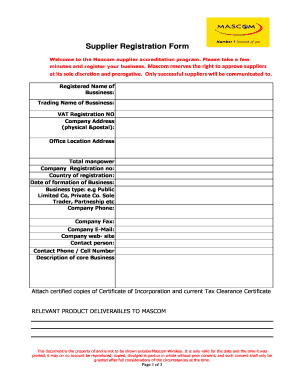
Completing the Supplier Registration Form online is an essential step for businesses wishing to partner with Mascom. This guide provides clear and supportive steps to ensure that you provide all necessary information accurately.
Follow the steps to successfully complete the Supplier Registration Form.
- Click ‘Get Form’ button to access the online version of the Supplier Registration Form.
- Begin by filling in the 'Registered Name of Business' and 'Trading Name of Business'. Ensure that these names match those on legal documents.
- Enter the total manpower and the 'Company Registration Number'. Include your country of registration and the 'Date of Formation of Business'.
- Select your 'Business Type' from the options provided, such as public limited company, private company, sole trader, or partnership.
- Fill in the 'Company Phone', 'Company Fax', 'Company Email', and 'Company Website'. Make sure all contact details are accurate.
- Provide the 'Contact Person's' name along with their phone or cell number. This should be someone who can provide more information if needed.
- Describe your core business activities clearly and concisely in the designated field.
- Attach certified copies of your Certificate of Incorporation and current Tax Clearance Certificate as required.
- Fill in the 'Financials' section with your annual turnover for the last three years, including auditor information.
- Provide details of your insurance coverage in the 'Insurance Details' section, indicating coverage types and amounts.
- Complete the 'Banking Details' section, providing your bank name, account number, account holder's name, branch code, and account type.
- List details of three references, including at least one from a bank operating in Botswana, and include their contact information.
- Fill in the 'Ownership Details' section with names, citizenship, and shareholding percentages of all owners.
- Submit any additional relevant information in the space provided.
- Finally, declare that all information provided is accurate to the best of your knowledge, noting your name, date, position, and affixing your company stamp or seal.
- Once all fields are completed and documents attached, you can save changes, download, print, or share the form as needed.
Start filling out your Supplier Registration Form online today to become a registered supplier with Mascom.
The SRP allows you to share Expressions of Interest (EOIs), Requests for Information (RFIs), Requests for Proposals (RFPs), and other procurement information to the entire list of registered suppliers or target a specific industry.
Industry-leading security and compliance
US Legal Forms protects your data by complying with industry-specific security standards.
-
In businnes since 199725+ years providing professional legal documents.
-
Accredited businessGuarantees that a business meets BBB accreditation standards in the US and Canada.
-
Secured by BraintreeValidated Level 1 PCI DSS compliant payment gateway that accepts most major credit and debit card brands from across the globe.