Loading
Form preview
  • US Legal Forms
  • Form Library
  • More Forms
  • More Uncategorized Forms
  • Print Name

Get Print Name

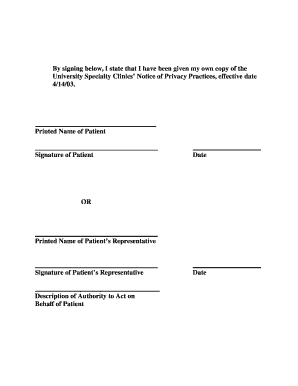
By signing below, I state that I have been given my own copy of the University Specialty Clinics Notice of Privacy Practices, effective date 4/14/03. Printed Name of Patient Signature of Patient Date.

How it works

  1. Open form

    Open form follow the instructions

  2. Easily sign form

    Easily sign the form with your finger

  3. Share form

    Send filled & signed form or save

How to fill out the Print Name online

This guide provides you with step-by-step instructions on how to accurately fill out the Print Name section of a medical document online. By following these instructions, you can ensure that your information is recorded correctly and securely.

Follow the steps to easily complete the Print Name section.

  1. Click 'Get Form' button to obtain the form and open it in the online editor.
  2. Locate the 'Printed Name of Patient' field within the form. Carefully input your full name as it appears on your official documents. Ensure that it is spelled correctly to avoid any discrepancies.
  3. If filling out the form on behalf of a patient, find the 'Printed Name of Patient’s Representative' field. Enter your full name as the representative, ensuring all details are accurate.
  4. Complete the corresponding 'Signature' fields. If you are the patient, sign your name in the designated area. If you are a representative, sign your name in the representative signature field.
  5. Fill in the 'Date' field next to your signature. Input the current date to signify when the document is completed. This is important for record-keeping purposes.
  6. Review all entered information for accuracy. Double-check spelling and formatting to make sure everything is correct.
  7. Decide how you would like to proceed with the completed form. You can choose to save your changes, download a copy, print the form for physical signatures, or share it as needed.

Complete your documents online quickly and efficiently.

Get form

Experience a faster way to fill out and sign forms on the web. Access the most extensive library of templates available.
Get form

Related content

Your Name in Print (9780312337599): Harper ......
Amazon.com: Your Name in Print (9780312337599): Harper, Timothy: Books.
Learn more
PRINT NAME PRINT NAME & DATE SIGNATURE
PRINT NAME. TYPE DET 004. NOTE: HIGH SCHOOL SCHOLARSHIP WINNERS ARE NOT. REQUIRED TO FILL...
Learn more
How to: Print on a Riso RP Directly from Mac OS X...
Sep 12, 2018 — Name: Name your printer however you like. Avoid unusual characters...
Learn more

Related links form

Criminal Information Sheet Acknowledgment For Budget SIMON VANDEKAR - Med Upenn Aub Online Petition

Questions & Answers

Get answers to your most pressing questions about US Legal Forms API.

Contact support

Generally speaking, any mark can be considered a legal signature regardless of how closely it resembles the person's printed name or how stylized it is. This frees people to sign a document with their name, drawing, unique marking, or even an “x.”

What's the difference between signature and printed name? PRINT NAME is simply defined as writing your name in CAPITAL LETTERS! unlike signatures that are mostly written in cursive or scribbles, thus making them hard to read.

Print your name means write it by hand. Please don't type... means you shouldn't use a typewriter (or a printer, as others have mentioned). The important distinction is that 'print' is by done by hand, 'type' is done mechanically.

A signature is a group of pages that are printed, most likely on both sides of a single sheet of paper that once folded, trimmed, bound and cut, become a specific number of pages. The number of pages on a signature depends on your page size and the size of the press sheet they fit on.

What's the difference between signature and printed name? PRINT NAME is simply defined as writing your name in CAPITAL LETTERS! unlike signatures that are mostly written in cursive or scribbles, thus making them hard to read.

0:22 1:12 What does Print Name mean when filling in forms? - YouTube YouTube Start of suggested clip End of suggested clip Name simply demands that you write very clearly. And without connecting the letters. So your writingMoreName simply demands that you write very clearly. And without connecting the letters. So your writing looks like printed. Text while signatures are important because they are legally binding print.

0:22 1:12 Name simply demands that you write very clearly. And without connecting the letters. So your writingMoreName simply demands that you write very clearly. And without connecting the letters. So your writing looks like printed. Text while signatures are important because they are legally binding print.

Unlike Signatures that are mostly written in cursive or scribbles, thus making them hard to read, PRINT NAME simply demands that you write very clearly and without connecting the letters, So your writing looks like Printed Text!

Get This Form Now!

Use professional pre-built templates to fill in and sign documents online faster. Get access to thousands of forms.
Get form
If you believe that this page should be taken down, please follow our DMCA take down processhere.

Industry-leading security and compliance

US Legal Forms protects your data by complying with industry-specific security standards.
  • In businnes since 1997
    25+ years providing professional legal documents.
  • Accredited business
    Guarantees that a business meets BBB accreditation standards in the US and Canada.
  • Secured by Braintree
    Validated Level 1 PCI DSS compliant payment gateway that accepts most major credit and debit card brands from across the globe.
Get Print Name
Get form
  • Adoption
  • Bankruptcy
  • Contractors
  • Divorce
  • Home Sales
  • Employment
  • Identity Theft
  • Incorporation
  • Landlord Tenant
  • Living Trust
  • Name Change
  • Personal Planning
  • Small Business
  • Wills & Estates
  • Packages A-Z
  • Affidavits
  • Bankruptcy
  • Bill of Sale
  • Corporate - LLC
  • Divorce
  • Employment
  • Identity Theft
  • Internet Technology
  • Landlord Tenant
  • Living Wills
  • Name Change
  • Power of Attorney
  • Real Estate
  • Small Estates
  • Wills
  • All Forms
  • Forms A-Z
  • Form Library
  • Legal Hub
  • About Us
  • Help Portal
  • Legal Resources
  • Blog
  • Affiliates
  • Contact Us
  • Delete My Account
  • Site Map
  • Industries
  • Forms in Spanish
  • Localized Forms
  • State-specific Forms
  • Forms Kit
  • Real Estate Handbook
  • All Guides
  • Notarize
  • Incorporation services
  • For Consumers
  • For Small Business
  • For Attorneys
  • USLegal
  • FormsPass
  • pdfFiller
  • signNow
  • altaFlow
  • DocHub
  • Instapage
Form Packages
  • Adoption
  • Bankruptcy
  • Contractors
  • Divorce
  • Home Sales
  • Employment
  • Identity Theft
  • Incorporation
  • Landlord Tenant
  • Living Trust
  • Name Change
  • Personal Planning
  • Small Business
  • Wills & Estates
  • Packages A-Z
Form Categories
  • Affidavits
  • Bankruptcy
  • Bill of Sale
  • Corporate - LLC
  • Divorce
  • Employment
  • Identity Theft
  • Internet Technology
  • Landlord Tenant
  • Living Wills
  • Name Change
  • Power of Attorney
  • Real Estate
  • Small Estates
  • Wills
  • All Forms
  • Forms A-Z
  • Form Library
Customer Service
  • Legal Hub
  • About Us
  • Help Portal
  • Legal Resources
  • Blog
  • Affiliates
  • Contact Us
  • Delete My Account
  • Site Map
  • Industries
  • Forms in Spanish
  • Localized Forms
  • State-specific Forms
  • Forms Kit
Legal Guides
  • Real Estate Handbook
  • All Guides
Prepared for you
  • Notarize
  • Incorporation services
Our Customers
  • For Consumers
  • For Small Business
  • For Attorneys
Our Sites
  • USLegal
  • FormsPass
  • pdfFiller
  • signNow
  • altaFlow
  • DocHub
  • Instapage
Social Media
Call us now toll free:
+1 833 426 79 33
As seen in:
© Copyright 1999-2026 airSlate Legal Forms, Inc. 3720 Flowood Dr, Flowood, Mississippi 39232
  • Your Privacy Choices
  • Terms of Service
  • Privacy Notice
  • Content Takedown Policy
  • Bug Bounty Program