We use cookies to improve security, personalize the user experience, enhance our marketing activities (including cooperating with our marketing partners) and for other business use.
Click "here" to read our Cookie Policy. By clicking "Accept" you agree to the use of cookies. Read less
Read more
Accept
Loading
Form preview
  • US Legal Forms
  • Form Library
  • More Forms
  • More Uncategorized Forms
  • Registering A Brand New Invalid Carriage Mobility Scooter - Disabilitiesfife Org

Get Registering A Brand New Invalid Carriage Mobility Scooter - Disabilitiesfife Org

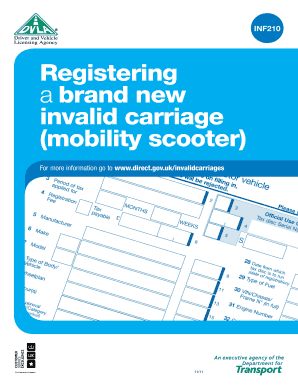
INF210 Registering a brand new invalid carriage (mobility scooter) For more information go to www.direct.gov.uk/invalidcarriages 11/11 Do I need to register my Invalid Carriage? If the vehicle has.

How it works

  1. Open form

    Open form follow the instructions

  2. Easily sign form

    Easily sign the form with your finger

  3. Share form

    Send filled & signed form or save

How to fill out the Registering A Brand New Invalid Carriage Mobility Scooter - Disabilitiesfife Org online

Registering a brand new invalid carriage mobility scooter is an essential step for users to ensure compliance with legal requirements. This guide provides clear and detailed instructions on how to effectively complete the registration form.

Follow the steps to successfully complete the registration process.

  1. Press the ‘Get Form’ button to access the registration form and open it in your document editor.
  2. Begin by filling in Section 2 of the application, entering ‘Disabled’ as your status.
  3. In Section 28, input today’s date to indicate when the application is being completed.
  4. For Section 3, enter ‘12’, which relates to the type of vehicle you are registering.
  5. In Section 29, specify the fuel type of the mobility scooter, which may include options like electric, petrol, or diesel.
  6. If known, provide the make of the scooter in Section 6; if unknown, simply write ‘Invalid Carriage’.
  7. In Section 11, input ‘Exempt’ to indicate the tax exemptions related to this type of vehicle.
  8. Section 17 requires you to provide the unladen weight of the scooter. You can find this information in the manufacturer's handbook.
  9. For Section 10, state the basic colors of the scooter, such as red or blue.
  10. Input ‘Non-standard’ in Section 9 to describe the scooter’s classification.
  11. In Section 8, enter ‘Invalid Vehicle’ to reflect the vehicle category.
  12. Provide any additional information required in Sections 30 and 31, which may come from the manufacturer's handbook; if not known, state ‘NOT KNOWN’ where applicable.
  13. Note that if the fuel type is electric, Section 32 does not need to be completed.
  14. In Section 44, indicate the current year, for example, 2023.
  15. For Section 18, enter the number of seats, typically ‘1’ for a mobility scooter.
  16. Complete Section 46 with your full name and address, and in Section 48, write your full name again.
  17. Finally, sign and date the form in the designated area to validate your application.
  18. After filling out the form, ensure to save your changes, and choose to download, print, or share the completed document as needed.

Complete your registration for the brand new invalid carriage mobility scooter online today.

Get form

Experience a faster way to fill out and sign forms on the web. Access the most extensive library of templates available.
Get form

Related content

Access to transport for disabled people...
17 Sep 2013 — given to allowing Class 3 invalid carriage users to travel in bus lanes...
Learn more
NaPTAN & NPTG Schema Guide - Transport for Ireland
3 Apr 2004 — 15.5.3 NPTG Discovery CSV 2.1 CSV Format Overview ... added a new stop type...
Learn more

Related links form

F-EP-0020.22 LP Gas Cylinders On-site Approval Form - Melbourne ... - World-heart-federation Judging Contract-new.columns. CFA Forms The St. Lucie County Education Channel Graduation Order Form ... Writable Marzano Protocol Short Form

Questions & Answers

Get answers to your most pressing questions about US Legal Forms API.

Contact support

Class 3 scooters can be used on the roads, as well as pavements. Class 2 mobility scooters are only permitted on the roads when crossing them. Class 3 scooters are larger and faster, they also have bright front and rear amber flashing lights – so they have good visibility for safety on the roads.

Yes! Mobility scooters are separated into 2 classes by the government. Class 2 mobility scooters are pavements scooters. The only rule is that a pavement scooter must not travel faster than 4 mph.

Class 1 mobility scooters are compact and lightweight, easy to transport, usually dismantle for ease of transportation, and are easy to stow. This makes them perfect for taking on holiday, days away or shorter trips at home.

Essentially, a class 2 scooter is the smaller type of scooter that you will see for sale. You do not require any sort of special license to drive a class 2 invalid carriage or any other class 3 vehicles – so you can drive every scooter class, as well as powered wheelchairs, with total peace of mind.

A class 2 mobility scooter is a type of pavement scooter that is only used on roads when you are crossing them. This is in contrast to a class 3 mobility scooter, which may be used on the roads.

The answer is NO, it is not necessary for you to be handicapped or disabled to own/use a mobility scooter. Mobility scooters can benefit a much broader number of individuals for many different reasons. You should not feel discouraged about using a scooter, no matter what your reason might be.

Class 2 mobility scooters can only be used on footpaths, pavements, and when crossing roads. They have a maximum speed of 4mph (6.4kph). Key features of class 2 scooters: can be used indoors.

Class 3 are the only types of mobility scooter or powered wheelchair that can be used on the road. They must have the following features: a maximum unladen weight of 150kg (or a maximum unladen weight of 200kg when carrying necessary user equipment, for example, medical supplies) a maximum width of 0.85 metres.

Get This Form Now!

Use professional pre-built templates to fill in and sign documents online faster. Get access to thousands of forms.
Get form
If you believe that this page should be taken down, please follow our DMCA take down processhere.

Industry-leading security and compliance

US Legal Forms protects your data by complying with industry-specific security standards.
  • In businnes since 1997
    25+ years providing professional legal documents.
  • Accredited business
    Guarantees that a business meets BBB accreditation standards in the US and Canada.
  • Secured by Braintree
    Validated Level 1 PCI DSS compliant payment gateway that accepts most major credit and debit card brands from across the globe.
Get Registering A Brand New Invalid Carriage Mobility Scooter - Disabilitiesfife Org
Get form
Form Packages
Adoption
Bankruptcy
Contractors
Divorce
Home Sales
Employment
Identity Theft
Incorporation
Landlord Tenant
Living Trust
Name Change
Personal Planning
Small Business
Wills & Estates
Packages A-Z
Form Categories
Affidavits
Bankruptcy
Bill of Sale
Corporate - LLC
Divorce
Employment
Identity Theft
Internet Technology
Landlord Tenant
Living Wills
Name Change
Power of Attorney
Real Estate
Small Estates
Wills
All Forms
Forms A-Z
Form Library
Customer Service
Terms of Service
Privacy Notice
Legal Hub
Content Takedown Policy
Bug Bounty Program
About Us
Help Portal
Legal Resources
Blog
Affiliates
Contact Us
Delete My Account
Site Map
Industries
Forms in Spanish
Localized Forms
State-specific Forms
Forms Kit
Legal Guides
Real Estate Handbook
All Guides
Prepared for You
Notarize
Incorporation services
Our Customers
For Consumers
For Small Business
For Attorneys
Our Sites
US Legal Forms
USLegal
FormsPass
pdfFiller
signNow
altaFlow
DocHub
Instapage
Social Media
Call us now toll free:
+1 833 426 79 33
As seen in:
  • USA Today logo picture
  • CBC News logo picture
  • LA Times logo picture
  • The Washington Post logo picture
  • AP logo picture
  • Forbes logo picture
© Copyright 1997-2025
airSlate Legal Forms, Inc.
3720 Flowood Dr, Flowood, Mississippi 39232
Form Packages
Adoption
Bankruptcy
Contractors
Divorce
Home Sales
Employment
Identity Theft
Incorporation
Landlord Tenant
Living Trust
Name Change
Personal Planning
Small Business
Wills & Estates
Packages A-Z
Form Categories
Affidavits
Bankruptcy
Bill of Sale
Corporate - LLC
Divorce
Employment
Identity Theft
Internet Technology
Landlord Tenant
Living Wills
Name Change
Power of Attorney
Real Estate
Small Estates
Wills
All Forms
Forms A-Z
Form Library
Customer Service
Terms of Service
Privacy Notice
Legal Hub
Content Takedown Policy
Bug Bounty Program
About Us
Help Portal
Legal Resources
Blog
Affiliates
Contact Us
Delete My Account
Site Map
Industries
Forms in Spanish
Localized Forms
State-specific Forms
Forms Kit
Legal Guides
Real Estate Handbook
All Guides
Prepared for You
Notarize
Incorporation services
Our Customers
For Consumers
For Small Business
For Attorneys
Our Sites
US Legal Forms
USLegal
FormsPass
pdfFiller
signNow
altaFlow
DocHub
Instapage
Social Media
Call us now toll free:
+1 833 426 79 33
As seen in:
  • USA Today logo picture
  • CBC News logo picture
  • LA Times logo picture
  • The Washington Post logo picture
  • AP logo picture
  • Forbes logo picture
© Copyright 1997-2025
airSlate Legal Forms, Inc.
3720 Flowood Dr, Flowood, Mississippi 39232