Loading
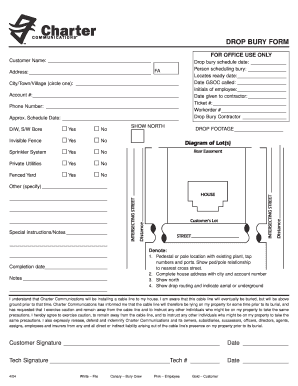
Get Drop Bury Form - Mhcnetnet
How it works
-

Open form follow the instructions
-

Easily sign the form with your finger
-

Send filled & signed form or save
How to fill out the Drop Bury Form - Mhcnetnet online
The Drop Bury Form - Mhcnetnet is essential for scheduling the burial of cable lines. This guide provides clear, step-by-step instructions on how to effectively complete the form online, ensuring all necessary information is accurately submitted.
Follow the steps to successfully fill out the form.
- Click ‘Get Form’ button to obtain the form and open it in the editor.
- Begin by entering your name in the 'Customer Name' field. Be sure to provide your full name as it appears on your account.
- Next, input your complete address, including street, city, and postal code in the 'Address' section.
- In the 'Account #' field, write your account number associated with your services.
- Provide your phone number in the designated space for contact purposes.
- Indicate the approximate date you would like the drop bury scheduled by filling in the 'Approx. Schedule Date' field.
- Answer the series of yes/no questions regarding additional services: D/W, S/W Bore, Invisible Fence, Sprinkler System, Private Utilities, and Fenced Yard. Circle 'Yes' or 'No' accordingly.
- Fill out the ‘Drop bury schedule date,’ ‘Person scheduling bury,’ and ‘Locates ready date.’ Ensure all dates are accurate.
- Record the date GSOC was called and the initials of the employee who processed the request.
- Enter the date given to the contractor and provide the ticket and work order numbers.
- Fill in the name of the drop bury contractor and specify the drop footage in the designated blanks.
- Add any other special notes or instructions that are important for this process.
- Complete the section denoting additional information like pedestal or pole locations, ensuring to show the relationship to the nearest cross street.
- Finally, confirm your understanding of the cable line installation by signing in the 'Customer Signature' field. Enter the date next to your signature.
- The technician will also need to sign and include their tech number along with the date.
- Once all sections are completed, review the form for accuracy. After confirming that all required information is filled out, you can save changes, download, print, or share the form as needed.
Complete your Drop Bury Form online today to ensure timely scheduling and processing.
Industry-leading security and compliance
US Legal Forms protects your data by complying with industry-specific security standards.
-
In businnes since 199725+ years providing professional legal documents.
-
Accredited businessGuarantees that a business meets BBB accreditation standards in the US and Canada.
-
Secured by BraintreeValidated Level 1 PCI DSS compliant payment gateway that accepts most major credit and debit card brands from across the globe.