Loading
Get Bsbitu201a Ch 9 Mail Merge With Word Table 2010
How it works
-

Open form follow the instructions
-

Easily sign the form with your finger
-

Send filled & signed form or save
How to use or fill out the BSBITU201A Ch 9 Mail Merge With Word Table 2010 online
This guide provides step-by-step instructions for effectively filling out the BSBITU201A Ch 9 Mail Merge With Word Table 2010 online. By following these clear and proficient guidelines, users can create individualized documents efficiently.
Follow the steps to successfully complete your mail merge.
- Click the ‘Get Form’ button to obtain the form and open it in your preferred editor.
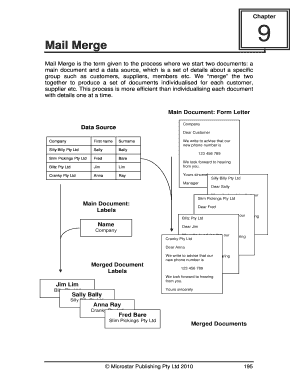
- Create a data source by entering the relevant details in a Word table, including fields such as title, first name, last name, address, city, state, and post code. Ensure that all necessary data is accurately represented.
- Open a new blank document for the main document that will be merged with the data source. Input consistent text that will be included in all letters or labels.
- Utilize the Mailings tab to start the mail merge process. Choose the letters option, and progress through the prompts to set up your merge.
- Select the existing list as your data source and choose the relevant file you prepared with customer details.
- Insert the merge fields into your main document where individualized data (like names and addresses) should appear.
- Preview your letters to check formatting and accuracy for each merged record. Make any necessary adjustments.
- Complete the merge either by printing directly or creating an editable document that includes all the merged letters or labels.
- Save the completed merged document under an appropriate name, ensuring to keep a copy of both the main document and data source.
Start filling out your documents online today using the provided steps and enhance your productivity with mail merge.
Merging to Word Right-click a custom table record, select Merge to, then select Word. Select the merge template that you wish to merge to, then click Open. In the File name field, Enter a name for the merged file, then click Save.
Industry-leading security and compliance
US Legal Forms protects your data by complying with industry-specific security standards.
-
In businnes since 199725+ years providing professional legal documents.
-
Accredited businessGuarantees that a business meets BBB accreditation standards in the US and Canada.
-
Secured by BraintreeValidated Level 1 PCI DSS compliant payment gateway that accepts most major credit and debit card brands from across the globe.