Loading
Get 18003211080
How it works
-

Open form follow the instructions
-

Easily sign the form with your finger
-

Send filled & signed form or save
How to fill out the 18003211080 online
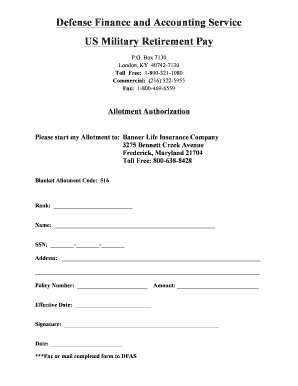
This guide provides a comprehensive overview of how to complete the 18003211080 form online. It is designed to assist users in accurately filling out the necessary information to initiate an allotment authorization.
Follow the steps to complete the online form effectively.
- Click the ‘Get Form’ button to access the form you need and open it in your preferred platform.
- Begin by filling in your rank in the designated section. This information is critical for identifying your military status.
- Next, enter your full name in the space provided. Ensure that you provide your name exactly as it appears on your military documents.
- In the section for SSN, insert your Social Security Number. This number is essential for processing your allotment and linking it to your records.
- Complete the address fields with your current mailing address. This should include your street address, city, state, and zip code.
- Fill in your policy number within the corresponding field to identify the insurance policy associated with your allotment.
- Specify the amount you wish to allot each month. Make sure this amount aligns with your financial planning.
- Indicate the effective date for when you would like the allotment to commence. Ensure that this date is practical and considers any processing times.
- Sign your name in the signature space provided to authorize the allotment. It’s vital that this signature is yours, as it validates the form.
- Finally, enter the date you are completing the form. After reviewing the form for completeness and accuracy, you have the option to save changes, download, print, or share the form as needed.
Start filling out your documents online today to ensure efficient processing!
Your first retired pay should be processed in 30 to 45 days after your retirement date. However, this can only happen if we receive a complete retirement package, including a correct DD Form 2656.