Loading
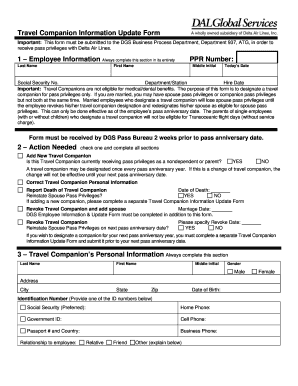
Get Dal Global Services Travel Companion Information Update Form
How it works
-

Open form follow the instructions
-

Easily sign the form with your finger
-

Send filled & signed form or save
How to fill out the DAL Global Services Travel Companion Information Update Form online
Filling out the DAL Global Services Travel Companion Information Update Form correctly is essential for securing travel privileges with Delta Air Lines. This guide offers step-by-step instructions to ensure all necessary information is completed thoroughly.
Follow the steps to complete the form accurately.
- Press the ‘Get Form’ button to access the form and open it in your preferred online editor.
- Begin by filling out the Employee Information section, ensuring to enter your last name, first name, middle initial, today's date, social security number, department/station, and hire date. This section is crucial and must be completed in full.
- In the Action Needed section, select one option: Add New Travel Companion, Correct Travel Companion Personal Information, Report Death of Travel Companion, Reinstate Spouse Pass Privileges, Revoke Travel Companion, or Revoke Travel Companion and add spouse. Complete all relevant subsections based on your selection.
- Proceed to fill out the Travel Companion’s Personal Information section. This includes their last name, first name, middle initial, gender, address, city, state, zip code, date of birth, and identification number (preferably social security). Provide phone numbers and specify the relationship to the employee.
- Sign the Employee’s Signature section and include the date. This certification indicates that you understand the regulations governing non-revenue travel and take responsibility for your travel companion’s conduct.
- Have your travel companion sign in the Travel Companion’s Signature section, ensuring they also date their signature. Their certification is important and confirms that they agree to the travel regulations.
- After completing the form, you can save changes, download it for your records, print a copy, or share it as necessary.
Complete your DAL Global Services Travel Companion Information Update Form online today to ensure your travel privileges.
To change your Delta passenger information, access the manage booking section on Delta's website. Here, you can update details like your name, travel companions, and any pertinent information, including the DAL Global Services Travel Companion Information Update Form. Ensuring your information is accurate helps avoid issues during your travel experience.