Loading
Get Acca Course Booking Form - First Intuition
How it works
-

Open form follow the instructions
-

Easily sign the form with your finger
-

Send filled & signed form or save
How to fill out the ACCA Course Booking Form - First Intuition online
This guide provides users with a comprehensive approach to completing the ACCA Course Booking Form - First Intuition online. By following the outlined steps, users can ensure that they accurately fill out each section of the form, leading to a smooth application process.
Follow the steps to accurately complete the ACCA Course Booking Form online.
- Click ‘Get Form’ button to access the ACCA Course Booking Form. This will open the form in your preferred editor for immediate use.
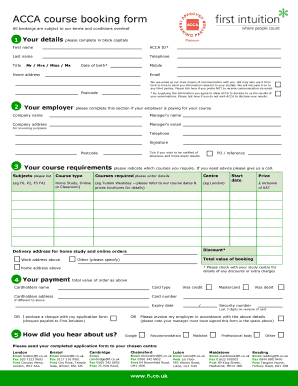
- Fill in your personal details in block capitals. Include your first name, last name, ACCA ID, telephone number, mobile number, home address, and email address. Remember, your email will be the primary means of communication, so ensure it is accurate.
- Complete the employer section if your employer is covering your course fees. Provide the company name, manager’s name, company address, and manager’s email. Note that by providing your examination results, you are consenting to disclosure.
- Indicate your course requirements. List the subjects you need, specify the course type (Home Study, Online, or Classroom), and mention the preferred training center. Make sure to include any relevant reference numbers and total booking value.
- Provide your payment details, including cardholder's name, card type, card number, expiry date, and security number. If preferred, indicate if you will send a cheque or request an invoice for your employer.
- Select how you heard about First Intuition by ticking the appropriate box. This helps us understand our outreach effectiveness.
- Finally, review the completed form for accuracy. Ensure all necessary sections are filled out correctly, and then proceed to save the document, download, print it, or share it as needed.
Complete your ACCA Course Booking Form online today and take the first step towards advancing your career.