Loading
Get Acs Cash Donation Receipt
How it works
-

Open form follow the instructions
-

Easily sign the form with your finger
-

Send filled & signed form or save
How to fill out the ACS Cash Donation Receipt online
Filling out the ACS Cash Donation Receipt is essential for documenting your contributions to the American Cancer Society. This guide will walk you through the process step-by-step to ensure you complete the form accurately and receive proper acknowledgment for your generosity.
Follow the steps to complete your ACS Cash Donation Receipt online.
- Press the ‘Get Form’ button to access the ACS Cash Donation Receipt and open it in your editing tool.
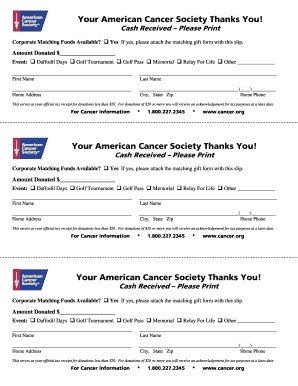
- Fill in the 'Amount Donated' field with the total amount you are contributing. Ensure to enter a numerical value only.
- Select the appropriate 'Event' by marking the box next to the event name you are supporting (e.g., Daffodil Days, Golf Tournament). If it is another event, please specify in the provided space.
- In the 'First Name' and 'Last Name' fields, input your full name to personalize the receipt.
- Complete the 'Home Address' section by entering your address, ensuring you include the street, city, state, and zip code for accurate record-keeping.
- In the 'Home Phone' field, provide your contact number for any necessary follow-up or confirmation from the organization.
- If corporate matching funds are available, check the 'Yes' box and attach the matching gift form to your submission.
- Review all the fields for accuracy, as this receipt serves as your official tax documentation for donations less than $20. For donations of $20 or more, an acknowledgment will be sent later for tax purposes.
- Once all fields are completed and verified, you can save the changes, download the document, print it for your records, or share it as needed.
Start filling out your ACS Cash Donation Receipt online today to support cancer research and programs.
Name of the Charity; Date of Contribution; and. Amount ($) of the Contribution.