Loading
Get Graduation Information Letter - University Of Toronto - Utm Toronto
How it works
-

Open form follow the instructions
-

Easily sign the form with your finger
-

Send filled & signed form or save
How to fill out the Graduation Information Letter - University Of Toronto - Utm Toronto online
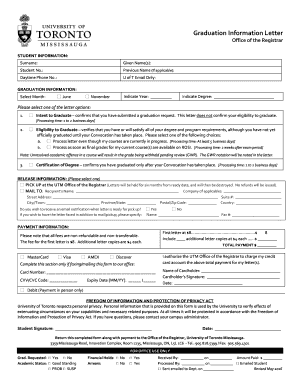
Completing the Graduation Information Letter online is a straightforward process that helps you confirm your graduation status or request important documentation related to your degree. This guide offers step-by-step instructions to ensure you accurately fill out the necessary fields and submit the form correctly.
Follow the steps to complete the Graduation Information Letter online.
- Press the ‘Get Form’ button to access the Graduation Information Letter and open it in your preferred editor.
- Begin by entering your personal information in the 'Student Information' section. Fill in your surname, given name(s), student number, and if applicable, your previous name. Ensure your daytime phone number and University of Toronto email address are entered correctly.
- In the 'Graduation Information' section, select the month of graduation you are applying for by checking either June or November. Then indicate the year and the degree you are graduating with in the designated fields.
- Choose one of the letter options you require by selecting the appropriate checkbox. You have three choices: 'Intent to Graduate', 'Eligibility to Graduate', or 'Certification of Degree'. For 'Eligibility to Graduate', indicate whether you want to process the letter while your courses are still in progress or after your final grades are available.
- Next, in the 'Release Information' section, select whether you want to pick up the letter at the office or have it mailed. If mailing, fill in the recipient’s details, including name, company (if applicable), street address, suite number, city/town, province/state, postal/zip code, and country.
- Indicate whether you wish to receive an email notification when your letter is ready. If you opt to have the letter faxed, provide the name and fax number.
- Proceed to the 'Payment Information' section and include your payment details. Choose your preferred payment method from MasterCard, Visa, AMEX, or Discover, and fill in the card number, CVV/CVC code, and expiry date if applicable.
- Calculate the total payment including the fee for the first letter and any additional copies you may be requesting. Enter your total payment amount.
- Complete the authorization section by signing your name, entering the cardholder's details, and dating the document.
- Finally, review all the information for accuracy and completeness before submitting. If required, you can save changes, download, print, or share the form.
Start completing your Graduation Information Letter online today!
Full-time status A student enrolled in 3.0 credits or more in the Fall/Winter Session is full-time. A student enrolled in 1.5 credits or more in the Summer Session is full-time.
Industry-leading security and compliance
US Legal Forms protects your data by complying with industry-specific security standards.
-
In businnes since 199725+ years providing professional legal documents.
-
Accredited businessGuarantees that a business meets BBB accreditation standards in the US and Canada.
-
Secured by BraintreeValidated Level 1 PCI DSS compliant payment gateway that accepts most major credit and debit card brands from across the globe.