Loading
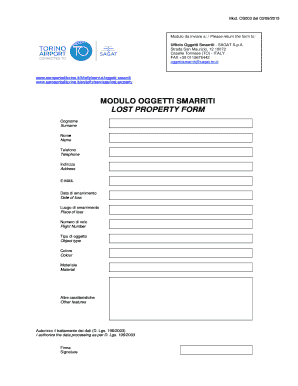
Get Modulo Oggetti Smarriti Lost Property Form
How it works
-

Open form follow the instructions
-

Easily sign the form with your finger
-

Send filled & signed form or save
How to fill out the MODULO OGGETTI SMARRITI LOST PROPERTY FORM online
This guide provides detailed, step-by-step instructions for users on how to complete the MODULO OGGETTI SMARRITI LOST PROPERTY FORM online. Whether you have experience with online forms or are new to the process, this information will support you in successfully submitting your lost property claim.
Follow the steps to complete your lost property form.
- Click the ‘Get Form’ button to access the form online and open it in your preferred document editor.
- Fill in your surname in the 'Cognome' field. Make sure to input your last name clearly to ensure accurate processing of your request.
- Next, enter your first name in the 'Nome' field. This should be your legal first name.
- Provide your contact telephone number in the 'Telefono' field. Ensure that the number is correct so that the office can reach you if needed.
- In the 'Indirizzo' field, enter your complete address. This should include your street address, city, and any other relevant details.
- Fill in your email address in the 'E-MAIL' field. This will be used for any correspondence regarding your claim.
- In the 'Data di smarrimento' field, specify the date when you lost the item. Use the format requested on the form to avoid confusion.
- Provide the 'Luogo di smarrimento,' indicating where the loss occurred, such as the specific location or terminal.
- Input your flight number in the 'Numero di volo' field if applicable. This helps identify any items lost while traveling.
- Indicate the type of item lost in the 'Tipo di oggetto' section. Be as descriptive as possible to assist the staff in identifying your belongings.
- Specify the color of the item in the 'Colore' field. This additional detail can aid in locating your lost property.
- In the 'Materiale' field, describe the material of the lost item, such as fabric, plastic, or metal.
- Utilize the 'Altre caratteristiche' section to provide any other relevant details about the item that may help in its identification.
- Confirm your agreement to the data processing by checking the box that states 'Autorizzo il trattamento dei dati.'
- Sign the form in the 'Firma' field. Ensure that your signature matches the name provided earlier.
- Finally, review all entries for accuracy, then save your changes. You can choose to download, print, or share the completed form as necessary.
Begin submitting your lost property form online today.