Loading
Get Formular 03 - Drejtoria E Tatimeve
How it works
-

Open form follow the instructions
-

Easily sign the form with your finger
-

Send filled & signed form or save
How to fill out the Formular 03 - Drejtoria E Tatimeve online
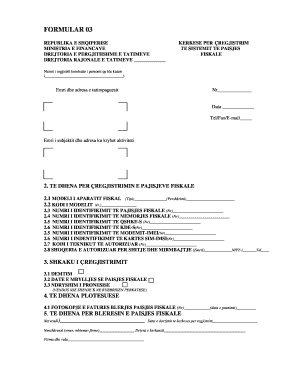
Filling out the Formular 03 - Drejtoria E Tatimeve is an essential part of deregistering fiscal devices in Albania. This guide provides a step-by-step approach to help users accurately complete the form online.
Follow the steps to complete the form with ease.
- Click the ‘Get Form’ button to obtain the form and open it in the editor.
- Begin by locating the field for the national registration number of the individual purchasing the cashier. Fill in the appropriate number.
- Provide the name and address of the taxpayer in the designated area. Make sure all information is accurate.
- In the section for deregistration of fiscal devices, enter details such as the model of the fiscal device, including its type and description.
- Fill in the model code number for the device along with the identification number for the fiscal device.
- Continue by entering the identification number of the fiscal memory and the identification number of the server.
- Input the identification numbers for the modem and SIM card as required.
- Next, provide the code of the authorized technician responsible for the device.
- Indicate the authorized company for sale and maintenance of the device, including its name and NIPT number.
- Select the reason for deregistration by marking the appropriate checkbox for damage, closure date of the fiscal device, or change of ownership.
- Add any supplemental information required by attaching a photocopy of the purchase invoice for the fiscal device.
- Complete the additional details for the buyer of the fiscal device, including the place of registration and the date of submission.
- Ensure that the signature section is filled out with the signer's name, surname, and position. Also, include the company stamp.
- Finally, review all the information for accuracy before proceeding to save your changes, download, print, or share the completed form.
Complete your documentation online to ensure proper deregistration of your fiscal devices.