Loading
Get Agguj
How it works
-

Open form follow the instructions
-

Easily sign the form with your finger
-

Send filled & signed form or save
How to fill out the Agguj online
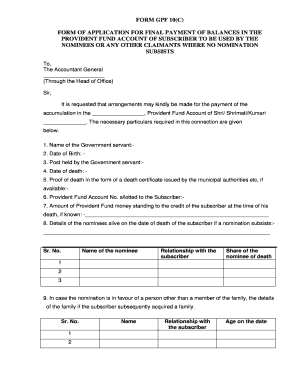
Filling out the Agguj is a crucial process for the final payment of provident fund balances. This guide provides step-by-step instructions to help users complete the form accurately and efficiently.
Follow the steps to successfully fill out the Agguj online.
- Click ‘Get Form’ button to obtain the Agguj and open it in the editor.
- Begin by entering the name of the government servant in the designated field.
- Fill in the date of birth of the government servant to ensure accurate identification.
- Provide the post held by the government servant at the time of their passing.
- Input the date of death of the government servant.
- Attach proof of death in the form of a death certificate issued by municipal authorities, if available.
- Enter the Provident Fund Account number that was allotted to the subscriber.
- If known, state the amount of Provident Fund money standing to the credit of the subscriber at the time of their death.
- Detail any nominees alive on the date of the subscriber's death if a nomination subsists, including their names, relationships, and share.
- If the nomination is in favor of a non-family member, include details of the family acquired by the subscriber.
- List the surviving family members on the date of death if no nomination exists.
- If there is a minor child whose mother (widow of subscriber) is not Hindu, attach the necessary legal documents.
- In the absence of a nominee or family, provide the names and addresses of persons entitled to the Provident Fund money.
- Specify the claimant's religion in the designated area.
- Indicate through which office or treasury the payment is desired.
- Ensure that all required documents are attached and duly attested as specified in the form.
- Review the information entered for accuracy.
- Save your changes and plan to download, print, or share the completed form as needed.
Complete your documents online and ensure your requests are processed smoothly.
How to Download General Provident Fund Account Statement Open this link: https://agwb.cag.gov.in/subs/login. Select GPF Series Code, GPF No., DOB, fill up the Captcha and Click Submit Button. You will receive an OTP on your registered mobile number and email id. ... Now you should be logged in successfully.
Industry-leading security and compliance
US Legal Forms protects your data by complying with industry-specific security standards.
-
In businnes since 199725+ years providing professional legal documents.
-
Accredited businessGuarantees that a business meets BBB accreditation standards in the US and Canada.
-
Secured by BraintreeValidated Level 1 PCI DSS compliant payment gateway that accepts most major credit and debit card brands from across the globe.