Loading
Form preview
  • US Legal Forms
  • Form Library
  • More Forms
  • More Uncategorized Forms
  • Trailhead Credit Union Form

Get Trailhead Credit Union Form

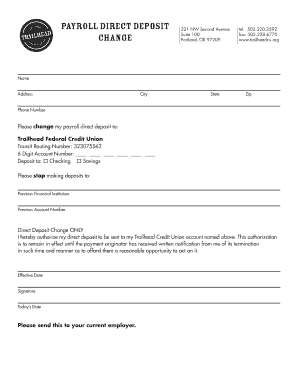
Ford them a reasonable opportunity to act on it. Effective Date Signature Today s Date Please send this to your current employer.

How it works

  1. Open form

    Open form follow the instructions

  2. Easily sign form

    Easily sign the form with your finger

  3. Share form

    Send filled & signed form or save

How to fill out the Trailhead Credit Union Form online

Filling out the Trailhead Credit Union Form is a straightforward process that enables users to change their payroll direct deposit information. This guide provides step-by-step instructions to help you navigate the form efficiently.

Follow the steps to complete the form successfully.

  1. Press the ‘Get Form’ button to access the Trailhead Credit Union Form and open it in your preferred online editor.
  2. Begin by providing your name in the designated field. Make sure to enter your full legal name to avoid any issues with the processing of your direct deposit.
  3. Enter your complete address, including street, city, state, and zip code in the respective fields. This information is crucial for verifying your identity and eligibility.
  4. Fill in your phone number. Ensure that the number you provide is active so that any necessary communication can be facilitated quickly.
  5. Indicate your new payroll direct deposit destination by selecting 'Checking' or 'Savings'. Choose the option that corresponds to the type of account you wish to use.
  6. Input the Transit Routing Number: 323075563 in the specified area. This number directs the funds to your credit union account.
  7. Fill in the 6-Digit Account Number, ensuring that each digit is entered correctly to avoid processing errors.
  8. Provide the name of your previous financial institution and account number to stop deposits to that location. This step is necessary to prevent any mix-up with your previous banking details.
  9. Specify the effective date of the changes in the designated area to inform the payment originator when the new deposits should commence.
  10. Review the authorization statement, confirming that you understand your rights regarding this direct deposit change.
  11. Sign and date the form in the provided fields, ensuring that your signature matches the one on file with your previous institution.
  12. After filling out the form, save your changes. You may then choose to download, print, or share the completed form as necessary to submit it to your employer.

Complete your documents online today for a smooth and efficient process.

Get form

Experience a faster way to fill out and sign forms on the web. Access the most extensive library of templates available.
Get form

Related content

Chapter 9 - Examiners Guide - National Credit...
P Other forms of insider abuse or preferential treatment;. 9 Limited personnel not ... The...
Learn more
Utilities & Banking | Housing | ESF Students...
... and business. Banks and Credit Unions Near Campus (Google map). Campus ATM. A SEFCU...
Learn more
Rosalynn Carter - Wikipedia
Eleanor Rosalynn Carter (née Smith; born August 18, 1927) is an American who served as...
Learn more

Related links form

What Is Ui Code In Ecs Form Lic Deformity Questionnaire Lic Form 3179 To Download Form FNO-NRI (PDF Format) - LIC Helpline

Questions & Answers

Get answers to your most pressing questions about US Legal Forms API.

Contact support

Trailhead Routing & Transit (ABA) Number: 323075563.

To activate your card and set your PIN, call 877-635-9624.

After the card is reset call the activation line at 866-599-5617 and select option 1 to activate and set a PIN.

Credit Union members can register for our online services with us on our website .linkcu.ie or our mobile app CuMobile. Website – When you register online, and your application has been approved you will receive a Personal Identification Number (PIN) via SMS.

To Activate your new Debit Card/VISA™ You no longer have to drive to an ATM to activate your card. We have streamlined the process to make it easier and more convenient for you. Just call the toll-free phone number listed on the sticker and follow the prompts- 1-800-992-3808.

To activate your card, follow the directions on the card sticker or call (833) 681-3456. With the CU1 CardControl Mobile App, you can turn your card on/off, set a spending radius to protect against fraudulent foreign purchases, enable or disable online transactions, and much more!

Get This Form Now!

Use professional pre-built templates to fill in and sign documents online faster. Get access to thousands of forms.
Get form
If you believe that this page should be taken down, please follow our DMCA take down processhere.
Get Trailhead Credit Union Form
Get form
  • Adoption
  • Bankruptcy
  • Contractors
  • Divorce
  • Home Sales
  • Employment
  • Identity Theft
  • Incorporation
  • Landlord Tenant
  • Living Trust
  • Name Change
  • Personal Planning
  • Small Business
  • Wills & Estates
  • Packages A-Z
  • Affidavits
  • Bankruptcy
  • Bill of Sale
  • Corporate - LLC
  • Divorce
  • Employment
  • Identity Theft
  • Internet Technology
  • Landlord Tenant
  • Living Wills
  • Name Change
  • Power of Attorney
  • Real Estate
  • Small Estates
  • Wills
  • All Forms
  • Forms A-Z
  • Form Library
  • Legal Hub
  • About Us
  • Help Portal
  • Legal Resources
  • Blog
  • Affiliates
  • Contact Us
  • Delete My Account
  • Site Map
  • Industries
  • Forms in Spanish
  • Localized Forms
  • State-specific Forms
  • Forms Kit
  • Real Estate Handbook
  • All Guides
  • Notarize
  • Incorporation services
  • For Consumers
  • For Small Business
  • For Attorneys
  • USLegal
  • FormsPass
  • pdfFiller
  • signNow
  • altaFlow
  • DocHub
  • Instapage
Form Packages
  • Adoption
  • Bankruptcy
  • Contractors
  • Divorce
  • Home Sales
  • Employment
  • Identity Theft
  • Incorporation
  • Landlord Tenant
  • Living Trust
  • Name Change
  • Personal Planning
  • Small Business
  • Wills & Estates
  • Packages A-Z
Form Categories
  • Affidavits
  • Bankruptcy
  • Bill of Sale
  • Corporate - LLC
  • Divorce
  • Employment
  • Identity Theft
  • Internet Technology
  • Landlord Tenant
  • Living Wills
  • Name Change
  • Power of Attorney
  • Real Estate
  • Small Estates
  • Wills
  • All Forms
  • Forms A-Z
  • Form Library
Customer Service
  • Legal Hub
  • About Us
  • Help Portal
  • Legal Resources
  • Blog
  • Affiliates
  • Contact Us
  • Delete My Account
  • Site Map
  • Industries
  • Forms in Spanish
  • Localized Forms
  • State-specific Forms
  • Forms Kit
Legal Guides
  • Real Estate Handbook
  • All Guides
Prepared for you
  • Notarize
  • Incorporation services
Our Customers
  • For Consumers
  • For Small Business
  • For Attorneys
Our Sites
  • USLegal
  • FormsPass
  • pdfFiller
  • signNow
  • altaFlow
  • DocHub
  • Instapage
Social Media
Call us now toll free:
+1 833 426 79 33
As seen in:
© Copyright 1999-2026 airSlate Legal Forms, Inc. 3720 Flowood Dr, Flowood, Mississippi 39232
  • Your Privacy Choices
  • Terms of Service
  • Privacy Notice
  • Content Takedown Policy
  • Bug Bounty Program