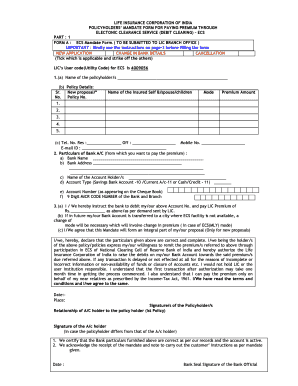
D TO LIC BRANCH OFFICE ) IMPORTANT : Kindly see the instructions on page-3 before filling the form NEW APPLICATION CHANGE IN BANK DETAILS CANCELLATION (Tick which is applicable and strike off the others) LIC s User code(Utility Code) for ECS is 4009056 1.(a) Name of the policyholder/s (b) Policy Details: Sr. New proposal/* No. Policy No. Name of the Insured Self &/spouse/children Mode Premium Amount 1. 2. 3. 4. 5. (c) Tel. No. Res :.
Open form follow the instructions
Easily sign the form with your finger
Send filled & signed form or save
How to fill out the What Is Ui Code In Ecs Form online
Filling out the What Is Ui Code In Ecs Form is essential for policyholders wishing to manage their premium payments through Electronic Clearance Service. This guide provides comprehensive, step-by-step instructions to ensure that you complete the form accurately and efficiently.
Follow the steps to complete the form successfully.
- Click ‘Get Form’ button to obtain the form and open it in your preferred online editor.
- Begin by indicating whether you are submitting a new application, changing bank details, or canceling your mandate by ticking the appropriate box and striking off the others. Ensure that you note the LIC’s User code (Utility Code) for ECS, which is 4009056.
- In the first section, provide your name as the policyholder. Next, fill out the policy details, including your policy number, name of the insured (yourself or your dependents), mode of payment, and premium amount for each applicable policy.
- Provide your contact information, including residential and office telephone numbers, along with your mobile number and email ID.
- In the bank account particulars section, enter the name and address of your bank, clearly providing the account holder's name, account type, account number, and the bank's 9-digit MICR code.
- You will then authorize the bank to debit your account for the LIC premium amount. Additionally, acknowledge that if your bank account is transferred to a city without ECS facilities, a mode change will be necessary.
- After reviewing your entries for accuracy, sign and date the form, ensuring to include the relationship of the account holder to the policyholder, if they differ.
- Finally, save any changes made, and choose to download, print, or share the completed form as necessary.
Complete your documents online to ensure your premium payments are managed efficiently through ECS.
Experience a faster way to fill out and sign forms on the web. Access the most extensive library of templates available.
Related content
Apt.: City: State: ZIP Code: 14. If you do not live in California, what is the name of the...
often is a source for errors (i.e., when model and UI disagree). Adding to the...
Although there are many ways to deploy the Jenkins open-source automation server on Amazon...
Get answers to your most pressing questions about US Legal Forms API.
What are the main components of ECS?
Amazon ECS components Clusters. An Amazon ECS cluster is a logical grouping of tasks or services. ... Containers and images. To deploy applications on Amazon ECS, your application components must be configured to run in containers. ... Task definitions. ... Tasks. ... Services. ... Container agent. ... Fargate architecture overview.
What is ECS and its features?
Amazon Elastic Container Service (Amazon ECS) is a fully managed container orchestration service that helps you easily deploy, manage, and scale containerized applications. As a fully managed service, Amazon ECS comes with AWS configuration and operational best practices built-in.
How do I connect to ECS?
How to connect to an Amazon ECS container using AWS ECS execute command Verify if ECS Exec is enabled on an ECS task. ... the session manager plugin for AWS CLI. ... Add SSM permissions to the task IAM role. ... Add ECS ExecuteCommand permission to your IAM role. ... Enable ECS Exec for your ECS task and services.
How do I set up an ECS task?
Open the Amazon ECS classic console at https://console.aws.amazon.com/ecs/ . In the navigation pane, choose Task Definitions and select the task definition to run. To run the latest revision of a task definition, select the box to the left of the task definition to run.
What is ECS task definition format?
The task definition is a text file, in JSON format, that describes one or more containers, up to a maximum of ten, that form your application. It can be thought of as a blueprint for your application.
What is the key concept of Amazon ECS?
So, what's Amazon Elastic Container Service (ECS)? ECS is a managed service for running containers on AWS, designed to make it easy to run applications in the cloud without worrying about configuring the environment for your code to run in.
What are the responsibilities of ECS?
The ECS task execution role grants the Amazon ECS container and Fargate agents permission to make AWS API calls on your behalf. The ECS agent is responsible for managing the tasks in your ECS cluster and manages all the overhead.
What are the system requirements for ECS?
Hardware Requirements 1 CPU Core. 2 GB Memory. 10 GB HDD. CentOS 7 Minimal installation (ISO- and network-based minimal installs are equally supported)
Use professional pre-built templates to fill in and sign documents online faster. Get access to thousands of forms.
If you believe that this page should be taken down, please follow our DMCA take down process here.