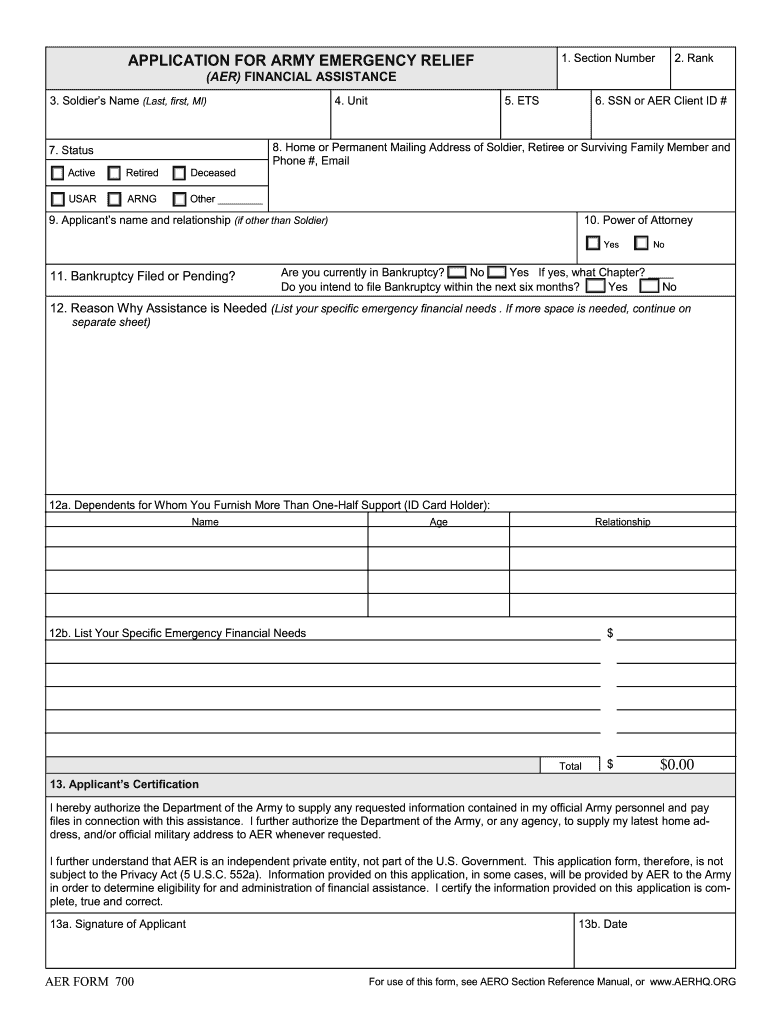
N number – enter if known 2-6. Self-Explanatory 7. Only one box may be checked 8. This item may have multiple lines 9. Self-Explanatory 10. Only one box may be checked 11. For each question, only Yes or No may to be checked. The Bankruptcy Chapter line may contain no more than 2 digits. 12. This item may have multiple lines 12a. Self-Explanatory 12b. The Financial Needs Amount Column will only allow numbers and will automatically add the total. 13a. Self-Explanatory 13b. .

Open form follow the instructions

Easily sign the form with your finger

Send filled & signed form or save
How to fill out the AER 700 online
The AER 700 is an essential form for people seeking Army Emergency Relief financial assistance. This guide will provide you with straightforward, step-by-step instructions to help you complete the form online efficiently.
Follow the steps to successfully complete your application
- Press the ‘Get Form’ button to access the AER 700 form and open it in the online editor.
- Begin by entering the AER section number, if known. This helps categorize your application appropriately.
- Input your rank in the designated field. This information is relevant for identification purposes.
- Fill in the soldier's name using the format Last, First, MI. This ensures clarity in identification.
- Select the current status of the individual by choosing one option among the provided categories: Active, Retired, Deceased, USAR, ARNG, or Other.
- Complete the unit information where the individual is assigned or associated.
- Indicate the ETS (Expiration Term of Service) date, which is a standard requirement for military forms.
- Fill in the Social Security Number or AER Client ID number in the appropriate field.
- Provide the home or permanent mailing address along with the phone number and email of the soldier, retiree, or surviving family member.
- If you are not the soldier, list your name and relationship to the soldier in the applicant's name and relationship field.
- Indicate whether you have a power of attorney by selecting yes or no.
- Answer the questions regarding bankruptcy by checking the appropriate boxes and providing details if applicable.
- Clearly state the reason why assistance is needed, detailing your specific emergency financial needs. Use a separate sheet if necessary.
- List any dependents for whom you provide more than half their support, including their name, age, and relationship.
- Enter your specific emergency financial needs in the designated area, ensuring that the amounts are numeric.
- Complete the applicant’s certification by checking the acknowledgment boxes, signing, and dating the form.
- The unit commander will review the application. They should provide their recommendation and necessary details in the appropriate sections.
- The approval authority will fill out their section based on the review provided by the unit commander. Ensure all fields are filled appropriately.
- Finally, review your information for accuracy. Once confirmed, you can save changes, download, print, or share the completed form.
Complete your AER 700 application online to access the support you need.
Experience a faster way to fill out and sign forms on the web. Access the most extensive library of templates available.
Related content
Dec 26, 2024 — Compliance and Airworthiness Division (AIR-700). The Compliance and...
Özlem Bedre-Defolie and Gary Biglaiser, “Contracts as a Barrier to Entry in Markets...
This manual is a user manual for the AVIATOR 700 System. The readers of this manual...
Get answers to your most pressing questions about US Legal Forms API.
Is there a limit on how many loans you can take out?
There is generally no strict limit on the number of AER loans you can take out. However, lenders often assess your income and credit history before approving multiple loans. With the AER 700, you can easily understand your eligibility criteria, which can help you secure financing that fits your needs. For tailored advice, check out USLegalForms.
What army regulation covers AER?
The Army Regulation that covers AER is AR 930-4. This document outlines the policies and procedures governing Army Emergency Relief, ensuring support for soldiers and their families in times of need. Understanding AR 930-4 is essential when navigating the resources available under AER 700. For further clarity, exploring resources on US Legal Forms can provide additional guidance and insight into these regulations.
Are AER donations tax deductible?
Yes, donations made to charities operating under the AER 700 framework are generally tax-deductible. However, it's essential to confirm that the organization is recognized as a qualified charity by the IRS. By donating to AER charities, you not only help support valuable causes but also may benefit from tax deductions when filing your returns. Be sure to keep detailed records of your contributions for tax purposes.
What type of charity is AER?
AER refers to a framework designed to support specific charitable initiatives and causes. Organizations using the AER 700 model typically focus on education, health, and community support, among other aims. They work towards making a positive impact in the communities they serve. Understanding the mission and impact of AER charities can inspire you to contribute confidently.
How do I know if a donation is tax-deductible?
To determine if your donation is tax-deductible, check if the charity is registered as a 501(c)(3) organization. Resources like the IRS website provide lists of eligible charities, including those associated with AER 700. Additionally, you can ask the charity for their tax-exempt status documentation. This step ensures that you know your donation will provide you with the tax benefits you're aiming for.
What charitable donations are not tax-deductible?
Certain donations do not qualify for tax deductions. Examples include contributions made to individuals, political campaigns, and non-qualified organizations not recognized by the IRS. If you're considering donating under the AER 700 program, be aware that your contribution must meet specific criteria to ensure it is tax-deductible. Always verify the status of the charity before making a donation.
Which donations are fully tax-deductible?
Donations to qualified 501(c)(3) organizations, such as nonprofit charities, are generally fully tax-deductible. This means that when you contribute to these entities, like charities utilizing the AER 700 framework, you can often deduct the entire amount from your taxable income. Always keep records of your donations to ensure you can claim them properly during tax season. You may also want to consult with a tax adviser to maximize your deductions.
What does AER mean in the army?
AER stands for Army Emergency Relief, an organization dedicated to providing financial assistance to soldiers and their families in times of need. When discussing the AER 700, it typically refers to one of the key programs aimed at supporting military personnel during various crises. This program assists with urgent financial situations, ensuring that service members can focus on their duty without the added stress of financial burdens. If you are navigating the complexities of AER programs, US Legal Forms offers resources that simplify access to necessary legal documents and guidance.
What ar covers aces?
AR 621-5 ACES Flashcards Preview.
What qualifies for an AER grant?
Almost all active duty soldiers and their dependents qualify for AER help, as well as military retirees, widows and orphans of soldiers who died on active duty or after retirement, medical retirees and their families and members of the Guard and reserve who have been activated for more than 30 days.
Use professional pre-built templates to fill in and sign documents online faster. Get access to thousands of forms.
If you believe that this page should be taken down, please follow our DMCA take down process here.