Loading
Get Ceac State Gov Login Iv
How it works
-

Open form follow the instructions
-

Easily sign the form with your finger
-

Send filled & signed form or save
How to fill out the Ceac State Gov Login Iv online
This guide provides comprehensive and user-friendly instructions on how to fill out the Ceac State Gov Login Iv form online. Whether you are a primary applicant, attorney, petitioner, or third-party agent, the following steps will ensure your application is correctly completed.
Follow the steps to successfully complete the form.
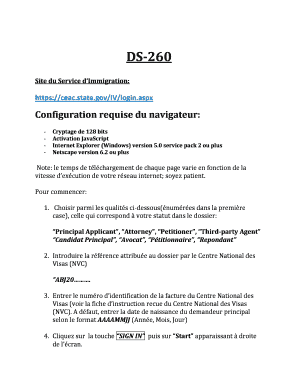
- Press the ‘Get Form’ button to acquire the form and open it for editing.
- Select your status from the options provided, such as 'Principal Applicant' or 'Attorney'. This is crucial as it determines the subsequent sections of the form you will be completing.
- Input the reference assigned to your case by the National Visa Center (NVC). Ensure that the reference number format is appropriate.
- Enter the Visa Center's invoice identification number. If you do not have this, input the principal applicant's date of birth in the format YYYYMMDD.
- Click on the 'SIGN IN' button and then select 'Start' that appears on the right side of the screen to access the form.
- In the personal information section, fill in your last name and first names as they appear on your passport. If applicable, include maiden names and click on ‘+ Add Another’ for any additional names.
- Provide your country of origin and details about your travel document, including type, number, country of issuance, issue date, and expiration date.
- If you hold or have held other nationalities, indicate them accordingly, and use the 'Add Another' option for each additional nationality.
- Enter your current address. Optional fields can be skipped if they do not apply.
- Fill in your contact numbers (personal, work, home) and email address. Specify whether your postal address is current and indicate if you expect to have a permanent address in the United States.
- In the family information section, provide your parents' details. If you have a spouse, include their information as well.
- If applicable, share details about any previous marriages and children. Use the 'Add Another' feature for additional entries.
- Complete the travel history section by providing information about any past visits to the United States, including visa details if applicable.
- Fill in your employment and education background, providing any necessary details about past and present professions and educational institutions attended.
- Answer questions regarding any affiliations with organizations, military service, and language abilities.
- Provide the petitioner's information, including their relationship to you, contacts, and addresses as applicable.
- Thoroughly address the security questions, providing explanations where necessary.
- Provide information on any previous social security applications. Confirm whether you consent to share this form's information with relevant agencies.
- If someone assisted you in completing this form, document their name, address, and relationship to you.
- Finally, electronically sign the form by clicking on 'Sign and Submit Application'. Confirm all responses are accurate, as false statements can lead to permanent visa denial.
- After completion, save your changes, download, print, or share the form as needed.
Begin filling out your Ceac State Gov Login Iv form online today to ensure a smooth application process.
How do I know I have been selected for administrative processing? Generally, an individual will receive a 221(g) letter indicating that their visa application is subjected to further administrative processing.