Loading
Get Provisional Allotment Letter
How it works
-

Open form follow the instructions
-

Easily sign the form with your finger
-

Send filled & signed form or save
How to fill out the Provisional Allotment Letter online
This guide provides clear instructions on how to proficiently complete the Provisional Allotment Letter online. Whether you are new to document management or have prior experience, this user-friendly guide will walk you through each step.
Follow the steps to fill out the Provisional Allotment Letter online:
- Click the 'Get Form' button to download the Provisional Allotment Letter and open it in your preferred online editor.
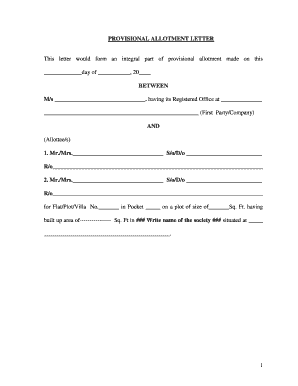
- In the first section, fill in the date of allotment and the name of the company, ensuring you enter accurate details about the parties involved.
- Next, list the allottee(s) names and details. Be sure to include their respective parent or guardian names, and addresses correctly.
- Specify the details of the property being allotted, including Flat/Plot/Villa number, size in square feet, and the name of the society.
- Proceed to the cost breakdown section. Accurately fill in the basic price, additional charges, and total cost for the allotment.
- In the payment plans section, indicate the desired payment schedule, including each installment amount and due date.
- Review the terms and conditions carefully and ensure you understand the obligations and commitments outlined.
- Finally, once all necessary fields are completed, save your changes. You can choose to download, print, or share your completed Provisional Allotment Letter for future reference.
Begin filling out your Provisional Allotment Letter online for a seamless experience.
Related Content. A temporary document of title by which new shares are offered to non-CREST shareholders in a rights issue. The PAL shows the shareholder's entitlement to the new shares, and can be traded in nil paid or fully paid form.