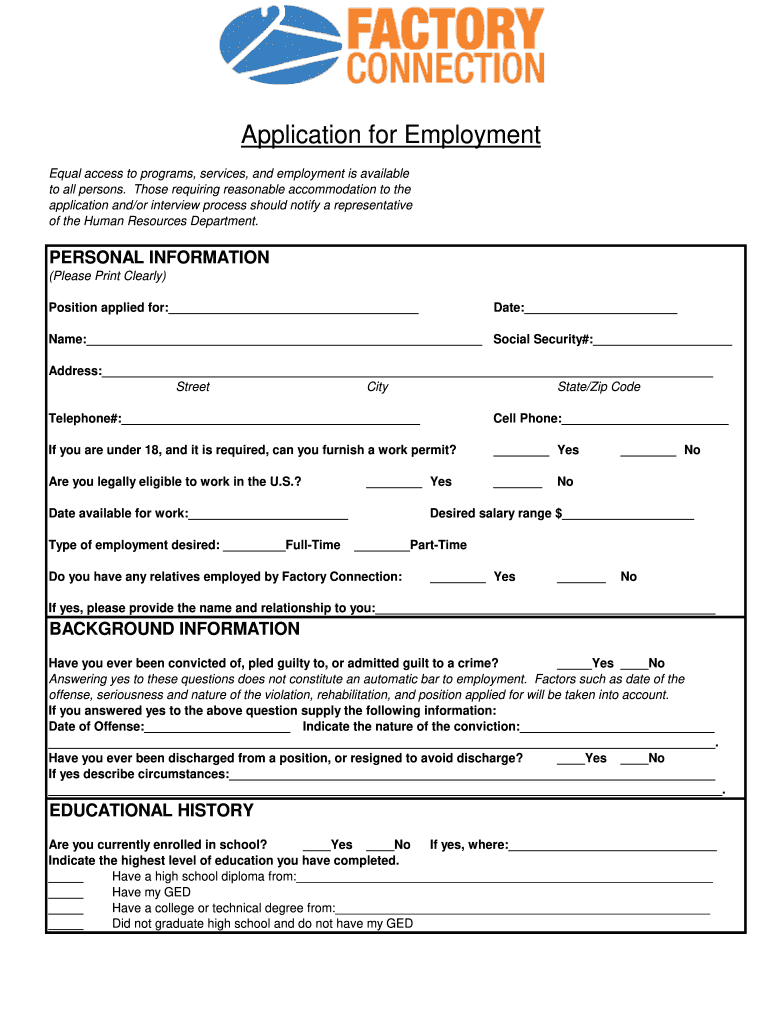
notify a representative of the Human Resources Department. PERSONAL INFORMATION (Please Print Clearly) Position applied for:____________________________________ Date:______________________ Name:_________________________________________________________ Social Security#:____________________ Address:________________________________________________________________________________________ Street City State/Zip Code Telephone#:___________________________________________ Cell Phone:_______________.

Open form follow the instructions

Easily sign the form with your finger

Send filled & signed form or save
How to fill out the Factory Connection Employment App Form online
Filling out the Factory Connection Employment App Form online can be a straightforward process when you understand each section and its requirements. This guide provides detailed, step-by-step instructions to ensure you complete the form accurately and efficiently.
Follow the steps to fill out the form correctly.
- Press the ‘Get Form’ button to access the form and open it in your chosen editor.
- Begin with the personal information section. Clearly print your name, address, and contact details. Indicate the position you are applying for and your availability for work.
- In the background information section, answer questions regarding your legal eligibility to work in the U.S. and any convictions. If applicable, provide details about the nature of the conviction.
- Proceed to the educational history section. Indicate your current enrollment status and the highest level of education completed.
- Fill out the employment history section, starting with your most recent employer. Provide details such as the employer's name, contact information, job title, and employment dates. Repeat this for up to four previous positions.
- Address any periods of unemployment in the designated section, providing reasons for the gaps in your employment history.
- List three work references, ensuring they are not family members. Include their names, relationship to you, and contact numbers.
- Summarize your skills and qualifications that may be relevant to the job you are applying for in the skills section.
- Review the applicant's statement carefully, acknowledge understanding, and provide your signature.
- Finally, save your changes, and you can either download, print, or share the completed form as needed.
Complete your application online today for a timely submission!
Experience a faster way to fill out and sign forms on the web. Access the most extensive library of templates available.
Related content
*Title of Position from Job Announcement (Required):. Spec #:. Application. Deadline:...
PROHIBITED EMPLOYMENT. Minors 14 and 15 years may not be employed in, or in connection...
◦. Application path: Enter the application path for the FactoryTalk View Site Edition...
Get answers to your most pressing questions about US Legal Forms API.
Does Factory Connection hire at 16?
Yes, Factory Connection does hire individuals at 16 years of age, subject to applicable labor laws and regulations. Young applicants are encouraged to submit their applications through the Factory Connection Employment App Form, ensuring they are considered for available positions that fit their skills and schedules.
What is an online employment application?
An online employment application is a specific type of digital form designed to gather information from job seekers. This typically includes sections for personal details, education, work history, and other relevant qualifications. Using the Factory Connection Employment App Form simplifies this process, offering a comprehensive platform for hiring.
What do you mean by online application?
An online application refers to a digital form that candidates complete when applying for a job. This form collects personal information, work history, and qualifications, which employers use to evaluate applicants. By adopting the Factory Connection Employment App Form, you ensure a modern, user-friendly way for applicants to express their interest.
What is an online application process?
The online application process involves candidates completing and submitting forms through a website. This process usually includes uploading resumes and cover letters, and sometimes answering additional questions. By using the Factory Connection Employment App Form, you can enhance the online experience for applicants and simplify the data collection.
Is it better to submit a job application online or in person?
Submitting a job application online is generally more efficient, as it allows you to reach a broader audience and process applications faster. Many employers prefer online submissions, as they can manage candidate information easily. Using the Factory Connection Employment App Form maximizes your chances of a successful application by adhering to current hiring practices.
How do online job applications work?
Online job applications work by allowing candidates to fill out forms digitally, submitting their information via the internet. This method saves time for both applicants and employers, as submissions can be reviewed quickly. With the Factory Connection Employment App Form, you can ensure a smooth, automated process for receiving applications.
How do I write a job request form?
Writing a job request form involves defining the job role, responsibilities, and required qualifications. Be clear and concise, providing a section for the applicant's contact information and a brief section for cover letters. The Factory Connection Employment App Form simplifies your process, helping you easily capture vital information.
How do I create an employee application form?
Creating an employee application form is straightforward. You can start by identifying the information you need, such as personal details, education, work experience, and references. Utilizing the Factory Connection Employment App Form allows you to streamline this process, ensuring you gather all necessary details efficiently.
How to fill out an employment application?
To effectively fill out the employment application using the Factory Connection Employment App Form, begin by providing clear and accurate personal details followed by relevant work history. Ensure that you highlight your skills and qualifications that make you a good fit for the role. Don’t rush through this process; review your application to eliminate any errors before submission.
What is a good opening sentence for a job application?
A strong opening sentence for your application in the Factory Connection Employment App Form grabs attention and establishes your intent. For example, you can start with a line that describes your enthusiasm for the position you are applying for and how your skills align with the company's needs. Crafting a solid introduction sets a positive tone for the rest of your application.
Use professional pre-built templates to fill in and sign documents online faster. Get access to thousands of forms.
If you believe that this page should be taken down, please follow our DMCA take down process here.