Loading
Form preview
  • US Legal Forms
  • Other Templates
  • Industry Forms
  • Industry Bank & Financial Forms
  • Close Business Account/cancel Ein

Get Close Business Account/cancel Ein

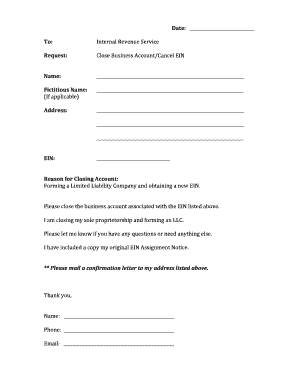
Account/Cancel  EIN       Name:       ____________________________________________________________________     Fictitious  Name:   ____________________________________________________________________   (If  applicable)     Address:     ____________________________________________________________________           ____________________________________________________________________              .

How it works

  1. Open form

    Open form follow the instructions

  2. Easily sign form

    Easily sign the form with your finger

  3. Share form

    Send filled & signed form or save

How to fill out the Close Business Account/Cancel EIN online

Closing a business account and canceling an Employer Identification Number (EIN) can be a straightforward process when you have the right guidance. This guide will help you fill out the Close Business Account/Cancel EIN form efficiently online, ensuring all necessary details are completed accurately.

Follow the steps to complete your form successfully.

  1. Press the ‘Get Form’ button to access the form and open it in your preferred editing tool.
  2. Begin by entering the current date at the top of the form. This should reflect when you are submitting your request.
  3. In the 'To' section, specify that the request is directed to the Internal Revenue Service (IRS).
  4. Next, accurately fill in your name in the designated 'Name' field to identify the person or entity submitting the request.
  5. If applicable, provide your fictitious business name, which is also known as a 'doing business as' (DBA) name.
  6. Fill out your complete business address in the 'Address' section, ensuring it matches the address on file with the IRS.
  7. Enter your EIN in the respective field. This number is crucial as it identifies your business with the IRS.
  8. Indicate your reason for closing the account. You may mention forming a new legal entity, such as a Limited Liability Company (LLC), or specify if you are ceasing operations.
  9. Include any relevant information you feel necessary to the IRS, such as your request for closure and any documents, like the EIN Assignment Notice, that support your request.
  10. Finish by signing your name, adding your phone number and email address in the respective fields. This information allows the IRS to contact you if needed.
  11. After filling out the form, review all entries for accuracy. Save your changes, and proceed to download, print, or share the completed form through your preferred method.

Begin closing your business account and canceling your EIN online today!

Get form

Experience a faster way to fill out and sign forms on the web. Access the most extensive library of templates available.
Get form

Related content

If you no longer need your EIN | Internal Revenue...
Aug 7, 2025 — If you no longer need your employer identification number (EIN), we can't...
Learn more
Tax Guide for Small Business
Oct 12, 1999 — You can account for business and personal items under different...
Learn more
2011 Publication 334
Dec 21, 2011 — What method can I use to account for my income and expenses? See...
Learn more

Related links form

YMCA Camp Information Guide YMCA Camp Orkila Release of Liability & Acknowledgment of Risk YMCA Daily Facility Usage Application - Day/Guest Pass Users YMCA Navy EFMP Respite Care Hours Tracking Log

Questions & Answers

Get answers to your most pressing questions about US Legal Forms API.

Contact support

To find an EIN for a closed business, you can check previous tax documents or bank statements that include your EIN. If you don't have these documents, contact the IRS directly for assistance. Remember, having access to this information is crucial for handling any tax matters post-closure. If you need expert guidance, platforms like UsLegalForms can help you locate your EIN efficiently.

To seek a refund from a closed business, you should file the appropriate tax forms with the IRS. Even after closing, you may be entitled to refunds for overpaid taxes. Gather all necessary documents related to your business income and expenses to support your claim. If you find the process confusing, UsLegalForms can provide valuable assistance in completing the required paperwork.

Yes, the IRS can pursue you personally for unpaid business taxes, especially if your business structure does not provide personal liability protection. This is particularly the case for sole proprietors and partners in a partnership. To mitigate your personal risk, it is essential to handle your tax obligations properly when closing your business. Consult resources like UsLegalForms to ensure you manage this process effectively.

You can request a copy of your EIN confirmation letter online through the IRS website. However, if you need a faster solution, consider using services from UsLegalForms, which can help streamline the process for obtaining key documents. Ensure you have your business information available to make your request easier. Keeping a record of your EIN confirmation letter is crucial for your business closure process.

Yes, the IRS can come after your LLC if it has outstanding tax debts. An LLC, while providing some liability protection, does not shield you from tax responsibilities. If your LLC is closed, ensure that you have fulfilled all tax obligations to prevent the IRS from taking action against your business. Proper closure includes appropriate filings and communication with the IRS to address any outstanding issues.

Yes, the IRS can pursue a closed business for any unpaid taxes. Even after closing, you may still have tax obligations that require attention. To avoid complications, it is crucial to address any potential liabilities before officially closing your business. If you need assistance navigating this process, consider using platforms like UsLegalForms to guide you.

Yes, you should cancel your EIN if you close your business. This action is important to prevent any potential tax liabilities in the future. Make sure to notify the IRS in writing that you have closed your business and wish to cancel your EIN. Doing so protects you from unwanted correspondence and concerns about your closed business.

Yes, the IRS can audit a closed business. While your business is no longer operating, you are still responsible for maintaining accurate records for a period of time, typically three years. This includes tax returns and any relevant documentation. If you have closed your business, ensure you keep these documents organized in case of an audit.

It is wise to dissolve your LLC after filing your taxes. This approach ensures all potential tax liabilities are addressed before you close your business account. By handling taxes first, you can avoid complications with the IRS concerning outstanding filings or payments. Ultimately, this process ensures you fulfill all obligations before officially closing your business.

Closing your LLC involves specific processes and ramifications. Primarily, you should fulfill any remaining tax obligations to the state and IRS. Failure to do so can lead to ongoing penalties or liabilities. Closing your LLC also cancels its legal protections, meaning you may be personally liable for debts incurred during operations. Properly managing the closure using the appropriate channels ensures your interests are protected.

Get This Form Now!

Use professional pre-built templates to fill in and sign documents online faster. Get access to thousands of forms.
Get form
If you believe that this page should be taken down, please follow our DMCA take down processhere.
Get Close Business Account/Cancel EIN
Get form
  • Adoption
  • Bankruptcy
  • Contractors
  • Divorce
  • Home Sales
  • Employment
  • Identity Theft
  • Incorporation
  • Landlord Tenant
  • Living Trust
  • Name Change
  • Personal Planning
  • Small Business
  • Wills & Estates
  • Packages A-Z
  • Affidavits
  • Bankruptcy
  • Bill of Sale
  • Corporate - LLC
  • Divorce
  • Employment
  • Identity Theft
  • Internet Technology
  • Landlord Tenant
  • Living Wills
  • Name Change
  • Power of Attorney
  • Real Estate
  • Small Estates
  • Wills
  • All Forms
  • Forms A-Z
  • Other Templates
  • Legal Hub
  • About Us
  • Help Portal
  • Legal Resources
  • Blog
  • Affiliates
  • Contact Us
  • Delete My Account
  • Site Map
  • Industries
  • Forms in Spanish
  • Localized Forms
  • State-specific Forms
  • Forms Kit
  • Real Estate Handbook
  • All Guides
  • Notarize
  • Incorporation services
  • For Consumers
  • For Small Business
  • For Attorneys
  • USLegal
  • FormsPass
  • pdfFiller
  • signNow
  • altaFlow
  • DocHub
  • Instapage
Form Packages
  • Adoption
  • Bankruptcy
  • Contractors
  • Divorce
  • Home Sales
  • Employment
  • Identity Theft
  • Incorporation
  • Landlord Tenant
  • Living Trust
  • Name Change
  • Personal Planning
  • Small Business
  • Wills & Estates
  • Packages A-Z
Form Categories
  • Affidavits
  • Bankruptcy
  • Bill of Sale
  • Corporate - LLC
  • Divorce
  • Employment
  • Identity Theft
  • Internet Technology
  • Landlord Tenant
  • Living Wills
  • Name Change
  • Power of Attorney
  • Real Estate
  • Small Estates
  • Wills
  • All Forms
  • Forms A-Z
  • Other Templates
Customer Service
  • Legal Hub
  • About Us
  • Help Portal
  • Legal Resources
  • Blog
  • Affiliates
  • Contact Us
  • Delete My Account
  • Site Map
  • Industries
  • Forms in Spanish
  • Localized Forms
  • State-specific Forms
  • Forms Kit
Legal Guides
  • Real Estate Handbook
  • All Guides
Prepared for you
  • Notarize
  • Incorporation services
Our Customers
  • For Consumers
  • For Small Business
  • For Attorneys
Our Sites
  • USLegal
  • FormsPass
  • pdfFiller
  • signNow
  • altaFlow
  • DocHub
  • Instapage
Social Media
Call us now toll free:
+1 833 426 79 33
As seen in:
© Copyright 1999-2026 airSlate Legal Forms, Inc. 17 Station Street, Ste. 203, Brookline, MA 02445
  • Your Privacy Choices
  • Terms of Service
  • Privacy Notice
  • Content Takedown Policy
  • Bug Bounty Program