Loading
Get Trinity Fair Banding
How it works
-

Open form follow the instructions
-

Easily sign the form with your finger
-

Send filled & signed form or save
How to fill out the Trinity Fair Banding online
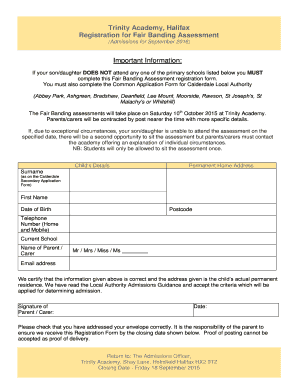
Filling out the Trinity Fair Banding assessment registration form is a crucial step in the admissions process for Trinity Academy. This guide will provide you with step-by-step instructions to ensure that you complete the form accurately and efficiently.
Follow the steps to successfully complete and submit the form.
- Click ‘Get Form’ button to obtain the form and open it in the editor.
- Enter your child’s details in the designated fields. This includes their surname, first name, date of birth, and postcode. Ensure that these names match what is on the Calderdale Secondary Application Form.
- Provide your contact information in the ‘Telephone Number’ section. Include both home and mobile numbers to ensure you can be reached easily.
- Fill in the ‘Current School’ name that your child is currently attending, ensuring all details are accurate.
- Identify the parent or carer by selecting Mr, Mrs, Miss, or Ms in the relevant field and enter their name. This signifies the individual responsible for this registration form.
- Input the email address of the parent or carer to facilitate further communication regarding the assessment.
- Read the certification statement carefully, confirming that all provided information is correct before signing it for verification. Include the date of signing.
- Review all entered information for accuracy before proceeding to submit the form.
- Save changes to your form if applicable, and prepare to submit it by printing it out and addressing it to the Admissions Officer at Trinity Academy. Make sure to mail it before the closing date.
Start filling out your Trinity Fair Banding registration form online today to ensure your child’s application is submitted on time.
Trinity Academy can cater for 1700 male and female pupils, aged 11 – 16.
Industry-leading security and compliance
US Legal Forms protects your data by complying with industry-specific security standards.
-
In businnes since 199725+ years providing professional legal documents.
-
Accredited businessGuarantees that a business meets BBB accreditation standards in the US and Canada.
-
Secured by BraintreeValidated Level 1 PCI DSS compliant payment gateway that accepts most major credit and debit card brands from across the globe.