Loading
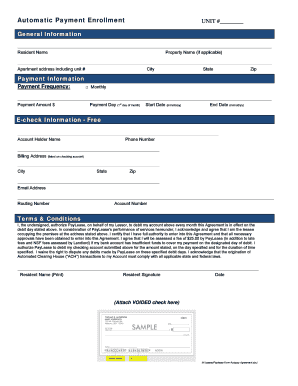
Get Paylease Formwebsite - Autopay Agreement.doc
How it works
-

Open form follow the instructions
-

Easily sign the form with your finger
-

Send filled & signed form or save
How to fill out the Paylease Formwebsite - Autopay Agreement.doc online
This guide will walk you through the process of completing the Paylease Autopay Agreement form online. By following these instructions, you will ensure that your automatic payment setup is handled smoothly and efficiently.
Follow the steps to complete your Autopay Agreement form.
- Click the ‘Get Form’ button to access the form and open it in the online editor.
- Fill in the general information section. Begin by entering your unit number, resident name, property name (if applicable), and the complete apartment address, including city, state, and zip code.
- Provide your payment information. Specify the payment frequency as monthly and enter the payment amount in dollars. Then, indicate the payment day of the month on which the debit will occur, as well as the start and end dates of the agreement in the mm/dd/yy format.
- Complete the e-check information section. Enter the account holder's name, phone number, and billing address that matches your checking account. Don’t forget to include the city, state, zip code, email address, routing number, and account number.
- Read and agree to the terms and conditions outlined in the agreement. Acknowledge your authorization for PayLease to debit your account as specified and the agreed-upon fees in case of insufficient funds.
- Sign and date the agreement by printing your name, signing it, and adding the date. Remember to attach a voided check for verification purposes.
- Once all fields are complete, ensure you have saved your changes. You can then download, print, or share the form as needed.
Complete your Paylease Formwebsite - Autopay Agreement online today to ensure timely payments.
Standard Processing will direct deposit funds to the recipient's account within 3 business days if initiated prior to cut-off time. Cut-off time for standard processing is 7:00 PM EST each business day. If your payment is initiated on a non-business day, it will process on the next business day.