Loading
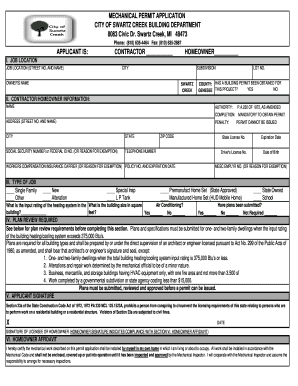
Get Mechanical Permit Application - City Of Swartz Creek - Cityofswartzcreek
How it works
-

Open form follow the instructions
-

Easily sign the form with your finger
-

Send filled & signed form or save
How to fill out the MECHANICAL PERMIT APPLICATION - City Of Swartz Creek online
This guide provides clear, step-by-step instructions to help you successfully complete the Mechanical Permit Application for the City of Swartz Creek. Whether you are a contractor or a homeowner, following these steps will ensure that your application is filled out accurately and efficiently.
Follow the steps to complete your application with ease.
- Press the ‘Get Form’ button to access the Mechanical Permit Application form and open it in your preferred editor.
- In the 'Applicant Is' section, select whether you are a contractor or a homeowner by checking the appropriate box.
- Fill in the 'Job Location' section with the street number and name, specifying the city, subdivision, owner's name, lot number, and county. Indicate whether a building permit has been obtained for the project by selecting 'Yes' or 'No.'
- In the 'Contractor/Homeowner Information' section, provide your name, authority, completion, address (street number and name), city, state, zip code, and telephone number. Include your social security number or federal ID number and the name of your workers compensation insurance carrier, along with the policy number and expiration date.
- In the 'Type of Job' section, select the appropriate options indicating whether it is a single-family residence, new construction, alteration, or other types of jobs.
- Indicate if plans are required for review under the 'Plan Review Required' section and whether plans have been submitted.
- Sign and date the application in the 'Applicant Signature' section to indicate your compliance with the required regulations.
- Complete the 'Homeowner Affidavit' if applicable, certifying that the work will be performed in accordance with the Mechanical Code.
- Provide a description of the work to be completed under the 'Fee Clarifications' section. If you are adding to an existing permit, include the existing permit number and details of the additional work.
- Fill out the 'Fee Chart' by entering the quantity of items being installed, calculate the total fee, and ensure that the application fee is included.
- Review the 'Completing Application' section to confirm that all information is accurate and ready for submission. Note the permit expiration conditions.
- Finally, save any changes made to the form and download or print a copy for your records before submitting it.
Submit your Mechanical Permit Application online today to ensure a smooth process!
Construction or alteration of a residential structure requiring permits include cutting away any wall, partition, or portion of the building; the removal or cutting of any structural beam; the removal or change of any required means of egress, or rearrangement of parts of the structure affecting the egress requirements ...
Industry-leading security and compliance
US Legal Forms protects your data by complying with industry-specific security standards.
-
In businnes since 199725+ years providing professional legal documents.
-
Accredited businessGuarantees that a business meets BBB accreditation standards in the US and Canada.
-
Secured by BraintreeValidated Level 1 PCI DSS compliant payment gateway that accepts most major credit and debit card brands from across the globe.