Loading
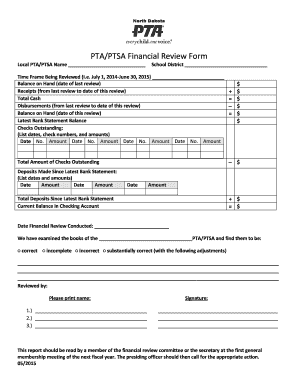
Get Ptaptsa Financial Review Form - Ndptaorg
How it works
-

Open form follow the instructions
-

Easily sign the form with your finger
-

Send filled & signed form or save
How to fill out the PTAPTSA Financial Review Form - Ndptaorg online
Completing the PTAPTSA Financial Review Form - Ndptaorg online is essential for ensuring transparency and accountability within your organization. This guide provides a detailed, step-by-step approach to help users navigate each section and field of the form seamlessly.
Follow the steps to complete the financial review form accurately.
- Click ‘Get Form’ button to obtain the form and open it in the editor.
- Begin by entering the local PTA/PTSA name in the designated field. Ensure that the name is accurate and matches official documentation.
- Fill in the school district name where your PTA/PTSA operates. This should reflect the corresponding district for proper record-keeping.
- Indicate the time frame being reviewed, using date formats like July 1, 2014-June 30, 2015. This allows for clear understanding of the financial period under review.
- Report the balance on hand as of the date of the last review, including all relevant figures in the spaces provided.
- Record receipts collected from the last review to the current review's date, ensuring all financial inflows are accurately captured.
- Calculate the total cash by adding the balance on hand and receipts together.
- List disbursements made during the review period, detailing each outgoing cash flow.
- Calculate the balance on hand at the date of this review by subtracting disbursements from the total cash.
- Input the latest bank statement balance to cross-check with your calculated figures.
- Document outstanding checks by listing their dates, check numbers, and amounts in the provided fields.
- Calculate the total amount of outstanding checks based on your listings.
- Record any deposits made since the latest bank statement, including dates and amounts.
- Calculate the total deposits since the latest bank statement to ensure accurate financial tracking.
- Finally, calculate the current balance in your checking account by adding or subtracting all relevant amounts.
- Fill in the date of the financial review conducted and ensure all reviewers provide their printed names and signatures.
Complete your PTAPTSA Financial Review Form online today to support transparency and accountability within your organization.
Related links form
An audit assistant usually assesses the strengths and weaknesses of the finances of the organisation under audit. This includes determining the accuracy of accounting procedures and systems and making recommendations for changes in business unit accounting systems and controls.
Industry-leading security and compliance
US Legal Forms protects your data by complying with industry-specific security standards.
-
In businnes since 199725+ years providing professional legal documents.
-
Accredited businessGuarantees that a business meets BBB accreditation standards in the US and Canada.
-
Secured by BraintreeValidated Level 1 PCI DSS compliant payment gateway that accepts most major credit and debit card brands from across the globe.