Loading
Form preview
  • US Legal Forms
  • Other Templates
  • More Forms
  • More Uncategorized Forms
  • Attending Physicians Return To Work Recommendations To Be Completed By Attending Physician Reviewed

Get Attending Physicians Return To Work Recommendations To Be Completed By Attending Physician Reviewed

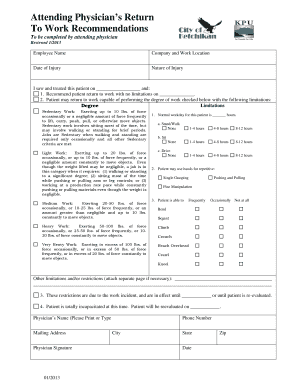
Attending Physicians Return To Work Recommendations To be completed by attending physician Reviewed 1/2013 Employee Name Company and Work Location Date of Injury Nature of Injury I saw and treated.

How it works

  1. Open form

    Open form follow the instructions

  2. Easily sign form

    Easily sign the form with your finger

  3. Share form

    Send filled & signed form or save

How to fill out the Attending Physicians Return To Work Recommendations To Be Completed By Attending Physician Reviewed online

This guide provides a clear and supportive overview of how to fill out the Attending Physicians Return To Work Recommendations form online. Follow the step-by-step instructions to ensure accurate completion for effective communication regarding the patient's ability to return to work.

Follow the steps to complete the form successfully.

  1. Press the ‘Get Form’ button to access the form and open it in the online editor.
  2. Begin by entering the employee's name in the designated field. This identifies the individual for whom the recommendations are being made.
  3. Fill in the company name and work location. This information is crucial for contextualizing the patient's employment situation.
  4. Specify the date of injury. This will help track the timeline of the patient's recovery process.
  5. Describe the nature of the injury briefly. This helps in understanding the context of the patient's limitations.
  6. Document the date you saw and treated the patient, which is necessary for record-keeping and follow-up evaluations.
  7. Choose whether you recommend the patient return to work with no limitations or with specified limitations. If there are limitations, proceed to the next fields.
  8. Indicate the type of work the patient may return to and check the appropriate degree of work (sedentary, light, medium, heavy, or very heavy).
  9. Specify the normal workday activities for the patient, such as standing, walking, sitting, and driving, by marking the relevant hours they can perform these tasks.
  10. Indicate the patient's ability to perform repetitive tasks using their hands by marking the frequency of actions like single grasping, pushing, pulling, or fine manipulation.
  11. Document any additional limitations and/or restrictions. If necessary, attach a separate page for detailed descriptions.
  12. Clarify that the restrictions are due to the work incident and indicate when these restrictions will be effective until or when the patient will be reevaluated.
  13. If the patient is currently incapacitated, confirm this and specify when they will be reevaluated.
  14. Finally, provide the physician's name and mailing address. Sign the form and include the date, phone number, city, state, and zip code to ensure all contact information is accurate.
  15. Save the changes you've made, and consider downloading, printing, or sharing the completed form as necessary.

Complete your documents online today to facilitate smooth communication regarding return-to-work recommendations.

Get form

Experience a faster way to fill out and sign forms on the web. Access the most extensive library of templates available.
Get form

Related content

CA-20 - US Department of Labor
Attending Physician's Report. Office of ... the type of work that could reasonably be...
Learn more
[PDF] Form CA-20 Attending Physician's Report
work mo. day yr. he/she can return to work? DYes 0No mo. day yr. 23. If employee ... the...
Learn more
FECA PT3 PR 700 - UserManual.wiki
Such meetings allow the DMD to transmit concerns and suggestions from the ... The Field...
Learn more

Related links form

Direct Loan Adjustment Form - Kingsborough Community College - Kbcc Cuny Hchs Pta John Jay College Readmission CONSENT AND DISCLOSURE - Baruch Cuny

Questions & Answers

Get answers to your most pressing questions about US Legal Forms API.

Contact support

An Attending Physician Statement (APS) is a questionnaire form that the insurer asks your physician to complete in order to assess your health and determine your insurability.

For those who deal with medical record retrieval in the world of insurance, you may be familiar with APS, which stands for “attending physician statement.” This report is typically created by a hospital, medical facility, or physician during or after patient treatment for insurance purposes.

Who completes an Attending Physician Statement? In order to be effective, an Attending Physician Statement must be completed by a doctor who knows you in person — your insurer or agency will reach out to get information from a physician who has either treated you in the past or is currently providing treatment.

What is a Doctor's Statement? A Doctor's Statement is the same as Letter of Medical Necessity. It's a letter written by your doctor, verifying that the medication you are buying with your Healthcare FSA is for a diagnosis, treatment, or prevention of a disease.

Typically, an APS includes places to indicate diagnoses, currently prescribed medication, and the length and extent of your treatment relationship with your treating medical provider.

Physicians typically do one or more of the following: (1) assess impairment, (2) provide treatment and care, and (3) communicate with third parties.

An attending physician statement (APS) is a report by a physician, hospital or medical facility who has treated, or who is currently treating, a person seeking insurance. In traditional underwriting, an APS is one of the most frequently ordered additional sources of medical background information.

“The Attending Physician Statement is a summary of your health condition, written from a doctor or medical facility that either has treated or is currently treating someone that is seeking life insurance,” explains Paya Schlass, Customer Success Manager at Haven Life.

Get This Form Now!

Use professional pre-built templates to fill in and sign documents online faster. Get access to thousands of forms.
Get form
If you believe that this page should be taken down, please follow our DMCA take down processhere.
Get Attending Physicians Return To Work Recommendations To Be Completed By Attending Physician Reviewed
Get form
  • Adoption
  • Bankruptcy
  • Contractors
  • Divorce
  • Home Sales
  • Employment
  • Identity Theft
  • Incorporation
  • Landlord Tenant
  • Living Trust
  • Name Change
  • Personal Planning
  • Small Business
  • Wills & Estates
  • Packages A-Z
  • Affidavits
  • Bankruptcy
  • Bill of Sale
  • Corporate - LLC
  • Divorce
  • Employment
  • Identity Theft
  • Internet Technology
  • Landlord Tenant
  • Living Wills
  • Name Change
  • Power of Attorney
  • Real Estate
  • Small Estates
  • Wills
  • All Forms
  • Forms A-Z
  • Other Templates
  • Legal Hub
  • About Us
  • Help Portal
  • Legal Resources
  • Blog
  • Affiliates
  • Contact Us
  • Delete My Account
  • Site Map
  • Industries
  • Forms in Spanish
  • Localized Forms
  • State-specific Forms
  • Forms Kit
  • Real Estate Handbook
  • All Guides
  • Notarize
  • Incorporation services
  • For Consumers
  • For Small Business
  • For Attorneys
  • USLegal
  • FormsPass
  • pdfFiller
  • signNow
  • altaFlow
  • DocHub
  • Instapage
Form Packages
  • Adoption
  • Bankruptcy
  • Contractors
  • Divorce
  • Home Sales
  • Employment
  • Identity Theft
  • Incorporation
  • Landlord Tenant
  • Living Trust
  • Name Change
  • Personal Planning
  • Small Business
  • Wills & Estates
  • Packages A-Z
Form Categories
  • Affidavits
  • Bankruptcy
  • Bill of Sale
  • Corporate - LLC
  • Divorce
  • Employment
  • Identity Theft
  • Internet Technology
  • Landlord Tenant
  • Living Wills
  • Name Change
  • Power of Attorney
  • Real Estate
  • Small Estates
  • Wills
  • All Forms
  • Forms A-Z
  • Other Templates
Customer Service
  • Legal Hub
  • About Us
  • Help Portal
  • Legal Resources
  • Blog
  • Affiliates
  • Contact Us
  • Delete My Account
  • Site Map
  • Industries
  • Forms in Spanish
  • Localized Forms
  • State-specific Forms
  • Forms Kit
Legal Guides
  • Real Estate Handbook
  • All Guides
Prepared for you
  • Notarize
  • Incorporation services
Our Customers
  • For Consumers
  • For Small Business
  • For Attorneys
Our Sites
  • USLegal
  • FormsPass
  • pdfFiller
  • signNow
  • altaFlow
  • DocHub
  • Instapage
Social Media
Call us now toll free:
+1 833 426 79 33
As seen in:
© Copyright 1999-2026 airSlate Legal Forms, Inc. 17 Station Street, Ste. 203, Brookline, MA 02445
  • Your Privacy Choices
  • Terms of Service
  • Privacy Notice
  • Content Takedown Policy
  • Bug Bounty Program