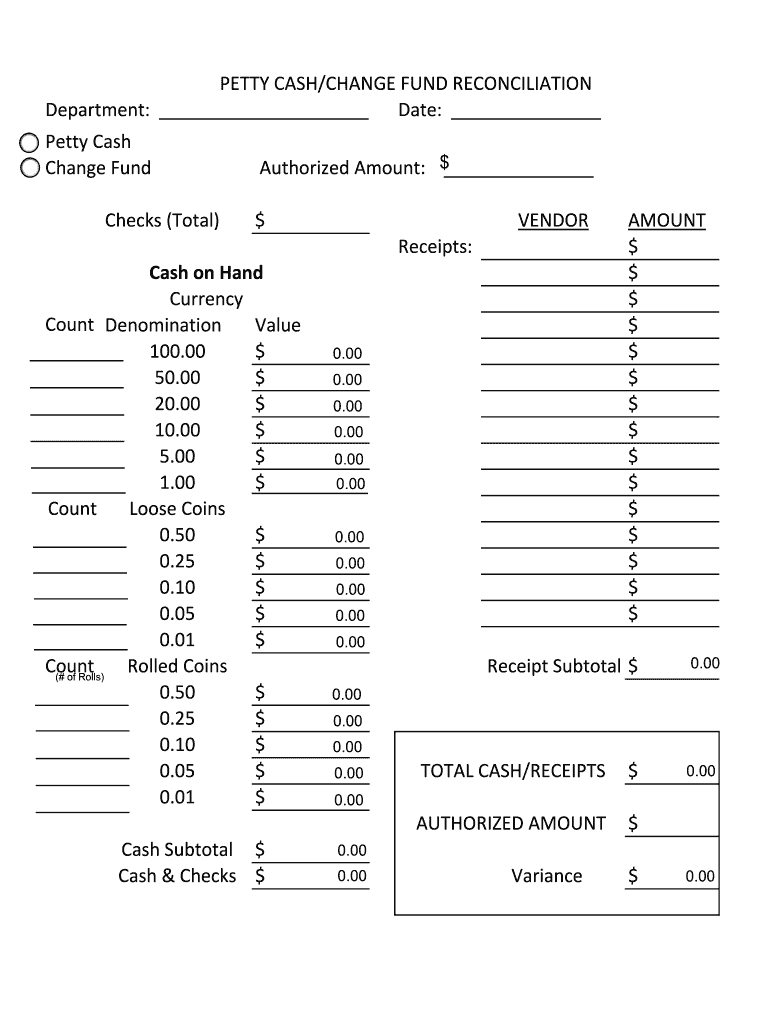
Loose Coins 0.50 $ 0.25 $ 0.10 $ 0.05 $ 0.01 $ Count Rolled Coins (# of Rolls) 0.50 $ 0.25 $ 0.10 $ 0.05 $ 0.01 $ 0.00 0.00 0.00 0.00 0.00 0.00 0.00 0.00 0.00 0.00 AMOUNT $ $ $ $ $ $ $ $ $ $ $ $ $ $ $ 0.00 Receipt Subtotal $ 0.00 0.00 0.00 0.00 TOTAL CASH/RECEIPTS $ AUTHORIZED AMOUNT Cash Subtotal $ Cash & Checks $ 0.00 0.00 $ 0.00 0.00 0.00 Variance $ 0.00 .
Loading

Open form follow the instructions

Easily sign the form with your finger

Send filled & signed form or save
How to fill out the Petty Cash/Change Fund Reconciliation online
This guide provides step-by-step instructions for completing the Petty Cash/Change Fund Reconciliation form online. By following these instructions, you will ensure accurate reporting of petty cash and change fund transactions.
Follow the steps to complete your reconciliation form accurately.
- Click ‘Get Form’ button to access the form and open it in your preferred editor.
- Begin by filling in the department name and the date on the form. This information is essential for identifying the specific cash fund being reconciled.
- In the 'Petty Cash' and 'Change Fund' sections, input the authorized amount corresponding to each section. This amount reflects what should be available for usage.
- Next, review the vendor receipts section. This area helps track all receipts against the cash on hand. Enter any relevant vendor receipts appropriately.
- Proceed to the 'Cash on Hand' section. Here, you will count and denote the physical currency in different denominations. Enter the count and value for each denomination, including bills and loose coins.
- If applicable, complete the 'Amount' section for each coin type, detailing the count of rolled coins. For any rolled coins, specify the number of rolls available.
- Calculate the subtotal for receipts and enter it in the 'Receipt Subtotal' field. This sum should match the total of the receipts provided.
- Determine the total cash and receipts by adding the cash subtotal and checks, and record this value in the designated field. Ensure all calculations are verified for accuracy.
- Finally, calculate the variance by subtracting the authorized amount from the total cash/receipts amount. Document the variance in the provided field.
- Once all fields have been completed, review the form thoroughly for any errors or omissions before submitting your reconciliation.
- Save your changes, and if needed, download, print, or share the finalized reconciliation form.
Complete your Petty Cash/Change Fund Reconciliation form online today for accurate financial management.
Experience a faster way to fill out and sign forms on the web. Access the most extensive library of templates available.
Related content
The petty cash fund should be reconciled by the custodian on or before the last day of...
PETTY CASH/CHANGE FUND RECONCILIATION. Cash on Hand. Currency. 1.00. $. $. Count. Loose...
The primary purpose of the petty cash fund is to create cash boxes for making change...
Get answers to your most pressing questions about US Legal Forms API.
What happens when petty cash doesn't balance?
Balance up the petty cash regularly do it every week if there are lots of petty cash payments, that way it's easier to find any mistakes. If you do make a mistake, and the petty cash doesn't balance, make a note of the difference in the petty cash book, and tell other members of the group.
How do you do petty cash reconciliation?
Ascertain stated balance. Review the company's petty cash policy and determine the stated petty cash balance for the fund to be reviewed. ... Obtain reconciliation form. ... Calculate withdrawn cash. ... Summarize vouchers. ... Investigate variances.
How do I reconcile petty cash in MYOB?
Go to the Banking command centre and click Reconcile Accounts. In the Account field, select the petty cash account. in the Bank Statement Date field, enter the current date. Match the payments in the Reconcile Accounts window with your cash receipts, marking the corresponding transactions off as cleared.
How can the petty cash system be improved?
Decide on a float and when to replenish. ... Segregation of roles. ... Define the expense limit and approval matrix. ... Use petty cash vouchers for all petty cash transactions. ... Demand receipts to back up the expenses claimed.
How is petty cash imprest calculated?
If the amount of petty cash is $100, then the Petty Cash account will always report a debit balance of $100. This $100 is the imprest balance. As long as $100 is adequate for the organization's small disbursements, then the general ledger account Petty Cash will never be debited or credited again.
Can petty cash balance be negative?
Our company hands over some cash to an employee for meeting day to day petty expenses. Some times the petty cashier puts in cash from his own pocket and spends for the company. When the vouchers are posted, the petty cash account shows a negative balance. ... There should not be any negative cash balance on any day.
What is petty cash balance?
Petty cash or petty cash funds is a small amount of money in the form of cash that is kept on hand used for paying small expenses when necessary. By using an invoicing software such as Debitoor, you can easily record all your money expenditure. Try it free for 7 days.
What is a change fund in accounting?
Change fund: A set amount of money used by a department to make change for customers who are purchasing goods or services. The selling of such goods or services must have been previously approved through appropriate channels.
How do you keep record of petty cash?
Step #1 - Purchase a Lock Box. ... Step #2 - Assign Responsibility. ... Step #3 - Store the Petty Cash Box and Set a Limit. ... Step #3 - Deposit Cash into the Petty Fund. ... Step #5 - Create a Transaction Log. ... Step #6 - Track the Petty Cash Fund on the Accounting Records of Your Business. ... Step #7 - Account For Petty Cash Transactions.
Use professional pre-built templates to fill in and sign documents online faster. Get access to thousands of forms.
If you believe that this page should be taken down, please follow our DMCA take down process here.