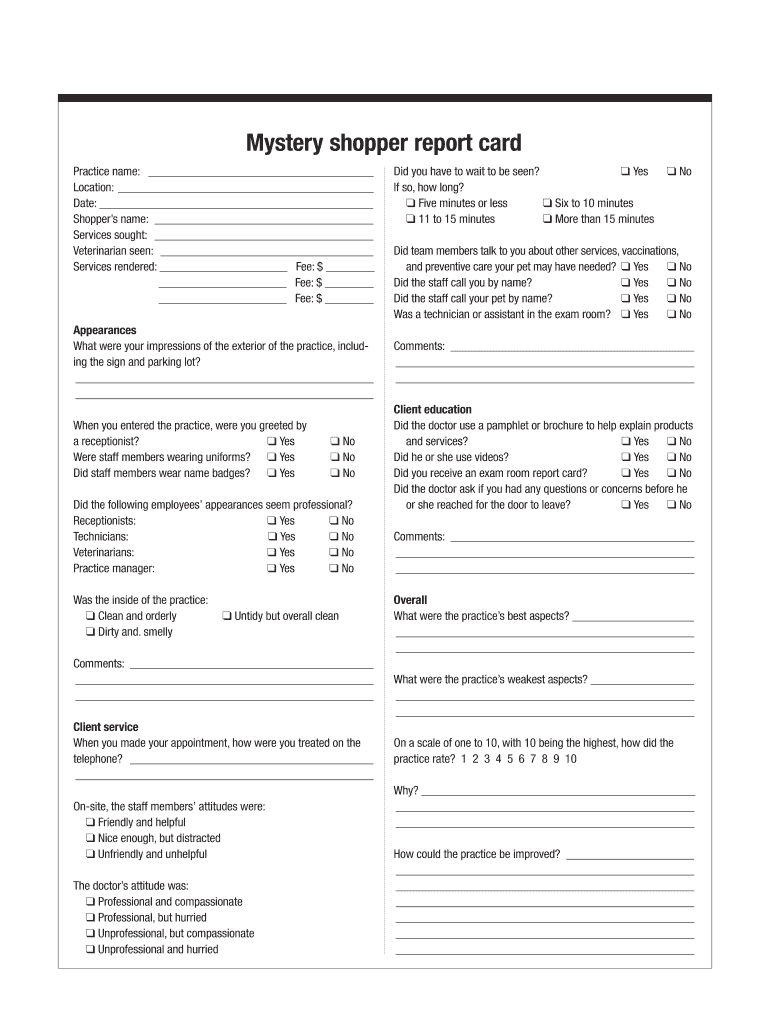
Mystery shopper report card Practice name: Location: Date: Shoppers name: Services sought: Veterinarian seen: Services rendered: Fee: $ Fee: $ Fee: $ Appearances What were your impressions of the.
Loading

Open form follow the instructions

Easily sign the form with your finger

Send filled & signed form or save
How to fill out the Mystery Shopper Report Card online
Completing the Mystery Shopper Report Card online is a straightforward process that allows you to provide valuable feedback about your experience. This guide will walk you through each section of the form to ensure your insights are captured accurately and effectively.
Follow the steps to successfully complete the report card online.
- Press the ‘Get Form’ button to obtain the report card and open it for editing.
- Fill in the practice name at the top of the form to identify the location being reviewed.
- Enter the location of the practice to provide context for your feedback.
- Record the date of your visit to help track the visit details.
- Provide the shopper’s name to personalize the report.
- Indicate the services you sought during your visit, detailing any specific needs.
- List the veterinarian you met during your appointment, which assists in reporting specific interactions.
- Detail the services rendered along with their associated fees in the designated sections.
- When describing your impressions of the exterior, include comments about the sign and parking area in the provided space.
- Indicate if you were greeted by a receptionist and note whether staff members wore uniforms and name badges by selecting 'Yes' or 'No' as applicable.
- Evaluate the professionalism of the staff's appearances, including receptionists, technicians, veterinarians, and the practice manager by selecting 'Yes' or 'No' for each.
- Assess the cleanliness and orderliness of the practice's interior, marking your observations from the options provided.
- Share your comments about the exterior and interior observations in the space provided.
- Rate your telephone experience when making an appointment based on your treatment and interactions.
- Review the attitudes of staff members on-site and the veterinarian and select the corresponding options.
- Note whether you had to wait to be seen and if so, the duration of the wait.
- Indicate if team members discussed other services available for your pet.
- Record whether staff addressed you and your pet by name.
- State if a technician or assistant was present in the exam room during your visit.
- Provide comments regarding your overall client service experience.
- For client education, indicate if the veterinarian used pamphlets, brochures, or videos to explain products or services.
- Confirm whether you received an exam room report card and if the doctor asked about any questions or concerns before leaving.
- Document any overall impressions including the best and weakest aspects of the practice.
- Rate the overall practice from one to ten, providing a rationale for your score in the comments section.
- Suggest possible improvements that the practice could make to enhance services.
- Once finished, you can save changes, download, print, or share the filled report card as needed.
Complete the Mystery Shopper Report Card online to offer your insights today!
Experience a faster way to fill out and sign forms on the web. Access the most extensive library of templates available.
Related content
Report It to the FTC. If you spot or lose money to a mystery shopping scam, report it to...
Andrea is working on her business degree and would like to become an assistant at this...
Feb 20, 2023 — This Special Consultation event is available from 2022-05-22 11:00 to...
Get answers to your most pressing questions about US Legal Forms API.
What is a good mystery shopper score?
A good mystery shopper score often ranges from 80% to 100%, depending on the criteria set by the business. This rating indicates a high level of service and customer satisfaction. The Mystery Shopper Report Card will outline the specific elements evaluated to reach this score. Striving for improvement based on feedback can further enhance customer experiences.
How to do a mystery shopper report?
Creating a mystery shopper report involves collecting detailed observations during your shopping experience. Focus on aspects like customer service, product availability, and store cleanliness. Use a structured format for your Mystery Shopper Report Card to ensure thoroughness and clarity. This document provides valuable feedback for businesses to improve their operations.
How to identify a mystery shopper?
Identifying a mystery shopper can be challenging, as they blend in with regular customers. Their primary goal is to observe service quality without drawing attention to their role. However, if you notice someone taking notes or behaving unusually during their visit, they may be conducting an evaluation. The insights on the Mystery Shopper Report Card reflect these subtle observations.
What to do if someone asks if you're a mystery shopper?
If someone inquires about your status as a mystery shopper, it’s best to remain discreet. You can politely decline to share specific details about your role to maintain the integrity of your evaluations. Protecting your identity is vital for producing valuable data on the Mystery Shopper Report Card. Transparency is important, but confidentiality is paramount.
Do mystery shoppers ask for receipts?
Yes, mystery shoppers often request receipts during their evaluations. This documentation is crucial for accurately reporting expenses and assessing service quality. A detailed Mystery Shopper Report Card should include such receipts to provide a comprehensive overview of the shopping experience. Clients benefit from this thorough approach.
How to know if a mystery shopper is legit?
To verify if a mystery shopper is legitimate, consider checking their references and prior reviews. Many reputable mystery shopping companies have established criteria and an application process for their shoppers. Furthermore, a well-documented Mystery Shopper Report Card will give you a clear indication of the quality of their work. Always ensure that you work with trusted platforms.
Do secret shoppers tell you they are secret shoppers?
Typically, secret shoppers do not disclose their identity as mystery shoppers. This approach allows them to provide unbiased and authentic feedback on their experience. Keeping their role confidential helps businesses understand how their services are perceived. The Mystery Shopper Report Card effectively captures these insights.
What does a mystery shopper report look like?
A mystery shopper report typically includes sections that document the shopper's observations, experiences, and overall impressions. It may present information in a combination of narrative and bullet points for clarity. The structured formatting allows businesses to quickly assess performance metrics and customer satisfaction levels. This organized presentation is what you will find in a well-prepared Mystery Shopper Report Card.
What is a mystery shopper checklist?
A mystery shopper checklist is a systematic guide that outlines the key areas to evaluate during a shopping experience. It often includes specific aspects such as staff behavior, cleanliness, and product availability. By following a checklist, mystery shoppers ensure thorough evaluations, ultimately contributing to an effective Mystery Shopper Report Card. This preparation enables businesses to pinpoint strengths and weaknesses in their service.
How to write a mystery step by step?
To write a mystery step by step, begin by outlining the plot elements, including the conflict and resolution. Develop your characters with depth, and craft an engaging setting that adds to the tension. As you write, implement clues and red herrings that lead toward a satisfying conclusion. This structured approach is similar to how you would create a comprehensive Mystery Shopper Report Card to assist a business.
Use professional pre-built templates to fill in and sign documents online faster. Get access to thousands of forms.
If you believe that this page should be taken down, please follow our DMCA take down process here.