Loading
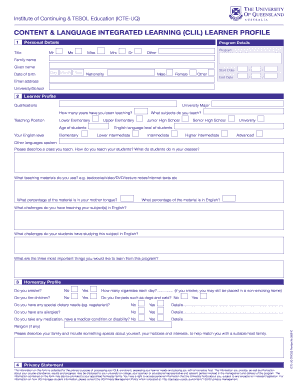
Get Onshore Programs Download Learner And Homestay Profile Form
How it works
-

Open form follow the instructions
-

Easily sign the form with your finger
-

Send filled & signed form or save
How to fill out the Onshore Programs Download Learner And Homestay Profile Form online
This guide provides you with clear, step-by-step instructions on how to effectively fill out the Onshore Programs Download Learner And Homestay Profile Form online. The process is designed to help you provide necessary information for your learner and homestay profile accurately.
Follow the steps to complete your form with ease.
- Click the ‘Get Form’ button to obtain the form and open it in your preferred editor.
- Begin by providing your personal details. Enter your title, family name, and given name. Fill in your date of birth, nationality, and gender. Be sure to provide a valid email address for future communication.
- Input your program details by specifying the program name, start date, and end date. Additionally, include the name of your university or school.
- Transition to the learner profile section. Here, detail your qualifications and major, and indicate how long you have been teaching along with your current teaching position.
- Provide further insights into your teaching by identifying the age group of your students, your English language level, and the subjects you teach. Specify the English level of your students and any other languages spoken.
- Describe your teaching approach, including class activities, teaching materials used, and the percentage of the material taught in English versus your mother tongue.
- Outline any challenges you face when teaching your subjects in English and any difficulties your students encounter while studying these subjects.
- List the three most important things you hope to learn from this program.
- In the homestay profile section, respond honestly to questions regarding smoking, preferences for children and pets, special dietary needs, and allergies.
- Indicate any medications, medical conditions, or disabilities you may have, providing any necessary details.
- Conclude by describing your family and sharing something special about yourself, including your hobbies and interests to help match you with a suitable host family.
- Finally, review all the information you provided, and make any necessary edits. Once satisfied, save your changes, download, print, or share the completed form as needed.
Get started now and complete your Onshore Programs Download Learner And Homestay Profile Form online to ensure you are fully prepared for your program.