Loading
Get Business Rules Entity-relationship Diagram (erd) - Info Slis Indiana
How it works
-

Open form follow the instructions
-

Easily sign the form with your finger
-

Send filled & signed form or save
How to use or fill out the Business Rules Entity-Relationship Diagram (ERD) - Info Slis Indiana online
This guide provides detailed instructions on how to navigate and fill out the Business Rules Entity-Relationship Diagram (ERD) for Info Slis Indiana. Whether you are an experienced user or new to digital forms, this comprehensive resource is designed to assist you with the process.
Follow the steps to efficiently complete the ERD form online.
- Click the ‘Get Form’ button to obtain the form and open it in the editor.
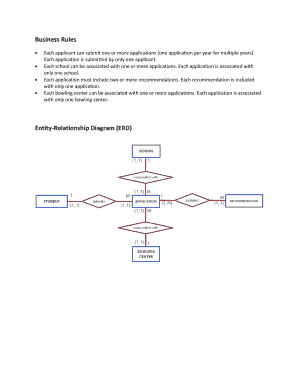
- Begin by reviewing the ERD to familiarize yourself with the application, student, school, bowling center, and recommendation tables. Understand their relationships as they are fundamental to accurate form completion.
- Fill in the APPLICATION table fields. Include details such as application ID number, application date, student ID, bowling center name, school ID, current school name, class level, GPA, and any relevant activities. Be sure to provide accurate information as it serves as the key data for processing the scholarship.
- Complete the STUDENT table with each applicant's personal information, including their last name, first name, middle initial, date of birth, and contact details, ensuring that all fields are filled out accurately.
- Provide the SCHOOL table details, ensuring you include the school name, type, address, and contact information. This information is necessary to validate the applicants' choice of school.
- Enter the BOWL_CENTER information, including the bowling center's name and contact details, since this is critical for the application context.
- Document the recommendations in the RECOMMENDATION table. Input the date, names of recommenders, their relationship to the applicant, and the numerical evaluations of the applicant’s attributes. Ensure these details are complete to enhance application strength.
- Once all sections are complete, review the input data for accuracy and consistency. Make any necessary edits to ensure that the information is correct.
- Finally, save the changes made to the form. Select options to download, print, or share the completed document as endorsed by the guidelines provided in the system.
Now that you have this guide, proceed to complete your documents online with confidence.
How things work here. Start with a single instance of each entity. Always stated in pairs—define relationship from perspective of each related entity. Become the verbs in the relationships. Determine cardinality and participation. The basis for stored procedures and triggers.
Industry-leading security and compliance
US Legal Forms protects your data by complying with industry-specific security standards.
-
In businnes since 199725+ years providing professional legal documents.
-
Accredited businessGuarantees that a business meets BBB accreditation standards in the US and Canada.
-
Secured by BraintreeValidated Level 1 PCI DSS compliant payment gateway that accepts most major credit and debit card brands from across the globe.