Loading
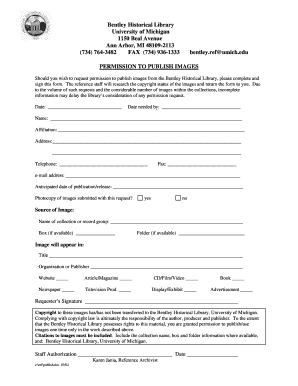
Get Permission Form - Bentley Historical Library - University Of Michigan - Bentley Umich
How it works
-

Open form follow the instructions
-

Easily sign the form with your finger
-

Send filled & signed form or save
How to fill out the Permission Form - Bentley Historical Library - University Of Michigan - Bentley Umich online
The Permission Form from the Bentley Historical Library enables users to request permission to publish images from their collections. This guide provides clear and comprehensive steps to assist you in completing the form accurately and efficiently.
Follow the steps to successfully fill out the Permission Form online.
- Press the ‘Get Form’ button to access the Permission Form and open it for editing.
- Fill in the date when the request is submitted in the designated space.
- Enter the date by which you require the permission in the 'Date needed by' field.
- Provide your full name in the 'Name' field.
- Indicate your affiliation, such as organization or institution, in the appropriate section.
- Complete your address in the specified areas, ensuring all necessary details are included.
- Input your telephone number, ensuring it is valid for official correspondence.
- If applicable, include your fax number in the designated field.
- Provide your email address for convenient follow-up.
- State the anticipated date when the publication or release will occur.
- Check 'yes' or 'no' in response to whether a photocopy of the images is submitted with the request.
- Document the source of the image by specifying the collection or record group name.
- If available, include the box number in the specified field.
- If applicable, provide the folder number where the image can be found.
- In the section about image appearance, write the title, organization or publisher, and select the applicable format such as website, book, or exhibition.
- Sign the Permission Form in the 'Requester’s Signature' area.
- Review the copyright notice, confirming whether copyright has been transferred to the library.
- Ensure that all fields are filled out completely; incomplete forms may cause delays.
- Once finished, save changes, and choose to download or print the form for submission.
Complete your Permissions request online to ensure a smooth process.
Most library facilities are open to the general public during regular hours. Any library open after midnight is accessible to only U-M students, faculty, and staff with valid Mcards.
Industry-leading security and compliance
US Legal Forms protects your data by complying with industry-specific security standards.
-
In businnes since 199725+ years providing professional legal documents.
-
Accredited businessGuarantees that a business meets BBB accreditation standards in the US and Canada.
-
Secured by BraintreeValidated Level 1 PCI DSS compliant payment gateway that accepts most major credit and debit card brands from across the globe.