Loading
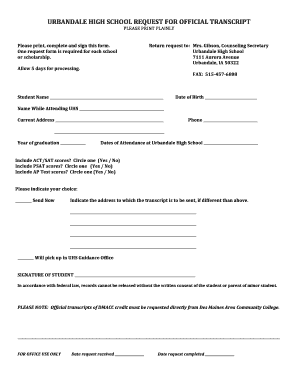
Get Urbandale High School Request For Official Transcript
How it works
-

Open form follow the instructions
-

Easily sign the form with your finger
-

Send filled & signed form or save
How to fill out the Urbandale High School request for official transcript online
Filling out the Urbandale High School Request for Official Transcript is a straightforward process that helps ensure you receive your educational records efficiently. This guide provides clear, step-by-step instructions to assist you in completing the form correctly.
Follow the steps to successfully complete your transcript request.
- Click ‘Get Form’ button to obtain the transcript request form and open it in your preferred document editor.
- Begin filling out the form by printing your full name clearly in the designated Student Name field.
- Enter your date of birth in the corresponding field, ensuring accuracy to prevent any processing delays.
- Provide your name while attending Urbandale High School in the specified space, if different from your current name.
- Fill in your current address and ensure it is complete for any correspondence related to your transcript request.
- Include your phone number for any necessary follow-up or clarification concerning your request.
- Indicate your year of graduation and confirm the dates you attended Urbandale High School.
- Choose whether to include your ACT/SAT and PSAT scores by circling either 'Yes' or 'No' in the provided options.
- Indicate your preference regarding AP test scores in the same manner.
- Specify the address where you want the transcript sent, if different from your current address.
- If you plan to pick up your transcript in person, mark the corresponding option 'Will pick up in UHS Guidance Office.'
- Sign and date the form to authorize the release of your records as required by federal law.
- After completing the form, save your changes, download, print it, or share the form as needed.
Start your official transcript request online today.
For requesting a transcript from the Bureau, please use the "Transcript Request Form" form. For additional information on recently closed schools, please visit bppe.ca.gov/students/guide.shtml. For assistance following the closure of your bureau approved school, contact the Office of Student Assistance and Relief.
Industry-leading security and compliance
US Legal Forms protects your data by complying with industry-specific security standards.
-
In businnes since 199725+ years providing professional legal documents.
-
Accredited businessGuarantees that a business meets BBB accreditation standards in the US and Canada.
-
Secured by BraintreeValidated Level 1 PCI DSS compliant payment gateway that accepts most major credit and debit card brands from across the globe.