Loading
Get Ky Tc 96-187 2013-2026
How it works
-

Open form follow the instructions
-

Easily sign the form with your finger
-

Send filled & signed form or save
How to fill out the KY TC 96-187 online
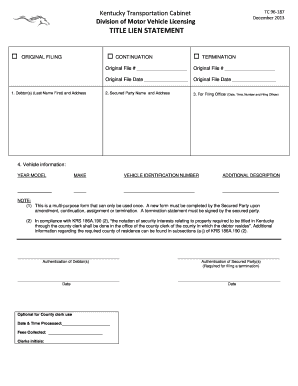
The KY TC 96-187 form is essential for managing title liens in Kentucky. This guide provides clear, step-by-step instructions on how to complete the form online, ensuring you understand each component.
Follow the steps to successfully complete the KY TC 96-187 form online.
- Click ‘Get Form’ button to access the KY TC 96-187 document and open it in the online editor.
- In the first section, enter the debtor(s) name in the format of Last Name First and provide their address.
- Indicate whether this is an original filing, continuation, or termination by selecting the appropriate option.
- Fill in the original file number and date if applicable to continuation or termination filings.
- Provide the secured party's name and address in the designated fields.
- Complete the vehicle information, including the year, model, make, vehicle identification number, and any additional description.
- Ensure that the authentication of both the debtor(s) and secured party(s) is completed, especially if filing a termination.
- Once all information is filled out accurately, you can save the changes, download the completed form, print it, or share it as needed.
Take the next step and file your documents online for a smoother process.
Filling out a petition to dispense with administration in Kentucky requires specific details about the decedent and their estate. Begin by gathering required documentation, and complete the petition forms by following the instructions found in KY TC 96-187. If you seek additional assistance, consider using US Legal Forms, which can provide resources and templates tailored to your needs.