Loading
Get Staff Physical Form.pdf - Teddy Bear Child Care
How it works
-

Open form follow the instructions
-

Easily sign the form with your finger
-

Send filled & signed form or save
How to fill out the Staff Physical Form.pdf - Teddy Bear Child Care online
Filling out the Staff Physical Form for Teddy Bear Child Care is essential for maintaining the health and safety of the environment. This guide will walk you through each section of the form, ensuring that you provide all necessary information clearly and accurately.
Follow the steps to complete the Staff Physical Form online
- Press the ‘Get Form’ button to obtain the Staff Physical Form and open it for editing.
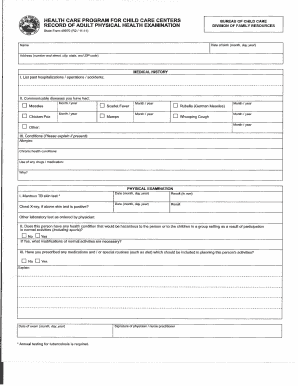
- Begin by entering the date of birth in the specified format (month, day, year), along with your full name and address (number and street, city, state, and ZIP code).
- In the medical history section, carefully list any past hospitalizations, operations, or accidents in the designated fields. Ensure each entry is as detailed as necessary.
- Indicate any communicable diseases you have had by checking the relevant boxes (e.g., measles, chickenpox). For additional diseases, use the 'Other' field to specify.
- If applicable, explain any existing conditions, allergies, or chronic health issues in the provided fields. Also, mention any medications you are currently using or reasons for their use.
- Complete the physical examination section starting with the Mantoux T8 skin test results, including dates and results in millimeters.
- If a chest X-ray was performed due to a positive skin test, fill in the applicable date and results.
- Answer the question regarding any health conditions that could be hazardous in a group setting by marking 'Yes' or 'No.' If 'Yes,' explain any necessary modifications for activities.
- State if any medications or special routines (like diet) are prescribed and should be taken into account while planning activities, marking 'Yes' or 'No' as necessary.
- Finally, ensure to enter the date of your examination, and have the physician or nurse practitioner sign the form.
- Once all fields are filled out, save your changes, download the completed form, print it, or share it as required.
Complete your Staff Physical Form online today for a safer childcare experience.