Loading
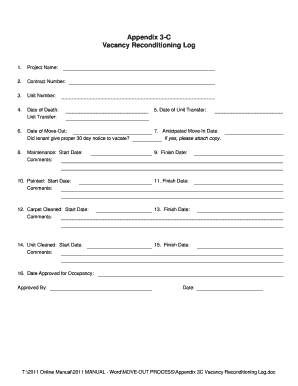
Get Appendix 3-c Vacancy Reconditioning Log
How it works
-

Open form follow the instructions
-

Easily sign the form with your finger
-

Send filled & signed form or save
How to fill out the Appendix 3-C Vacancy Reconditioning Log online
The Appendix 3-C Vacancy Reconditioning Log is a vital document for managing the reconditioning of housing units. This guide provides comprehensive and user-friendly instructions on how to accurately fill out this form online.
Follow the steps to complete the log efficiently.
- Click ‘Get Form’ button to access the form and open it in your preferred editor.
- Input the project name in the designated field. This identifies the specific project related to the vacancy.
- Enter the contract number for the associated work. This field ensures that all logs are connected to the correct contractual agreement.
- Fill in the unit number. This should correspond to the specific housing unit being logged for reconditioning.
- Document the date of death if applicable, along with unit transfer information. If no death occurred, you may leave this section blank.
- Record the date of unit transfer to indicate when the unit was officially handed over for reconditioning.
- Specify the date of move-out. Check the box to confirm whether the tenant provided proper 30-day notice to vacate.
- Input the anticipated move-in date for the new tenant. Attach any necessary documentation if the tenant did provide notice.
- Fill in the maintenance start date and add comments if necessary, regarding any maintenance concerns.
- Indicate the maintenance finish date once the work is complete.
- If painting is required, input the start date and any comments regarding the painting process.
- Enter the finish date for the painting work.
- For carpet cleaning, fill out the start date and add any relevant comments about the process.
- Input the finish date for the carpet cleaning.
- Document the start date for unit cleaning and include comments if necessary.
- Fill out the finish date for the cleaning of the unit.
- Finally, indicate the date approved for occupancy and the name of the approving person, with the date they approved it.
- Once all fields are completed, save your changes, and choose to download, print, or share the form as needed.
Complete and manage your Vacancy Reconditioning Log online today!