Loading
Get Ieee Template
How it works
-

Open form follow the instructions
-

Easily sign the form with your finger
-

Send filled & signed form or save
How to fill out the Ieee Template online
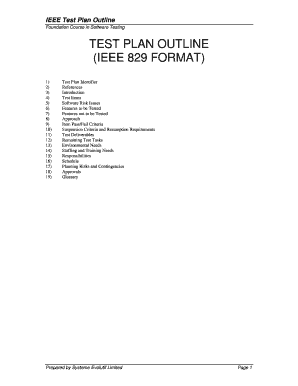
This guide provides a comprehensive overview of the Ieee Template, specifically designed for managing test plans in software testing. By following these steps, users will be able to effectively fill out respective sections of the test plan template online.
Follow the steps to complete the Ieee Template successfully.
- Use the ‘Get Form’ button to access the Ieee Template and open it in your preferred online editor.
- Fill in the Test Plan Identifier. Enter a unique company-generated number that identifies this test plan, including its level and version.
- List the References. Include all documents that support this test plan, specifying the actual version and release number.
- Write the Introduction. State the purpose of the test plan, including essential aspects like the scope and any relevant documents.
- Outline the Test Items. Identify the specific functions and features intended for testing within the test plan.
- Assess Software Risk Issues. Identify and document potential risks associated with the software and testing process.
- Specify Features to be Tested. Mention the features from the user's perspective that will be tested, along with their risk levels.
- Indicate Features not to be Tested. Clearly state which features will not be tested and provide reasons for their exclusion.
- Define the Approach. Elaborate on your testing strategy, specifying tools, configuration management, and regression testing details.
- Establish Item Pass/Fail Criteria. Specify the criteria for determining whether tests have passed or failed.
- Detail Suspension Criteria and Resumption Requirements. Identify conditions where testing may need to be paused and when it should resume.
- Outline Test Deliverables. Document what will be delivered as part of the test plan, such as test cases and specifications.
- Identify Remaining Test Tasks. Note any tasks that are pending as part of a multi-phase process.
- Review Environmental Needs. List any special environmental requirements needed for the testing process.
- Outline Staffing and Training Needs. Specify the training requirements and staffing considerations for conducting tests.
- Clearly define Responsibilities. Assign roles and responsibilities to team members involved in the testing process.
- Schedule the testing activities realistically. Align testing timelines with development deadlines and activities.
- Assess Planning Risks and Contingencies. Document potential risks related to the project and establish contingency plans.
- Finalize Approvals. List who needs to approve the test plan for it to proceed to the next level.
- Create a Glossary. Define any specific terms or acronyms used in the document to ensure clarity.
- Once all fields are completed, users can save changes, download, print, or share the form as necessary.
Complete your Ieee documentation online today to streamline your software testing process.
IEEE Paper Format | Template & Guidelines Formatting the text as two columns, in Times New Roman, 10 pt. Including a byline, an abstract, and a set of keywords at the start of the research paper. Placing any figures, tables, and equations at the top or bottom of a column, not in the middle.
Industry-leading security and compliance
US Legal Forms protects your data by complying with industry-specific security standards.
-
In businnes since 199725+ years providing professional legal documents.
-
Accredited businessGuarantees that a business meets BBB accreditation standards in the US and Canada.
-
Secured by BraintreeValidated Level 1 PCI DSS compliant payment gateway that accepts most major credit and debit card brands from across the globe.